MaterialX is an IR for materials: build a typed shader graph in Python, then lower it to GLSL and OSL
A MaterialX material is a typed dataflow graph stored as XML, which a library type-checks and compiles to several shading languages. With only pip install MaterialX, build a checkerboard material in Python, watch the validator reject a float wired into a color, and generate GLSL and OSL from the same file.

TL;DR 3D apps describe surfaces (wood, metal, skin) as node graphs, and every renderer has its own shading language, so materials rarely survive a move between tools. MaterialX is an open standard that stores the graph as typed XML, and its library type-checks the graph and compiles it to GLSL, OSL, MSL, MDL and more. We build a material in about 25 lines of Python, break it on purpose, and generate shaders from it without opening a 3D app.
MaterialX in 60 seconds
In a renderer, a material is the program that decides what color a surface returns for each pixel or ray hit. Artists build materials as node graphs: a texture node feeds a color input on a surface shader node, which has inputs for roughness, metalness and so on. The trouble is that renderers don't share a language. A real-time viewport wants GLSL or Metal, OSL runs in many offline renderers (Arnold, RenderMan, V-Ray, Cycles and Redshift among them), and NVIDIA has its own material language, MDL. A graph built for one doesn't run in another without translation.
MaterialX, which began at Industrial Light & Magic in 2012, went open source in 2017 and has been an Academy Software Foundation project since 2021, takes the approach a compiler engineer would expect. The graph is the portable thing. It is stored as XML, every node and port has a type, and the node definitions (what checkerboard or standard_surface takes and returns) live in a shared standard library. Each backend supplies its own implementations of those definitions. The same .mtlx file can then be lowered to whichever language a renderer needs, so it plays the role of an intermediate representation. Houdini's Solaris, for example, can reference a .mtlx file from disk with a Reference LOP and render it in Karma.
Building a material in Python
The Python bindings ship as a wheel: pip install MaterialX (wheels for CPython 3.9 to 3.14 on Windows, macOS and Linux). We ran everything below with MaterialX 1.39.5 on Python 3.12. Save this as build.py:
# Build a MaterialX material in Python: a tiled checker feeding a surface shader.
import MaterialX as mx

lib = mx.createDocument()                        # node definitions: the "headers"
mx.loadLibraries(mx.getDefaultDataLibraryFolders(), mx.getDefaultDataSearchPath(), lib)
doc = mx.createDocument()
doc.setDataLibrary(lib)                          # referenced, not copied into the file

# A node graph is a function: typed inputs in, typed outputs out.
g = doc.addNodeGraph("NG_checker")
uv = g.addNode("texcoord", "uv", "vector2")
checker = g.addNode("checkerboard", "checker", "color3")
checker.setConnectedNode("texcoord", uv)
checker.setInputValue("uvtiling", mx.Vector2(8, 8))
checker.setInputValue("color1", mx.Color3(0.9, 0.5, 0.1))
checker.setInputValue("color2", mx.Color3(0.05, 0.05, 0.08))
g.addOutput("out", "color3").setConnectedNode(checker)

# The shader node sits outside the graph and reads the graph's output.
shader = doc.addNode("standard_surface", "SR_checker", "surfaceshader")
base = shader.addInput("base_color", "color3")
base.setNodeGraphString("NG_checker")
base.setOutputString("out")
shader.setInputValue("specular_roughness", 0.35)
doc.addMaterialNode("M_checker", shader)

ok, msg = doc.validate()
print("MaterialX", mx.getVersionString(), "valid:", ok)
mx.writeToXmlFile(doc, "checker.mtlx")It prints MaterialX 1.39.5 valid: True, and the file it writes is short enough to read. Here is the graph part:
<nodegraph name="NG_checker">
  <texcoord name="uv" type="vector2" />
  <checkerboard name="checker" type="color3">
    <input name="texcoord" type="vector2" nodename="uv" />
    <input name="uvtiling" type="vector2" value="8, 8" />
    ...
  </checkerboard>
  <output name="out" type="color3" nodename="checker" />
</nodegraph>Every input carries a type, and every connection is a name reference (nodename="uv"), so the file is a serialized dataflow graph. Because it is plain text, it diffs cleanly in git.
The type checker
Now break the graph on purpose. noise2d declared as float outputs one number, and the checker's color2 input expects a color3. Add this to the end of build.py:
g = doc.getNodeGraph("NG_checker")
n = g.addNode("noise2d", "grain", "float")            # float output
g.getNode("checker").setConnectedNode("color2", n)    # color2 expects color3
print(doc.validate())It prints:
(False, 'Node interface error: Input \'color2\' doesn\'t match declaration: <checkerboard name="checker" type="color3">\n')The call didn't refuse the connection. setConnectedNode quietly changed the input to match its source, so the document now says <input name="color2" type="float" nodename="grain" />, and no definition of checkerboard has a float color2. This is the same check a C compiler runs when an argument doesn't match a prototype in a header, and here the standard library's node definitions play the part of the headers. There is no implicit promotion from float to color3: you add an explicit convert node, or pick the noise2d variant typed color3.
Lowering to GLSL and OSL
Shader generation lives in separate modules, one per backend. This script reloads checker.mtlx and compiles the same shader node twice:
import MaterialX as mx
from MaterialX import PyMaterialXGenShader as mx_gen
from MaterialX import PyMaterialXGenGlsl as mx_glsl
from MaterialX import PyMaterialXGenOsl as mx_osl

lib = mx.createDocument()
mx.loadLibraries(mx.getDefaultDataLibraryFolders(), mx.getDefaultDataSearchPath(), lib)
doc = mx.createDocument()
mx.readFromXmlFile(doc, "checker.mtlx")
doc.setDataLibrary(lib)

shader_node = doc.getNode("SR_checker")
for ext, backend in [("glsl", mx_glsl.GlslShaderGenerator), ("osl", mx_osl.OslShaderGenerator)]:
    generator = backend.create()           # keep a reference while generating
    generator.registerTypeDefs(doc)
    ctx = mx_gen.GenContext(generator)
    ctx.registerSourceCodeSearchPath(mx.getDefaultDataSearchPath())
    shader = generator.generate("SR_checker", shader_node, ctx)
    src = shader.getSourceCode(mx_gen.PIXEL_STAGE)
    open(f"SR_checker.{ext}", "w").write(src)
print(f"{generator.getTarget():8} {len(src.splitlines()):5} lines")It prints genglsl 2006 lines and genosl 469 lines. The GLSL is a complete fragment shader (#version 400, with a main()). Saved as a .frag file, it passes Khronos' reference compiler front end, glslangValidator 16.3.0, with no errors.
The interesting part is what checkerboard turned into. It isn't a hand-written GLSL function. In the standard library it is itself a node graph built from multiply, subtract, floor, dotproduct, modulo and mix nodes, and the generator flattened that graph into one function:
void NG_checkerboard_color3(vec3 color1, vec3 color2, vec2 uvtiling, vec2 uvoffset, vec2 texcoord, out vec3 out1)
{
    vec2 N_mtlxmult_out = texcoord * uvtiling;
    vec2 N_mtlxsubtract_out = N_mtlxmult_out - uvoffset;
    vec2 N_mtlxfloor_out = floor(N_mtlxsubtract_out);
    ...
vec3 N_mtlxmix_out = mix(color2, color1, N_modulo_out);So the library has two layers: primitive nodes, each with a hand-written implementation per backend, and composite nodes defined as graphs of other nodes. In the 1.39.5 library, 529 of the 807 node definitions have hand-written GLSL and 266 are graphs like checkerboard. A new backend writes its own versions of the primitives, and the graph-defined nodes come with it. Recent releases show this in practice: 1.39.4 (September 2025) added WGSL (WebGPU) generation, and 1.39.5 (May 2026) added Slang, which has the same 266 graph-defined nodes.
Because the composite is plain math, you can also run it anywhere. The same function in NumPy, evaluated on a 24 by 6 grid with tiling (8, 2), gives the pattern you'd expect:
import numpy as np

def checkerboard(color1, color2, uvtiling, uvoffset, uv):
    cell = np.floor(uv * uvtiling - uvoffset)          # mult, subtract, floor
    t = np.mod(cell @ np.array([1.0, 1.0]), 2.0)        # dotproduct, modulo
    return color2 + (color1 - color2) * t[..., None]    # mix(color2, color1, t)

# 24 x 6 samples at pixel centers, v = 1 at the top row, "#" where color1 wins
u, v = np.meshgrid((np.arange(24) + 0.5) / 24, (np.arange(6)[::-1] + 0.5) / 6)
img = checkerboard(np.ones(3), np.zeros(3), np.array([8.0, 2.0]), np.zeros(2), np.dstack([u, v]))
for row in img[..., 0]:
print("".join("#" if x else "." for x in row))###...###...###...###...
###...###...###...###...
###...###...###...###...
...###...###...###...###
...###...###...###...###
...###...###...###...###As a cross-check, we drew the graph's output in UV space with the GLSL renderer that ships in the same wheel (PyMaterialXRenderGlsl), 128 by 128 into a float buffer, with the material's own colors and tiling. Every texel matched this NumPy function to within 2.4e-8.
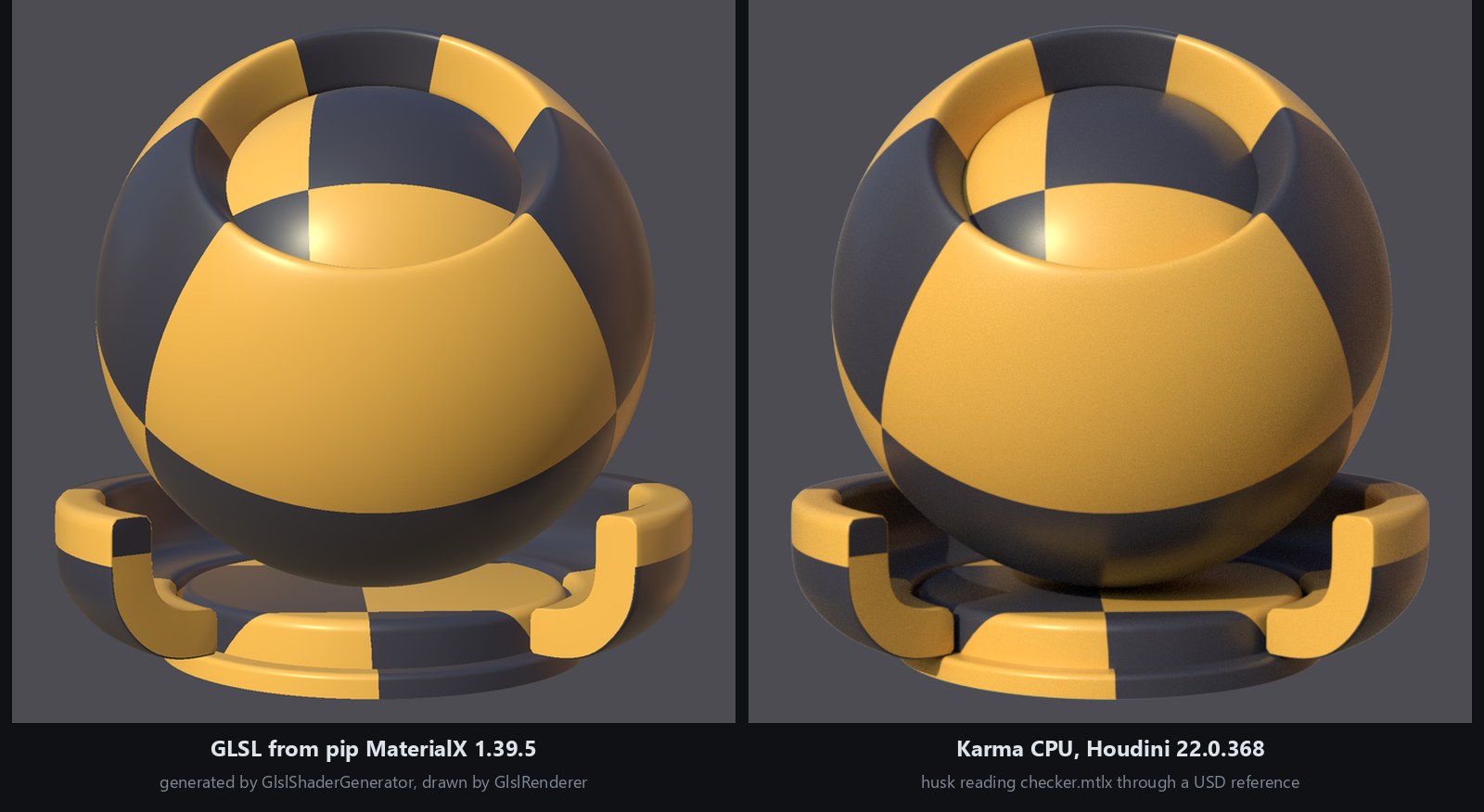
The full shader can be drawn the same way. On the left below, the wheel's GlslRenderer ran the generated GLSL on MaterialX's shader ball, with the lights its viewer uses by default. The wheel doesn't include those meshes and HDR images; they're in the resources folder of the MaterialX repository, and Houdini installs a copy. On the right, Karma in Houdini 22.0.368 rendered the same checker.mtlx, pulled into a USD scene with a reference. The checker lands on the same faces, and where the lighting is similar the colors are close: one lit orange patch is (206, 156, 67) in the GLSL image and (211, 156, 64) in Karma's. Shadows differ, because Karma path-traces them and this GLSL render has none.
What trips you up, and what clicks
- The data library is not optional, and forgetting it fails quietly. A fresh document knows no node types. Load
checker.mtlxwithout callingsetDataLibraryandvalidate()still returnsTrue, because there are no declarations to check against, even with the float-into-color3 mistake in place. Generation is where it finally fails, withCould not find a nodedef for node 'SR_checker'. If you callimportLibraryinstead, the writer adds dozens ofxi:includelines with absolute paths to your Python install into the.mtlxfile (56 in our run), which won't resolve on anyone else's machine. - Keep the generator alive. In our runs, passing
GlslShaderGenerator.create()straight intoGenContextand then callingctx.getShaderGenerator().generate(...)returnedNone, and that generator'sgetTarget()returned an empty string. Holding the generator in a variable fixed it. The officialgenerateshader.pyscript does the same. - The pip
usd-corewheel isn't the same as USD with MaterialX. With usd-core 26.11,Usd.Stage.Open("checker.mtlx")failed with "Cannot determine file format", because none of the wheel's 28 plugins is UsdMtlx, the MaterialX file-format plugin. Builds of USD inside DCCs can include it: Houdini 22.0.368'susdcatprintschecker.mtlxas USD, and its Karma rendered the figure above. - What clicks: treat a
.mtlxfile as source code. It can be linted withvalidate(), diffed, unit-tested by generating every target in CI, and reviewed in a pull request.
Try it yourself
Everything here is free: pip install MaterialX numpy, plus glslangValidator if you want to compile the GLSL (prebuilt binaries are on glslang's GitHub page, and Debian packages it as glslang-tools). Then:
- Fix the broken graph two ways: put a
convertnode between the noise and the checker, or switch the noise to itscolor3variant. Runvalidate()after each. - Swap
standard_surfaceforopen_pbr_surfaceand compare the generated GLSL sizes. - Generate MSL or Slang by importing
PyMaterialXGenMslorPyMaterialXGenSlang, both included in the 1.39.5 wheel. - In Houdini, bring
checker.mtlxinto Solaris with a Reference LOP, pick/MaterialX/Materials/M_checkeras the reference primitive, assign it with an Assign Material LOP, and render it in Karma.
Sources
- MaterialX on GitHub (Academy Software Foundation)
- MaterialX 1.39.5 release notes (Slang)
- MaterialX 1.39.4 release notes (WGSL)
- MaterialX on PyPI
- generateshader.py, the official shader generation script
- Houdini docs: MaterialX in Solaris and Karma
- OpenUSD docs: UsdMtlx, the MaterialX file format and shader plugins
- Open Shading Language on GitHub (renderers with OSL support)
- NVIDIA MDL SDK on GitHub
- glslang, Khronos' GLSL reference compiler front end
Related
 HoudiniStage in, stage out: Houdini's Solaris treats every node as a function over a USD sceneIn Houdini's Solaris, every LOP node takes a composed USD stage and returns one, and its edits land in one in-memory layer at the top. A 31-line usd-core model of that contract, the Python LOP that does it for real, the same network checked in Houdini 22, and why a Layer Break decides what gets saved.
 Houdinisplit() is a tokenizer: building cache paths from strings in Houdini VEXVEX strings look like Python's, but split() merges separators and drops empty fields, len() counts bytes, and a wrangle expands $ before the compiler sees it. A per-piece cache path built from the scene file name, and the traps along the way, checked in Houdini 22.
 HoudiniOut of range returns 0: arrays and array attributes in Houdini VEXVEX arrays slice like Python lists, but an out-of-range read quietly returns 0, a write past the end grows the array, and arrays can't nest. Per-point neighbor lists sorted by distance, read back from other points, and the traps that turn a bad index into point 0.