Out of range returns 0: arrays and array attributes in Houdini VEX
VEX arrays slice like Python lists, but an out-of-range read quietly returns 0, a write past the end grows the array, and arrays can't nest. Per-point neighbor lists sorted by distance, read back from other points, and the traps that turn a bad index into point 0.
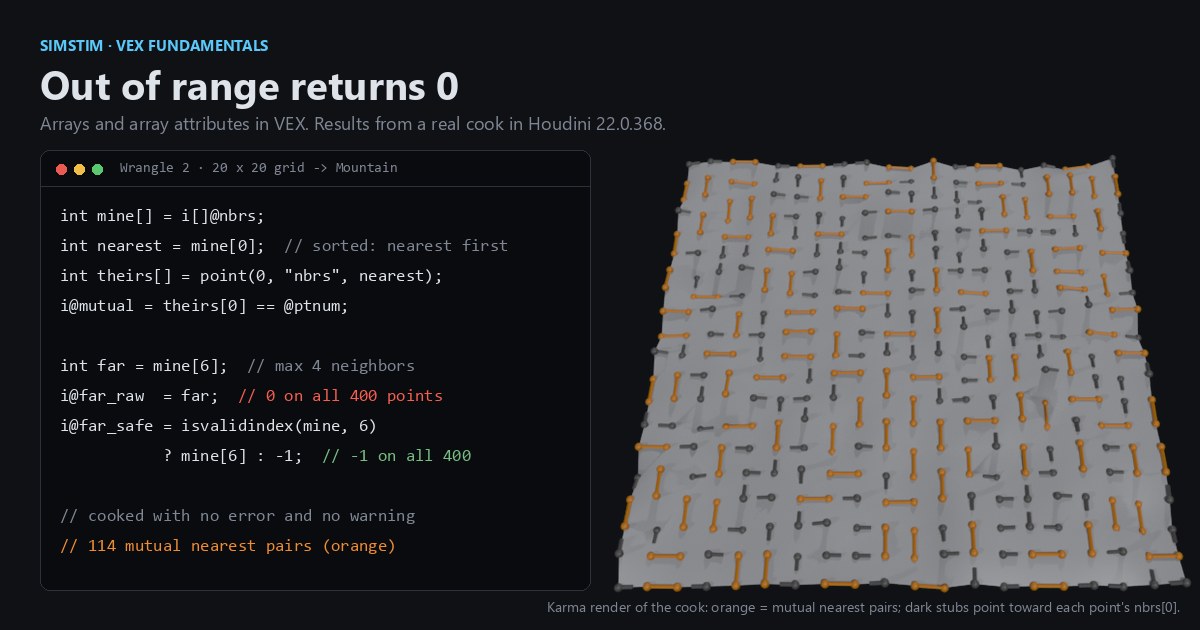
TL;DR Houdini's VEX language has dynamic arrays with Python-style negative indices and slices, and any point can carry an array as an attribute, which gives you a ragged list per element. Unlike Python, an out-of-range read returns 0 instead of raising, and 0 is a perfectly valid point number. Houdini 22 doesn't warn about it. We build sorted neighbor lists, read them back from other points, and show how to guard the indices.
Houdini in 60 seconds
Houdini builds geometry with SOPs (surface operators), nodes that take geometry in and pass geometry out. Geometry is points, primitives (polygons, curves) and vertices, plus one "detail" record for the whole object, and each of those can carry named, typed attributes such as @P (position). An Attribute Wrangle runs a VEX snippet once per element; with Run Over set to Points, read the snippet as the body of a GPU kernel and @ptnum as the thread index. Sliders are uniforms, the first post in this series, has the longer version.
Attributes are usually one value per element, like one column of a table. An array attribute stores a whole list per element, and the lists can have different lengths. If you have used Awkward Array in Python, or a sparse matrix in CSR form, that's the shape.
Arrays as local variables
Inside a snippet, int a[] declares a dynamic array. Here are the rules a C or Python programmer would guess wrong, with the values Houdini 22 gives:
int nums[] = {0, 1, 2, 3, 4, 5};
int tail[] = nums[1:];       // {1, 2, 3, 4, 5}
int rev[]  = nums[::-1];     // {5, 4, 3, 2, 1, 0}
int big[]  = nums[2:100];    // {2, 3, 4, 5}: slice bounds clamp, as in Python
int last   = nums[-1];       // 5
int oops   = nums[10];       // 0: no error, no warning

float d[];                   // empty
d[3] = 7.5;                  // d is now {0, 0, 0, 7.5}
d[len(d)] = 9;               // appends: {0, 0, 0, 7.5, 9}

int two[] = {1, 2};
two[-5] = 9; // too negative: nothing happens, two is still {1, 2}- Literals in braces, such as
{1, 2, 3}, are built at compile time and can't contain variables. Usearray(x, y, z)when the values are computed. - Negative indices count from the end and slices work as in Python, including the clamping of slice bounds that run past either end.
- Reading out of range, past either end, does not raise and does not crash. It returns 0, an empty string or a zero vector, depending on the type.
- Writing past the end grows the array and fills the gap with zeros (or empty strings), so
d[len(d)] = xappends. Writing at a negative index that's out of range doesn't grow anything; it does nothing at all. - There are no arrays of arrays. Arrays of vectors and matrices are allowed, and
pts[1][0]is the x component of the second vector, not a nested array. To flatten vectors into floats,serializeandunserializeconvert in both directions. - Assigning an array copies it. After
int b[] = a;, changingbleavesaalone, where Python'sb = agives you a second name for the same list.
The list API is the familiar one under different names: len, append and push, pop, insert, removeindex, removevalue, find, sort, argsort, reorder, reverse and slice.
Per-point lists, sorted by distance
Here is a two-wrangle setup. The first stores, on every point, the list of its edge-connected neighbors sorted nearest first. neighbours returns them "in no particular order", per its docs, so sorting is our job.
// Wrangle 1. Run Over: Points. Input 0: Grid -> Mountain (so edge lengths differ).
int nbrs[] = neighbours(0, @ptnum);    // 2 at corners, 3 on borders, 4 inside
float d[];                             // empty; grows as we write past the end
foreach (int i; int nb; nbrs) {        // i = index, nb = value
    vector q = point(0, "P", nb);      // typed local, so point() returns a vector
    d[i] = distance(@P, q);
}
int order[] = argsort(d);              // indices that would sort d ascending (stable)
i[]@nbrs = reorder(nbrs, order);       // write a per-point int array attribute
f[]@dist = reorder(d, order);
i@count = len(nbrs);The second wrangle reads those arrays back, including from other points, and marks pairs of points that are each other's nearest neighbor:
// Wrangle 2. Run Over: Points. Input 0: the output of Wrangle 1.
int mine[] = i[]@nbrs;                      // copy the attribute into a local
int nearest = mine[0];                      // first entry = nearest neighbor

int theirs[] = point(0, "nbrs", nearest);   // gather another point's array
i@mutual = theirs[0] == @ptnum;

int far = mine[6];                          // never valid here: no grid point has 7 neighbors
i@far_raw  = far;                           // 0, and point 0 really exists
i@far_safe = isvalidindex(mine, 6) ? mine[6] : -1;

v@Cd = i@mutual ? {1, 0.35, 0} : {0.15, 0.15, 0.15};Changing mine changes only the local copy. To update the attribute, assign the array back with i[]@nbrs = mine;. The point call is the same gather pattern from Gather, don't scatter, now returning a whole list: it picks the array version because theirs is declared int[].
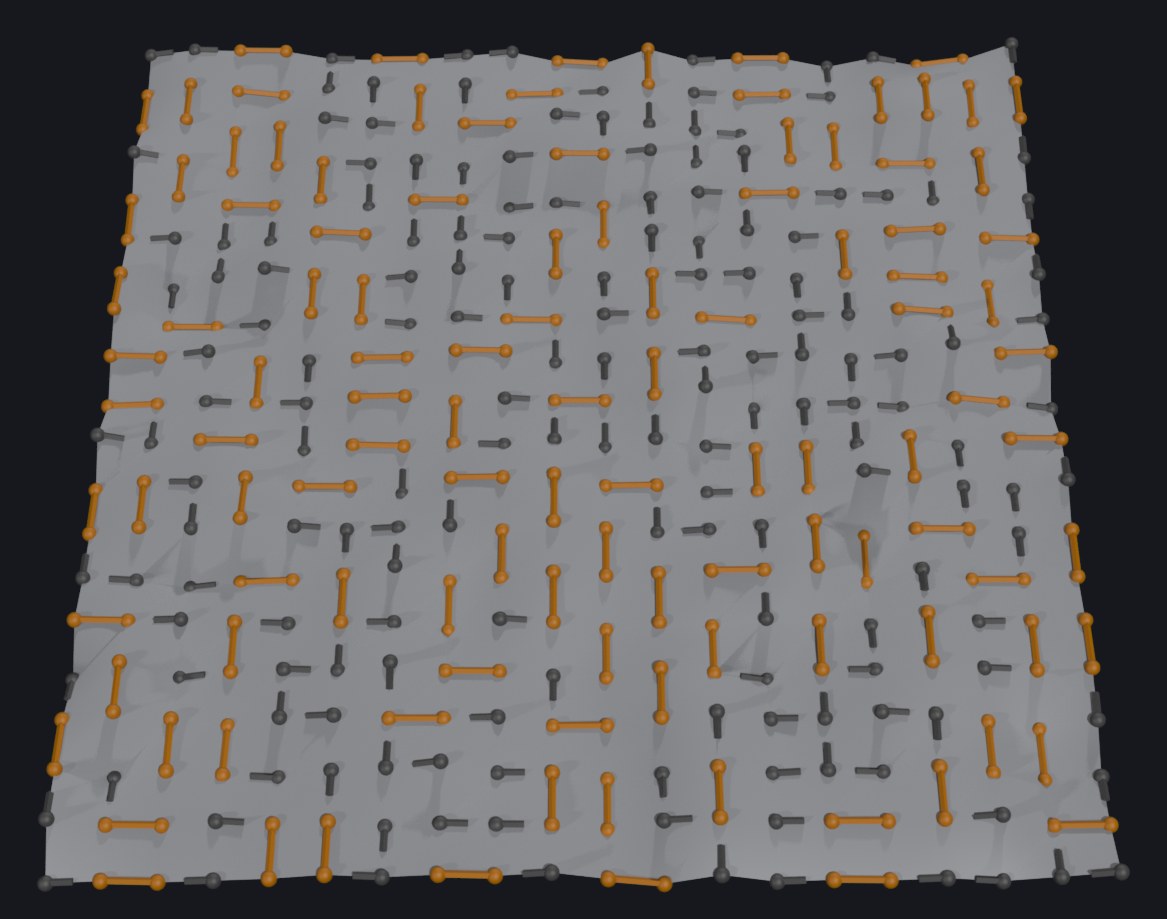
On a 20 × 20 grid through a default Mountain, no two edges around a point have the same length, so every list has a clear order. In the result, 228 of the 400 points form 114 mutual pairs.
The same idea in Python
Python and NumPy make the differences easy to see. Run with Python 3.12.10 and NumPy 2.5.4; the comments show the output we got.
import numpy as np

nbrs = [[1, 3], [0, 2, 4], [1, 5]]       # ragged per-point lists, like i[]@nbrs

def vex_read(a, i):                       # VEX rule: an out-of-range read gives 0
    return a[i] if -len(a) <= i < len(a) else 0

print(vex_read(nbrs[0], -1), vex_read(nbrs[0], 5))   # 3 0  <- 0 is a real point number
try:
    nbrs[0][5]
except IndexError as e:
    print("Python:", e)                   # Python: list index out of range

# One flat buffer plus offsets (CSR): how ragged lists are stored without nesting
flat = np.concatenate(nbrs)
offsets = np.cumsum([0] + [len(n) for n in nbrs])
print(flat, offsets, flat[offsets[1]:offsets[2]])    # [1 3 0 2 4 1 5] [0 2 5 7] [0 2 4]

d = np.array([0.7, 0.2, 0.5])
order = np.argsort(d, kind="stable")      # VEX argsort is stable too
print(order, d[order], np.array(nbrs[1])[order][:2]) # [1 2 0] [0.2 0.5 0.7] [2 4]The CSR layout is also the workaround for VEX's missing nested arrays: keep one flat array plus an offsets array, or use one array attribute per element as above and let Houdini do the bookkeeping.
What trips you up, and what clicks
- A bad index becomes point 0. Out-of-range reads return 0, so
mine[6]hands you point 0's data. Houdini 22 compiles and cooks it without a warning. The arrays page says a warning or optional runtime error may be added later; until then, guard withisvalidindexor compare againstlen. findfails with a negative number. When the value is missing, the scalarfindreturns-len(array)-1, which the docs say is meant to cause an error if used as an index. Given the rule above, using it as an index reads 0 instead. Test the result before indexing.reorderwith a bad index inserts zeros rather than failing:reorder(array(10, 20, 30), array(2, 5, 0))gives{30, 0, 10}. The docs call that case an error you should treat as one.- Braced literals can't hold variables.
{x, y}fails to compile with "Syntax error, unexpected identifier";array(x, y)works. int a[][]compiles, and that's as far as it goes. Houdini 22 accepts the declaration, but nothing fits in it: a braced literal fails with "Invalid array literal for type: int[][]",pushfinds no matching overload, anda[0] = rowfails with "Invalid assignment from int[] to int". Flatten withserialize, or use a flat array plus offsets.array(a, b)doesn't nest or join arrays. Given twointarrays, it compiles without a warning and returns{0, 0}: each array argument becomes a 0. To join two arrays, useappend(a, b).- User functions take arguments by reference. The language reference says parameters to user functions are always passed by reference, so a helper that calls
popon an array argument shortens the caller's array too. Aconstparameter makesx[0] = 42a compile error ("Read-only expression on left side of assignment"), but notpop(x)orpush(x, 4): in Houdini 22 those still compile, with no warning, and leave the array unchanged, even inside the function. neighboursorder isn't spatial. Sort it yourself, as Wrangle 1 does.
What clicks: an array attribute is a ragged column. Once you think of i[]@nbrs as "one list per row", adjacency, per-point candidate lists and per-primitive tag lists all become one wrangle each.
Tomori's tutorial, written in early 2018, builds its example array with array() and then uses pop and push; all three still exist in Houdini 22, alongside append, insert and isvalidindex. His "Reading arrays" section also reads components of matrices inside arrays, a topic that belongs with matrices more than with arrays.
Try it yourself
Houdini Apprentice is free for non-commercial learning. Build a Grid with Rows and Columns set to 20, wire it into a Mountain, then add Wrangle 1 and Wrangle 2 as above, both with Run Over set to Points. In the Geometry Spreadsheet, count, nbrs and dist show each point's list, far_raw is 0 on every point, and far_safe is -1. The orange points are mutual nearest pairs.
Then try these:
- Keep only the two nearest neighbors by adding
i[]@nbrs = mine[:2];to Wrangle 2, and check what the corners and borders end up with. - Replace
mine[6]withmine[find(mine, 99999)]and confirm it also reads 0. - No Houdini? Add a
vex_writeto the Python above that follows the Houdini 22 rules: a write past the end pads with zeros, and a write at a negative index past the start does nothing.
Functions used: neighbours, point, distance, argsort, reorder, len, isvalidindex, find, array, append, push, pop, insert, removeindex, removevalue, sort, reverse, slice, serialize, unserialize. Each one links to its entry in the Simstim VEX reference.
Sources
- jtomori/vex_tutorial, Juraj Tomori's VEX tutorial ("Reading arrays" and "Arrays", the outline this series follows)
- SideFX: VEX arrays
- SideFX: VEX language reference (user function parameters are passed by reference)
- SideFX: Using VEX expressions (binding array attributes with
i[]@) - SideFX VEX docs: neighbours, argsort, reorder, find, isvalidindex, serialize, point
Related
 HoudiniStage in, stage out: Houdini's Solaris treats every node as a function over a USD sceneIn Houdini's Solaris, every LOP node takes a composed USD stage and returns one, and its edits land in one in-memory layer at the top. A 31-line usd-core model of that contract, the Python LOP that does it for real, the same network checked in Houdini 22, and why a Layer Break decides what gets saved.
 Houdinisplit() is a tokenizer: building cache paths from strings in Houdini VEXVEX strings look like Python's, but split() merges separators and drops empty fields, len() counts bytes, and a wrangle expands $ before the compiler sees it. A per-piece cache path built from the scene file name, and the traps along the way, checked in Houdini 22.
 LatestMaterialX is an IR for materials: build a typed shader graph in Python, then lower it to GLSL and OSLA MaterialX material is a typed dataflow graph stored as XML, which a library type-checks and compiles to several shading languages. With only pip install MaterialX, build a checkerboard material in Python, watch the validator reject a float wired into a color, and generate GLSL and OSL from the same file.