Houdini digital assets are versioned packages: namespaces, pinned instances, and why 2.10 beats 2.9
A Houdini digital asset turns a node network into a reusable node type whose name carries a namespace and a version, much like a package. How Houdini 22 resolves those names, why saved scenes stay pinned to old versions, and a 29-line Python model of the rules.
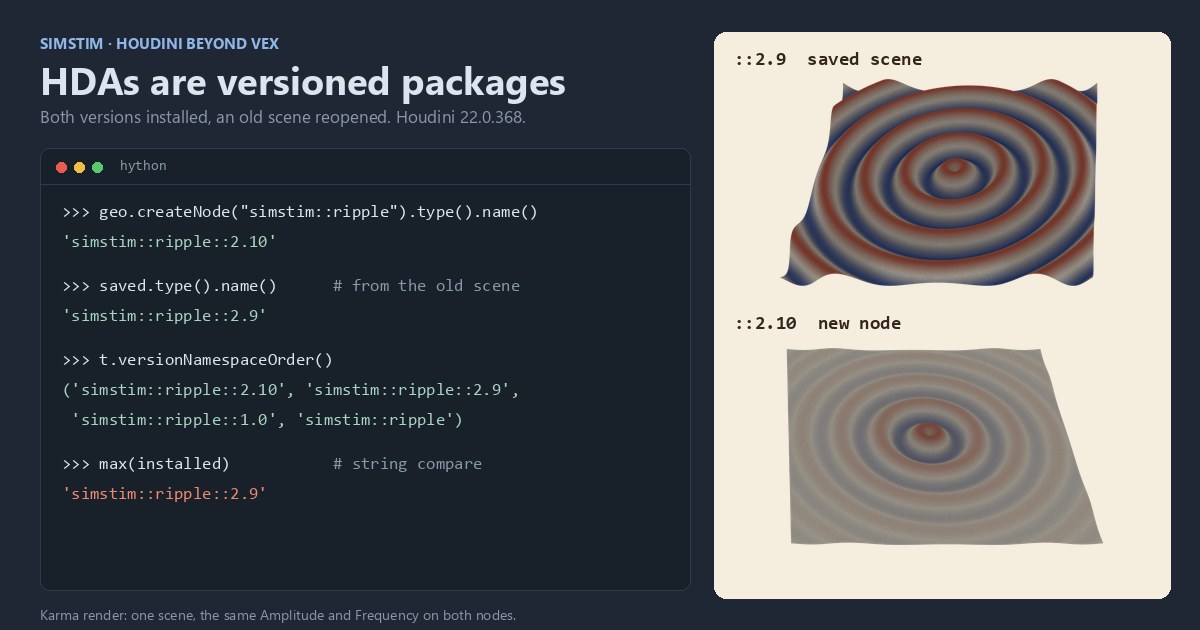
TL;DR Houdini lets you package a network of nodes as a new node type, called a digital asset (HDA). Its internal name works like a package coordinate:
namespace::name::version. New nodes get the newest version, saved scenes keep the version they were built with, and versions are compared as numbers, not strings. We model those rules in 29 lines of plain Python, check them against Houdini 22, and show thehoucalls that create and upgrade a real asset.
Houdini in 60 seconds
Houdini is a procedural 3D tool: you build geometry by wiring nodes into a graph, and every node is an operator with typed inputs, an output and a panel of parameters. SOPs (surface operators) are the nodes that work on geometry. A subnet is a node that holds a whole sub-graph, the way a block holds statements.
A digital asset, or HDA (Houdini Digital Asset), is what you get when you promote a subnet to a node type of its own. The definition (the inner network, the parameter interface, help, scripts) lives in a library file, usually a .hda file (Houdini Indie writes .hdalc, and Apprentice has its own format). Every node you place from it is an instance that refers to that definition by name. If you think of a subnet as inlined code, an HDA is a function compiled into a library, and the instance is a call site.
That makes the name the contract, and Houdini's name format works a lot like a package manager's.
The type name is a package coordinate
SideFX's docs give the format as [namespace::]name[::version]. The New Digital Asset dialog fills in both optional parts by default: your user name as the namespace, plus a version. SideFX's example is sanjay::threelightrig::1.0. The parts do what you'd expect:
- The namespace keeps your asset from colliding with a built-in node, a vendor's asset, or a node SideFX adds later. Houdini already ships a Ripple SOP, so an asset called plain
ripplewould clash with it;simstim::rippledoesn't. It is the npm scope or the Java package of the asset world. - The version may contain only digits and dots.
2,2.1and19.1.3are fine;2aandalphaare not. No pre-release tags, no build metadata. Houdini doesn't rejectsimstim::ripple::2a, though. It reads it as a node called2ain a namespace calledsimstim::ripple, so it never takes part in version resolution. - The label shown in the UI is separate and free-form, so users see "Ripple" while scripts see
simstim::ripple::2.0.
SideFX uses the scheme for its own nodes. In Houdini 22, createNode("ripple") gives you ripple::2.0, and ripple:: gives you the original Ripple, still installed for the scenes that use it.
The docs also say the name is permanent: "You can change the label later, but you can't change the internal name without recreating the asset." Choose the namespace before anyone uses the asset.
Resolution: new code gets latest, old code stays pinned
Here is the part that matters for a pipeline. When several versions of simstim::ripple are installed side by side, Houdini's Tab menu shows only the latest by default. createNode("simstim::ripple"), with no version, gets the highest version number, and a definition with no version at all counts as the lowest. Nodes already saved in a scene keep their full versioned name, so they keep using the old definition. In the docs' words: "Instances of the old version will still work and use the old implementation, while users placing a new node will get the latest version."
We checked that in Houdini 22.0.368. We published simstim::ripple::2.9 to a library folder, placed a node with the unversioned name (it got 2.9) and saved the scene. Then we added 2.10 to the same folder and reopened the scene in a fresh session, with that folder on the asset scan path. The saved node was still simstim::ripple::2.9, and its points matched 2.9's formula to 7e-7. A new node got 2.10. Installing 2.10 by hand after opening the scene gave the same result, and the install order made no difference.
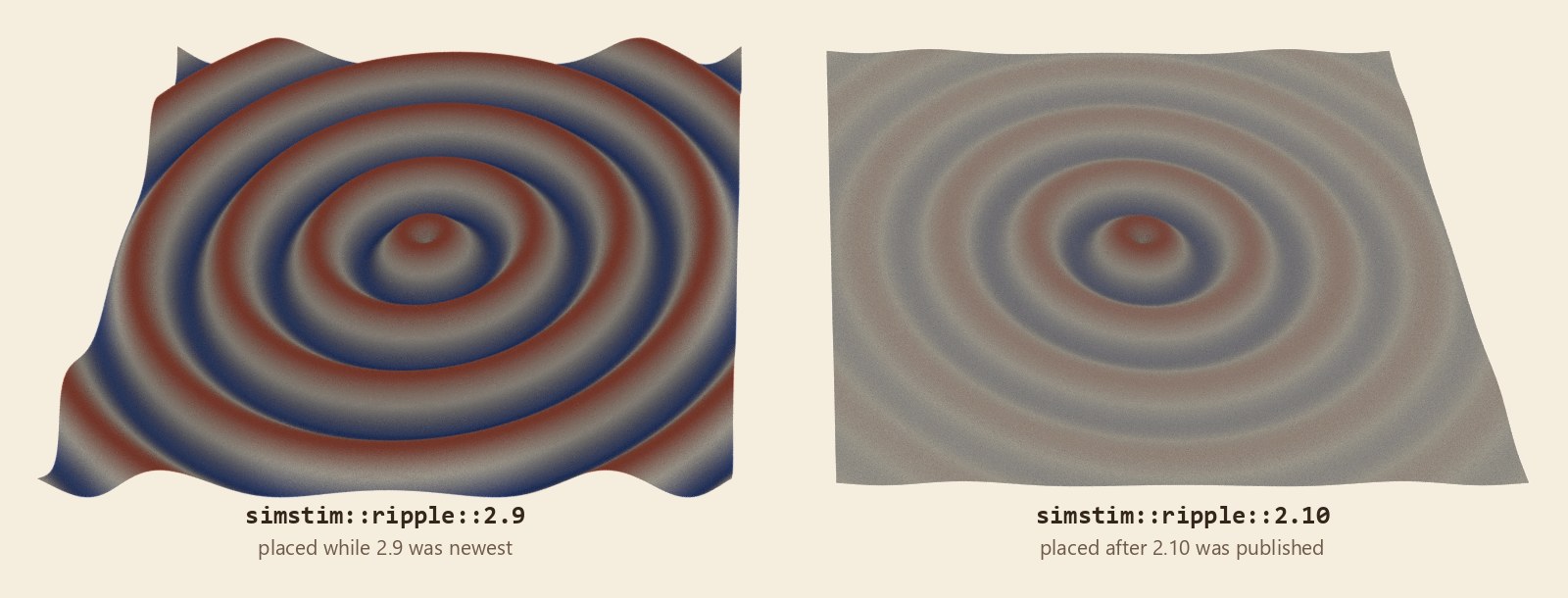
If you write C, this is glibc's symbol versioning. On x86-64, a binary linked against glibc before 2.14 binds to memcpy@GLIBC_2.2.5 and keeps the old behavior, which also handles overlapping buffers, while newly linked code gets memcpy@GLIBC_2.14. Both live in the same library. A Houdini scene saved with simstim::ripple::2.9 is that old binary.
There are two ways out of the default. A trailing :: asks for the definition with no version (simstim::ripple::), and a leading :: asks for no namespace (::ripple gives Houdini's own ripple::2.0). The HOUDINI_OPNAMESPACE_HIERARCHY environment variable lists preferred namespaces in priority order, so a studio can make a bare name mean its own asset on every machine. With it set to simstim, createNode("ripple") gave us simstim::ripple::2.10 instead of Houdini's Ripple. An entry can also pin a version, but in our test only when it included the node category: simstim::Sop/ripple::2.9 worked, while simstim::ripple::2.9, the form in SideFX's example, changed nothing.
We wrote the version rules down as a small Python model. It runs anywhere; we ran it with Python 3.12.10 and with Houdini 22's Python 3.13.10.
# A toy model of how Houdini picks an asset definition by type name.
# Rules from SideFX's "Asset namespaces and versions" page: versions are
# digits and dots, a name with no version counts as the lowest version,
# and a reference without a version gets the highest version installed.
import re

installed = ["simstim::ripple", "simstim::ripple::1.0",
             "simstim::ripple::2.9", "simstim::ripple::2.10"]

def version_key(type_name):
    parts = type_name.split("::")
    ver = parts[2] if len(parts) == 3 else ""
    if ver and not re.fullmatch(r"\d+(\.\d+)*", ver):
        raise ValueError(f"bad version in {type_name!r}")
    # compare numerically, component by component: (2, 10) > (2, 9)
    return tuple(int(n) for n in ver.split(".")) if ver else ()

def resolve(ref):
    if ref.endswith("::"):                     # "name::" means no version
        return ref[:-2]
    if len(ref.split("::")) == 3:              # versioned name: pinned
        return ref
    matches = [t for t in installed if t == ref or t.startswith(ref + "::")]
    return max(matches, key=version_key)       # unversioned: newest wins

print("new node  simstim::ripple      ->", resolve("simstim::ripple"))
print("saved     simstim::ripple::1.0 ->", resolve("simstim::ripple::1.0"))
print("explicit  simstim::ripple::    ->", resolve("simstim::ripple::"))
print("string max (the wrong answer) ->", max(installed))Output:
new node  simstim::ripple      -> simstim::ripple::2.10
saved     simstim::ripple::1.0 -> simstim::ripple::1.0
explicit  simstim::ripple::    -> simstim::ripple
string max (the wrong answer) -> simstim::ripple::2.9Houdini gave the same answers for all three lookups with these four definitions installed. The last line is the trap for a hand-rolled version picker: compare 2.10 and 2.9 as strings and 2.9 wins. A pipeline script that sorts asset names to find "the latest" needs the tuple key, not sorted(). Inside Houdini you can ask instead: a node type's versionNamespaceOrder() lists the installed versions newest first, as Houdini ranks them. For our four it returned simstim::ripple::2.10, ::2.9, ::1.0, then the unversioned one.
2.10 isn't a corner case you have to go looking for. Right-click an asset node and choose Digital Asset > Increase Minor Version, and the code behind that menu proposes 2.10 for a 2.9 asset.
The same thing with the real API
Inside Houdini, the hou Python module does the work. This runs in the Python Shell (Windows > Python Shell) with a subnet already built at /obj/geo1/ripple. Since Houdini 20, createDigitalAsset and changeNodeType live on hou.OpNode, which SOP nodes inherit.
import hou

sub = hou.node("/obj/geo1/ripple")             # a subnet you've built
name = hou.hda.fullNodeTypeNameFromComponents("", "simstim", "ripple", "2.0")
ext = hou.hda.defaultFileExtension()           # ".hdalc" under Indie
path = hou.text.expandString("$HOUDINI_USER_PREF_DIR/hda/simstim--ripple-2.0" + ext)

ptg = sub.parmTemplateGroup()                  # the subnet's parameters
node = sub.createDigitalAsset(name=name, hda_file_name=path,
                              description="Ripple",
                              min_num_inputs=1, max_num_inputs=1)
node.type().definition().setParmTemplateGroup(ptg)   # not copied for you
print(node.type().name())                      # the full versioned name
print(hou.hda.componentsFromFullNodeTypeName(node.type().name()))

# Upgrading is explicit: move every 1.0 instance onto 2.0, keeping parms.
old = hou.nodeType(hou.sopNodeTypeCategory(), "simstim::ripple::1.0")
for inst in (old.instances() if old else ()):
inst.changeNodeType("simstim::ripple::2.0", keep_parms=True)It prints:
simstim::ripple::2.0
('', 'simstim', 'ripple', '2.0')The file name follows SideFX's recommended "Standard" pattern, namespace, then name, then version. defaultFileExtension() picks the extension for your license; under Indie, a name ending in .hda is written exactly as given. The setParmTemplateGroup line matters: createDigitalAsset leaves the subnet's spare parameters on the converted node only, so without it every new instance comes up with no parameters at all.
Nothing upgrades on its own. That is a feature: a render farm re-opening a scene from three months ago gets the network the artist approved, not whatever was published since.
What trips you up, and what clicks
- There are two "versions." The Version field in the asset's Type Properties window "has no relation to the
::versionpart of the node type name," per the docs. Only the name part drives resolution. - A new version is a new type.
2.0is not an edit of1.0; it is a separate definition. Parameters that keep their names carry acrosschangeNodeType; renamed ones come back at their new defaults. - Lookups don't resolve.
createNode("simstim::ripple")picks the newest version, buthou.nodeType(category, "simstim::ripple")is an exact lookup and returns the unversioned definition. Ask for the version you mean. - Check the proposed number. The code behind Increase Major Version keeps the minor part, so a 2.9 asset is offered 3.9, not 3.0. The name is editable in the dialog.
- Bumping is a breaking-change decision. If a change would alter what old scenes compute, make a new version. If it only fixes a crash, editing the existing definition reaches every scene. That is semantic versioning, just without a tool to enforce it.
- Unlocked instances drift. Right-click an instance and choose Allow Editing of Contents, and
matchesCurrentDefinition()returns False: the node no longer follows its library.matchCurrentDefinition()puts it back. Audit for unlocked nodes before trusting an upgrade. - Embedded definitions travel with the scene. Saving an asset into the
.hipfile is convenient for sharing, but the copy in the scene and the one in your library can quietly diverge.
Try it yourself
The Python model needs nothing but Python 3. Extend it with a namespace hierarchy list, or make it reject a version like 2a at install time instead of at lookup.
For the real thing, Houdini Apprentice is free for non-commercial use:
- Build a small SOP subnet at
/obj/geo1/ripplewith a spare parameter or two. In the snippet, change2.0to1.0in thenameandpathlines, and run it without its last three lines (the upgrade). The subnet becomes asimstim::ripple::1.0node. Rename that node so the path is free. - Build a changed subnet at
/obj/geo1/rippleand run the snippet as written, again without the last three lines. - Place a Ripple from the Tab menu and compare its
type().name()with the first node's. The new one is 2.0; the old one is still 1.0. - Run the last three lines. The 1.0 node moves onto 2.0 and keeps the values of the parameters both versions share.
To see both versions in the Tab menu, set Edit > Preferences > Shelf Tools and Tab Menu > TAB Menu Operator Namespace Filtering to Show All Operators.
Sources
- SideFX: Asset namespaces and versions
- SideFX: Creating and versioning digital assets
- SideFX: hou.Node (the Houdini 20 split into hou.OpNode)
- SideFX: hou.OpNode (createDigitalAsset, changeNodeType, matchesCurrentDefinition)
- SideFX: hou.NodeType (versionNamespaceOrder)
- SideFX: hou.hda module
- SideFX: hou.HDADefinition (setParmTemplateGroup)
- SideFX: Environment variables (HOUDINI_OPNAMESPACE_HIERARCHY)
- SideFX: Houdini Apprentice
- Linux man-pages: memcpy(3), on the versioned symbol added in glibc 2.14
Related
 HoudiniStage in, stage out: Houdini's Solaris treats every node as a function over a USD sceneIn Houdini's Solaris, every LOP node takes a composed USD stage and returns one, and its edits land in one in-memory layer at the top. A 31-line usd-core model of that contract, the Python LOP that does it for real, the same network checked in Houdini 22, and why a Layer Break decides what gets saved.
 Houdinisplit() is a tokenizer: building cache paths from strings in Houdini VEXVEX strings look like Python's, but split() merges separators and drops empty fields, len() counts bytes, and a wrangle expands $ before the compiler sees it. A per-piece cache path built from the scene file name, and the traps along the way, checked in Houdini 22.
 LatestMaterialX is an IR for materials: build a typed shader graph in Python, then lower it to GLSL and OSLA MaterialX material is a typed dataflow graph stored as XML, which a library type-checks and compiles to several shading languages. With only pip install MaterialX, build a checkerboard material in Python, watch the validator reject a float wired into a color, and generate GLSL and OSL from the same file.