7 / 10 = 0: integer division and casting in Houdini VEX
In a Houdini VEX wrangle, @ptnum and @numpt are ints, so the obvious 0-to-1 ramp divides two integers and comes out black. How VEX casts between int, float and vector, where Houdini 22 differs from C and from its own docs, and why float(@id) stops being unique past 16,777,216.
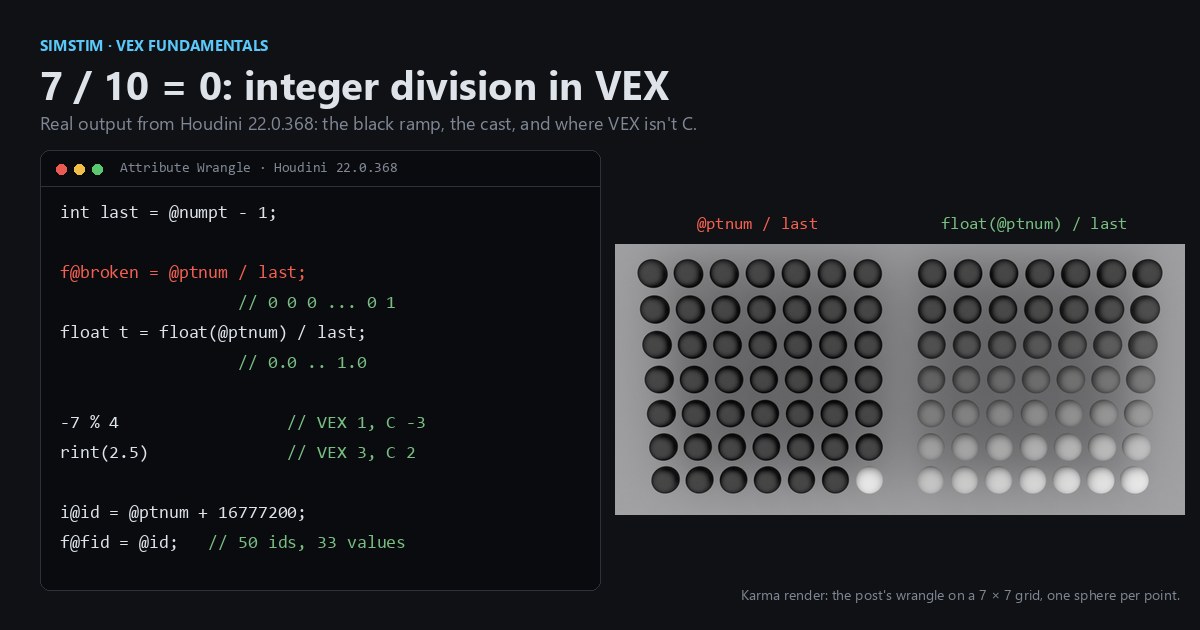
TL;DR VEX is a small C-like language that Houdini runs once per point, and it keeps C's rule that an int divided by an int is an int. The classic first gradient, point number over point count, comes out black for that reason. Cast one side to float, and know that a float assigned to a vector fills all three components. Houdini 22 turns a mixed int and float into a float on either side of the operator, as C does, although its language reference says the left operand decides. The real differences from C are smaller:
%takes the sign of the divisor, andrintrounds halves up. And VEX floats are 32-bit by default, so integer IDs above 2^24 don't survive a trip through a float attribute.
Houdini in 60 seconds
Houdini builds geometry with SOPs (surface operators), nodes that each take geometry in and pass geometry out. Geometry is a list of points, primitives (polygons, curves) and vertices, and every element can carry named, typed attributes: @P is position, @Cd is color. An Attribute Wrangle node runs a VEX snippet once per element; with Run Over set to Points, think of the snippet as the body of a GPU kernel and @ptnum as the thread index. Sliders are uniforms covers the details.
Two facts from the SideFX docs matter here. @ptnum and @numpt (the current point's number and the point count) are ints. And any @name Houdini doesn't recognize is assumed to be a float unless you give it a prefix such as i@ or v@.
The black gradient
A classic first wrangle is a ramp from the first point to the last, and it divides an int by an int:
// Attribute Wrangle, Run Over: Points, on a Line or Grid SOP.
int last = @numpt - 1;              // both sides of the division are ints

f@broken = @ptnum / last;           // int / int truncates: 0 everywhere except the last point

float t = float(@ptnum) / last;     // cast one operand first: 0.0 .. 1.0
// (float)@ptnum / last is the same cast in C syntax; both are accepted

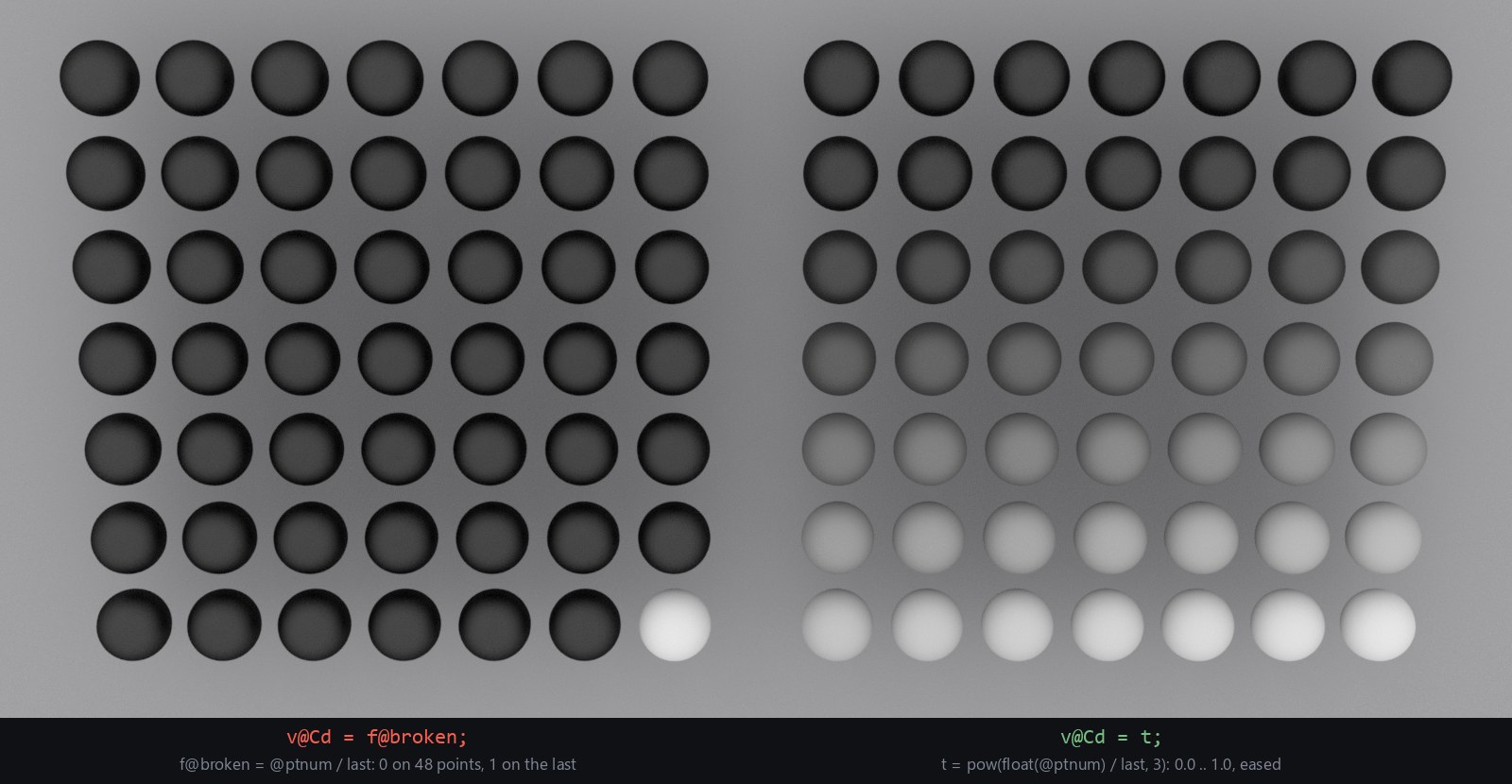
t = pow(t, 3);                      // ease-in, so the ramp is easy to see
v@Cd = t; // a float assigned to a vector fills all three: {t, t, t}The division happens in integer arithmetic before the result is converted to float for the assignment, so f@broken holds 0 on every point but the last. On a 50-point Line in Houdini 22.0.368, points 0 to 48 get 0 and point 49 gets 1. This is the same rule C, Java and Fortran use, and the one Python 2 used before / became true division. Here is the C version, compiled with zig cc -std=c17 -Wall -Wconversion (clang 21.1) and with gcc 16.2, with the output we saw:
#include <stdio.h>
int main(void) {
    int ptnum = 7, numpt = 10;
    printf("7/10      = %d\n", ptnum / numpt);          /* 0 */
    printf("7/10.0    = %g\n", ptnum / (double)numpt);  /* 0.7 */
    printf("(int)-2.7 = %d\n", (int)-2.7);              /* -2: truncates toward zero */
    float f = 16777217;                                 /* 2^24 + 1 */
    printf("float     = %.1f\n", f);                    /* 16777216.0 */
    return 0;
}Both compilers warn on the float f line that the conversion changes the value: clang by default, gcc once -Wconversion is on. The VEX compiler accepts float f = 16777217; without a word, which matters in the last section. The fix is the same in both languages: convert one operand before dividing. float(@ptnum) and (float)@ptnum are what the SideFX docs call variable casting, a real conversion that, as the docs note, generates extra instructions. Dividing by @numpt - 1 rather than @numpt is what makes the last point land exactly on 1.0.
Mixed int and float: the compiler and the docs disagree
In C, mixing an int and a float promotes the int, whichever side it is on. The VEX language reference for Houdini 22.0 states a different rule under "Operator type interactions": "the result is the type to the left of the operator. That is, float * int = float, while int * float = int." Houdini 22.0.368 doesn't do that. In our tests @ptnum * 0.5 and 0.5 * @ptnum gave the same float on all 50 points, and @ptnum / (float(@numpt) - 1) ran from 0 to 1 exactly like the cast version. Writing @ptnum * 0.5 to an int attribute raised the float-to-int warning, so the result really is a float, and a compiled probe with one overload per type resolved int * float, int / float and int + float to the float overload. The snippets page of the same docs divides an int by a float this way, and Tomori's tutorial and a 2020 SideFX forum answer by Tomas Slancik (tamte) describe the C-style promotion too.
So the rule Houdini 22 follows is C's. Until the reference and the compiler agree, though, float(@ptnum) / last is the form that is right under either reading, and the probe in "Try it yourself" shows what your own build does.
Where VEX really is not C
Integer division truncates toward zero, as in C: -7 / 2 is -3. The remainder doesn't follow C. The reference notes that the sign of % comes from the second argument, and Houdini does that: -7 % 4 is 1 in VEX and -3 in C, and 7 % -2 is -1 in VEX and 1 in C. VEX's % behaves like Python's while its / behaves like C's, so the C identity (a / b) * b + a % b == a fails for negative a.
Going from float to int, int(x) drops the fractional part, toward zero: int(-2.7) is -2. Assigning a float to an int variable or attribute does the same, and the node shows a warning: "Implicit cast from float to int. Use explicit cast instead." If you want rounding rather than truncation, floor and rint round to whole numbers, and rint is another place VEX parts from C. It rounds halves up, toward positive infinity: rint(2.5) is 3 and rint(-2.5) is -2. C's rint rounds halves to even (2 and -2), and C's round rounds them away from zero (3 and -3).
floor is also overloaded on its return type. int fl = floor(-2.5); picks the int version and gives -3 without a warning, while int r = rint(2.5); warns, because rint only comes in float. Pass floor(x) straight to printf and nothing picks the return type, so the compiler stops with "Ambiguous call to function floor()". That return-type dispatch is VEX's function casting, a separate topic from the variable casts here.
Scalars and vectors
Assigning a scalar to a vector broadcasts it: v@Cd = t; gives {t, t, t}, which is why the wrangle above produces gray, not red. Arithmetic between a vector and a scalar is component-wise, like NumPy broadcasting with a scalar. Mixing vector sizes is less friendly. The result has the larger size, and the reference says the smaller vector's missing components are filled in from {0, 0, 0, 1}. So a vector2 plus a vector4 adds 0 to z and 1 to w: {1, 2} + {1, 2, 3, 4} is {2, 4, 3, 5}, which is what Houdini 22 gave us. Assign a vector4 result to a vector and you get another implicit-cast warning. If you combine vectors of different sizes, write out the components you mean.
32 bits, all of them
VEX runs in 32-bit or 64-bit mode, and there is no double or long for mixing precisions. A wrangle's VEX Precision parameter defaults to Auto, which follows the preferred precision of the incoming geometry; on ordinary geometry that is 32-bit. A 32-bit float has a 24-bit significand, so it holds every integer exactly only up to 2^24 = 16,777,216. Past that, casting an ID to float and back quietly merges neighbors. NumPy shows it with no DCC involved (Python 3.12.10, NumPy 2.5.4):
import numpy as np
ptnum = np.arange(10)                       # like @ptnum on 10 points
print(ptnum // 10)                          # integer division: [0 0 0 0 0 0 0 0 0 0]
print(int(-2.7), -7 // 2)                   # -2 -4: int() truncates, // floors

ids = np.array([16_777_216, 16_777_217, 16_777_218], dtype=np.int32)
print(ids.astype(np.float32).astype(np.int64)) # [16777216 16777216 16777218]The point ID 16,777,217 comes back as 16,777,216, and Houdini agrees. On a 50-point Line, i@id = @ptnum + 16777200; followed by f@fid = @id; leaves 33 distinct values in fid, and 17 of the 50 IDs read back wrong. Scaling makes it worse: f@seed = @id * 0.001; on the same points gives only 25 distinct seeds. That expression starts colliding a little below 2^24, from ID 16,384,000, because there the seed is a float near 16,384, and neighboring floats that size are about 0.002 apart.
Don't test this with a literal. int(float(16777217)) printed 16777217 in our runs, both in a wrangle and in vexexec: with a constant, the round trip never happens at 32 bits. Real attributes, and local variables filled from them, do lose the bits.
There are two fixes. Keep IDs in int attributes and do integer work on them, such as hashing or modulo, before converting. Or set the wrangle's VEX Precision to 64-bit: the same f@fid = @id; then keeps all 50 values, because the attributes a 64-bit wrangle creates are 64-bit. An attribute that already exists at 32 bits stays 32-bit, so this only helps for new ones.
Python's // floors, so -7 // 2 is -4, while C's / truncates toward zero and gives -3. If you port grid-index math between Python, C and VEX, negative coordinates are where they disagree: VEX's / gives C's answer, and its % gives Python's.
What trips you up, and what clicks
@ptnum / @numptis integer division and is 0 on every point. Cast one side.- Divide by
@numpt - 1if the last point should reach exactly 1.0. - The reference says the left operand decides the type of mixed int/float arithmetic. Houdini 22 promotes to float on either side, like C.
float(@ptnum) / lastis right under both. %takes the divisor's sign:-7 % 4is 1, not C's -3.int(x)truncates toward zero, andrintrounds halves up, sorint(-2.5)is -2. Reach forfloorwhen you need one consistent direction.- A float assigned to a vector broadcasts to all components, which is handy for grayscale color and surprising when you expected only
.xto change. - Floats are 32-bit by default: integers above 16,777,216 are not exact once stored as floats. Keep IDs as ints, or switch the wrangle to 64-bit.
What clicks: VEX's numeric rules are mostly C's, plus a few shader-language habits. If you've chased a black texture in a fragment shader caused by 1/2, you already know this bug.
Try it yourself
Houdini Apprentice is free for non-commercial learning. Drop a Line SOP (set Points to 50), add an Attribute Wrangle with Run Over set to Points, and paste the first snippet. Open the Geometry Spreadsheet to compare broken with Cd.
Then add a second wrangle with Run Over set to Detail (only once), and run this probe to see how your build answers the questions above. Output goes where any printf goes; printf debugging a million points covers where to look.
// Attribute Wrangle, Run Over: Detail (only once). Prints once.
int   i = 3;
float a = i * 0.5;                  // int on the left
float b = 0.5 * i;                  // float on the left
printf("i*0.5 = %g   0.5*i = %g\n", a, b);
printf("7/2 = %d   7/2.0 = %g   -7/2 = %d\n", 7 / 2, 7 / 2.0, -7 / 2);
printf("-7%%4 = %d   7%%-2 = %d\n", -7 % 4, 7 % -2);
printf("int(2.7) = %d   int(-2.7) = %d\n", int(2.7), int(-2.7));
int fl = floor(-2.5);               // assigning to an int picks floor's int version
printf("floor(-2.5) = %d rint(2.5) = %g rint(-2.5) = %g\n", fl, rint(2.5), rint(-2.5));Houdini 22.0.368 printed:
i*0.5 = 1.5   0.5*i = 1.5
7/2 = 3   7/2.0 = 3.5   -7/2 = -3
-7%4 = 1   7%-2 = -1
int(2.7) = 2   int(-2.7) = -2
floor(-2.5) = -3 rint(2.5) = 3 rint(-2.5) = -2If a and b differ, your build follows the reference's left-operand rule. For a stretch, write i@id = @ptnum + 16777200; on a Line of 50 points, then f@fid = @id; in a second wrangle, and count how many distinct values fid holds (we got 33). Then set that wrangle's VEX Precision to 64-bit and count again.
Functions used: pow, floor, rint, printf.
Sources
- Juraj Tomori's VEX tutorial, "Variables casting" (the outline this series follows)
- SideFX: VEX language reference (Operators, Operator type interactions, Data types, Type casting)
- SideFX: VEX snippets, attribute types VEX infers
- SideFX: Attribute Wrangle, VEX Precision parameter
- SideFX: floor
- SideFX: rint
- SideFX forum: Explicit casting and manual datatype specification in VEX
Related
 HoudiniStage in, stage out: Houdini's Solaris treats every node as a function over a USD sceneIn Houdini's Solaris, every LOP node takes a composed USD stage and returns one, and its edits land in one in-memory layer at the top. A 31-line usd-core model of that contract, the Python LOP that does it for real, the same network checked in Houdini 22, and why a Layer Break decides what gets saved.
 Houdinisplit() is a tokenizer: building cache paths from strings in Houdini VEXVEX strings look like Python's, but split() merges separators and drops empty fields, len() counts bytes, and a wrangle expands $ before the compiler sees it. A per-piece cache path built from the scene file name, and the traps along the way, checked in Houdini 22.
 LatestMaterialX is an IR for materials: build a typed shader graph in Python, then lower it to GLSL and OSLA MaterialX material is a typed dataflow graph stored as XML, which a library type-checks and compiles to several shading languages. With only pip install MaterialX, build a checkerboard material in Python, watch the validator reject a float wired into a color, and generate GLSL and OSL from the same file.