printf debugging a million points: how VEX formats strings and where the output goes
A printf in a Houdini VEX wrangle runs once per point, in parallel. What each format specifier really prints in Houdini 22, where the output goes, and why a string attribute or a guarded print beats flooding the console.
TL;DR VEX, Houdini's C-like language, runs a wrangle once per point, in parallel, so a
printfin it behaves like aprintfinside a GPU kernel: one line per point, arriving in blocks, in no fixed order. This post covers whatprintfandsprintfformat strings actually do in Houdini 22 (the argument's type matters more than the letter), where the output goes, and why a string attribute you can read in the Geometry Spreadsheet is usually the better debugger.
Houdini in 60 seconds
Houdini stores a 3D model as tables. Points are positions, primitives are faces or curves built from those points, vertices are the corners linking a primitive to its points, and detail is one global row. Each column is an attribute: P (position), v (velocity), or anything you make up. You process geometry in SOPs (surface operators), which are nodes in a graph. The Attribute Wrangle SOP is a text box where you write VEX. Its Run Over setting picks which table the code iterates over. With Points, the snippet is the body of a loop over every point, and Houdini runs it in parallel across cores, much like a compute shader or a NumPy ufunc.
That's the catch for this topic. Inside a wrangle, printf doesn't run once. It runs once per element.
The core idea: C format strings, VEX types
printf and sprintf take a format string that will look familiar to anyone who has written C: %[flags][width][.precision]type. Here is what each conversion in the Houdini 22 docs printed when we ran it:
%dand%iprint ints.%xand%Xprint hex with a0xprefix that C doesn't add (255 prints as0xffand0xFF), and%oprints octal with a leading zero (0377).%f,%eand%Eprint floats, and they also take vectors and matrices, formatting each component:%.3fon{1, 2.5, -3}prints{1.000,2.500,-3.000}.%sprints a string.%gand%pprint the "general" form of anything. A vector prints as{1,2.5,-3}, amatrix3as{1,0,0 0,1,0 0,0,1}(rows separated by spaces), an array as{1, 2, 3}and a dict as indented JSON.%cis listed with%gin the docs, but it printed a character for an int (65 givesA) and nothing at all for a float, a vector or a string.- The flags are
-(left-justify),0(zero pad) and+. A*takes the width or precision from the argument list.
Two things work differently from C, and both matter when you're debugging:
- The argument's type decides the formatting more than the letter does.
%don a float printed3.14159,%son an int printed255, and%don a vector printed the whole vector. Nothing warns you about any of it. A letter VEX doesn't know (%a,%b,%ld) prints as the bare letter, a specifier with no argument left prints as-is, and extra arguments are ignored. None of these is a compile error. One undocumented curiosity:%visn't a vector format. It printedvaryingforv@Panduniformfor a constant, a glimpse of the compiler's own bookkeeping about which values differ from point to point. - The
+flag quotes strings. On a number it forces the sign. On a string it wraps the value in quotes, so%+10sgives"abcdef"and%+son an empty string gives"". That makes empty strings and trailing spaces visible in a log.
sprintf takes the same arguments but returns the string instead of printing it. Day to day, that's where most of the value is: file paths, node names, labels and padded frame numbers. sprintf("frame.%04d.exr", 42) returns frame.0042.exr.
What trips you up, and what clicks
- One line per point, in blocks, in no fixed order. A
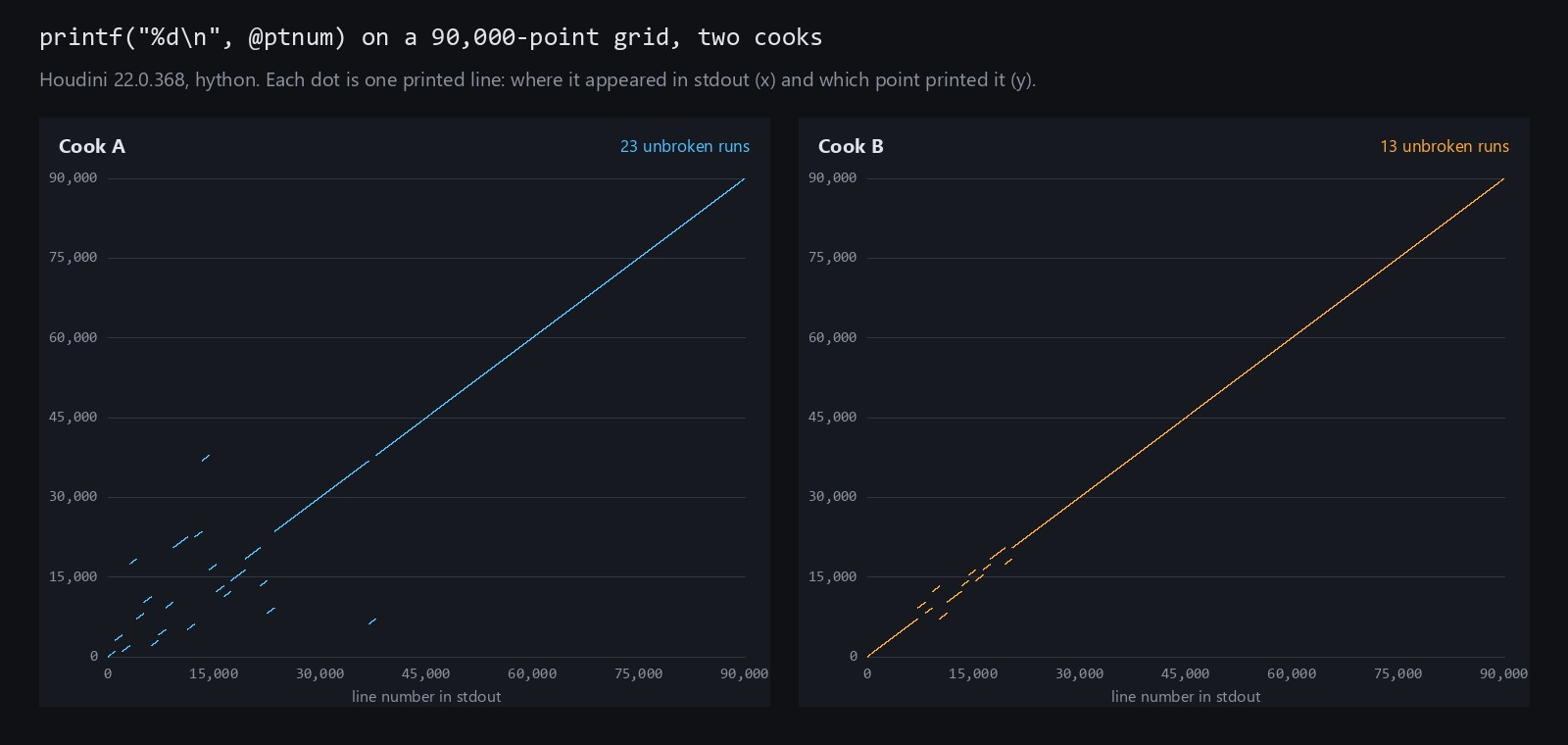
printfin a point wrangle runs for every point. On a 90,000-point grid,printf("%d\n", @ptnum)printed all 90,000 lines with none garbled, but in blocks of 1,024 consecutive points, and the blocks came out in a different order on each cook. (A 100-point grid printed in order.) It's slow, too: printing every point of a 100,000-point grid took 13.6 seconds against 0.05 seconds without the print, inhythonwith the output going to a file. In a SideFX forum thread on VEX debugging, one user reports crashing Houdini "many times" by printing to the console. The fix is the same as in a CUDA kernel: guard the print with an index check (if (@ptnum == 0)) or print every Nth element. Printing every 1,000th point cost 0.055 seconds. For a single message,print_once()prints once per cook, not once per point. - "The console" depends on how you launched Houdini. The docs say
printf"Prints values to the console which started the VEX program." Inhython, Houdini's command-line Python, the lines go to the process's standard output. On Windows, the Houdini application opens its own floating console window for this output (theHOUDINI_DISABLE_CONSOLEenvironment variable turns that off). On Linux and macOS, the output goes to the terminal you started Houdini from, so start it from a shell if you want to see anything. Tomori's tutorial suggests the-foregroundflag; the Houdini 22 help says that flag keeps Houdini from handing the terminal back to the shell. The output never shows up on the node itself: a wrangle that only prints has no messages, warnings or errors. - Attributes are a better debugger. Instead of printing,
sprintfa label into a string attribute and open the Geometry Spreadsheet, Houdini's table view of the attributes. It shows every element, it stays there after the cook, and clicking a column header sorts by that column. A Marker visualizer set to Text draws attribute values as labels in the viewport. It's much closer to inspecting a DataFrame than reading a log, and it's the advice a SideFX forum regular gives in the thread above. - Backslashes are processed twice;
@isn't processed at all. In a Houdini 22 wrangle a normal VEX string goes through escape processing twice, once before VEX receives the snippet and once in the compiler. Plainvccprocesses escapes only once (len("a\\b")is 3 there and 2 in a wrangle), so it is the wrangle."\\n"is a newline, and a literal backslash followed byntakes four backslashes,"\\\\n". Tomori's tutorial pointed out the extra backslashes in 2018. Raw strings,r"..."andR"(...)", print exactly what you typed. His tutorial also escapes@inside strings as\@. That's no longer needed:printf("a @P b\n")printsa @P band creates no attribute, and\@still works. warning()anderror()report through the node. Both takeprintfformat strings. Each distinct message fromwarning()becomes one line of the node's warning: 1,000 points runningwarning("pt %d", @ptnum)gave a 1,000-line warning, while 1,000 identical messages collapsed to one. The docs' caveat is fair: "It's quite easy to accidentally report thousands of different warnings."error()fails the cook, so the node outputs no geometry and shows your message.print_once()doesn't format at all:print_once("once %d\n", @ptnum)printedonce %d, so wrap the message insprintfif you need values in it.
Code: debug labels instead of console spam
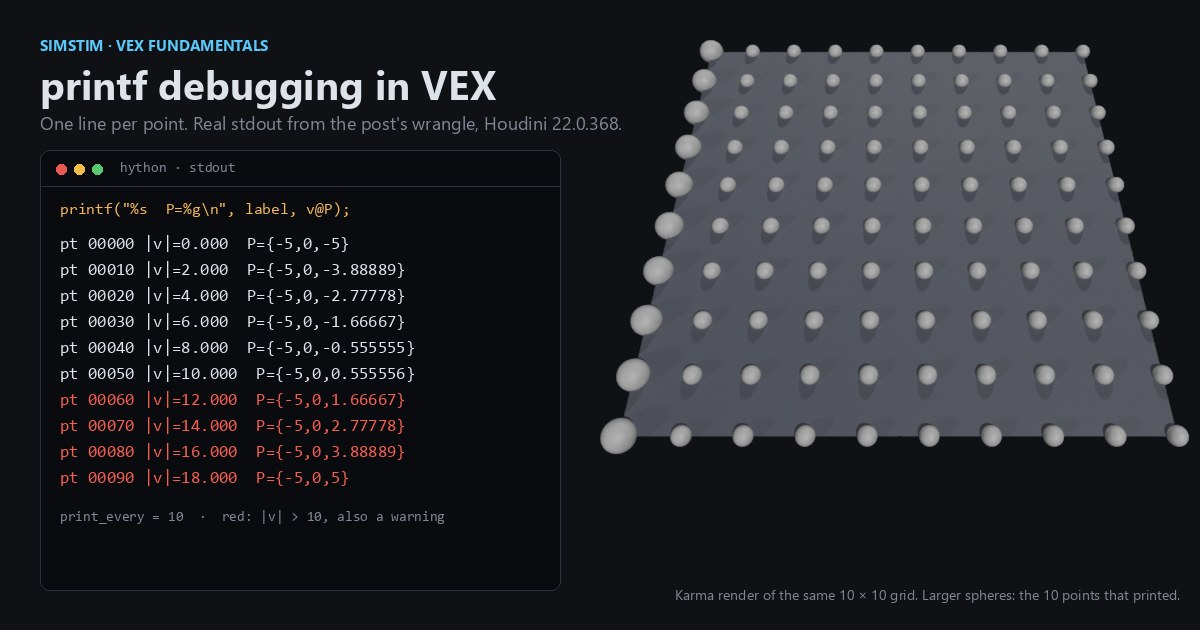
Make an Attribute Wrangle with Run Over: Points and feed it a Grid. The code reads velocity, so put another wrangle between them with v@v = set(@ptnum * 0.2, 0, 0);, which gives speeds from 0 to 19.8. (A Point Velocity SOP on a grid that doesn't move gives all zeros.) Paste the code, then click the Create spare parameters button to the right of the code editor to get the print_every parameter. It starts at 0, which prints nothing, so set it to 10.
// Attribute Wrangle, Run Over: Points
// Write a readable label on every point; print only a sample.
int every = chi("print_every");      // spare int parm; 0 prints nothing, try 10

// v@v is velocity. If the input has none, this read creates it as {0,0,0}.
float speed = length(v@v);

// sprintf returns a string: zero-padded point number, 3-decimal speed
string label = sprintf("pt %05d |v|=%.3f", @ptnum, speed);
s@debug = label;                     // inspect in the Geometry Spreadsheet

if (every > 0 && @ptnum % every == 0) {
    // %g prints a vector as a braced triple
    printf("%s  P=%g\n", label, v@P);
}

if (speed > 10.0)
warning("pt %d is moving fast: %g", @ptnum, speed);On the default 10 × 10 grid, this is the whole console output:
pt 00000 |v|=0.000  P={-5,0,-5}
pt 00010 |v|=2.000  P={-5,0,-3.88889}
pt 00020 |v|=4.000  P={-5,0,-2.77778}
pt 00030 |v|=6.000  P={-5,0,-1.66667}
pt 00040 |v|=8.000  P={-5,0,-0.555555}
pt 00050 |v|=10.000  P={-5,0,0.555556}
pt 00060 |v|=12.000  P={-5,0,1.66667}
pt 00070 |v|=14.000  P={-5,0,2.77778}
pt 00080 |v|=16.000  P={-5,0,3.88889}
pt 00090 |v|=18.000 P={-5,0,5}The node's warning has 49 lines, from pt 51 is moving fast: 10.2 to pt 99 is moving fast: 19.8, and every point carries its debug label in the spreadsheet. Two VEX details hide in the guard. Integer % by zero doesn't fail in VEX (it returns 0, so @ptnum % 0 == 0 would print every point), and && evaluates both sides, so the every > 0 test is what keeps the print off, not a short circuit.
For comparison, here's the same pattern in NumPy: label everything, print a sample.
import numpy as np
P = np.random.rand(1000, 3); v = np.random.rand(1000, 3) * 20
speed = np.linalg.norm(v, axis=1)
debug = [f"pt {i:05d} |v|={s:.3f}" for i, s in enumerate(speed)]
for i in range(0, len(P), 100):
print(debug[i], "P=", P[i])The difference is that in VEX the loop is implicit and parallel, so the if is the only thing between you and one line per point.
Try it yourself
- Install Houdini Apprentice, the free, non-commercial edition from SideFX.
- Build the Grid → velocity wrangle → debug wrangle chain above, set
print_everyto 10, then open the Geometry Spreadsheet and click thedebugcolumn header to sort by it. - Change
%05dto%-8dand%sto%+s, then print amatrix3with%gto see how its rows are laid out. - No Houdini? Run the NumPy version, then try the same thing with Blender's
bpyovermesh.vertices. You'll end up with the same "label everything, print a sample" pattern.
The next post in this series looks at vector swizzling.
Functions used: printf, sprintf, print_once, warning, error, chi, length. Each one links to its entry in the Simstim VEX reference.
Sources
- jtomori/vex_tutorial, Juraj Tomori's VEX tutorial ("Printing and formatting", "Printing attributes")
- SideFX VEX docs: printf, sprintf, print_once, warning, error
- SideFX: Strings (raw strings, escape sequences in wrangles)
- SideFX: Environment variables (
HOUDINI_DISABLE_CONSOLE) and command line options (-foreground) - SideFX: Geometry Spreadsheet and the Marker visualizer
- SideFX forum: VEX debugging methods
Related
 HoudiniStage in, stage out: Houdini's Solaris treats every node as a function over a USD sceneIn Houdini's Solaris, every LOP node takes a composed USD stage and returns one, and its edits land in one in-memory layer at the top. A 31-line usd-core model of that contract, the Python LOP that does it for real, the same network checked in Houdini 22, and why a Layer Break decides what gets saved.
 Houdinisplit() is a tokenizer: building cache paths from strings in Houdini VEXVEX strings look like Python's, but split() merges separators and drops empty fields, len() counts bytes, and a wrangle expands $ before the compiler sees it. A per-piece cache path built from the scene file name, and the traps along the way, checked in Houdini 22.
 LatestMaterialX is an IR for materials: build a typed shader graph in Python, then lower it to GLSL and OSLA MaterialX material is a typed dataflow graph stored as XML, which a library type-checks and compiles to several shading languages. With only pip install MaterialX, build a checkerboard material in Python, watch the validator reject a float wired into a color, and generate GLSL and OSL from the same file.