VEX swizzling: GLSL-style vector reads, and a write rule the compiler doesn't enforce
Houdini's VEX reorders vector components with shader-style swizzles like p.zyx, but only at full length and only for reading. Houdini 22 rejects v.xz = …, yet compiles v.zyx = b and quietly ignores the swizzle. Plus why swapping two axes turns a mesh inside out.
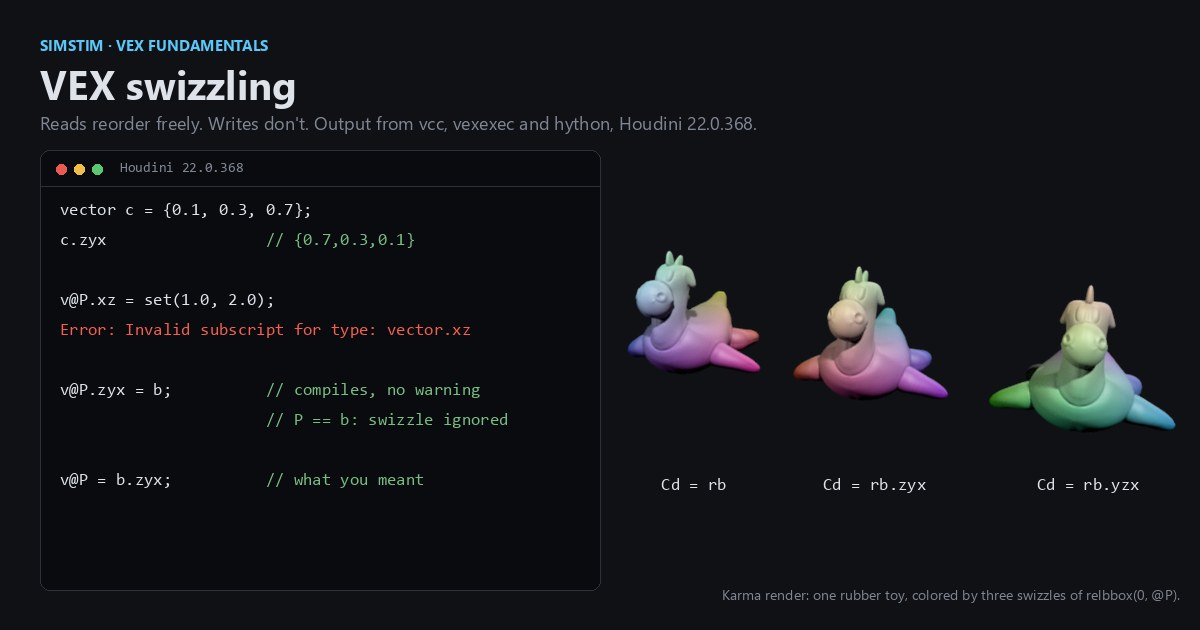
TL;DR VEX, Houdini's C-like data-parallel language, lets you reorder vector components with shader-style syntax like
p.zyx. Two GLSL habits don't carry over: a VEX swizzle must name every component of the vector (.xyon a 3-vector doesn't compile), and you can't assign through one. Houdini 22 rejectsv.xz = ...outright, but it compilesv.zyx = bwithout a warning and ignores the swizzle. Also: "just swap Y and Z" mirrors your geometry, turning closed meshes inside out, instead of rotating it.
Houdini in 60 seconds
Houdini builds geometry by passing it through a graph of nodes. The geometry nodes are called SOPs. A mesh is made of points (positions), primitives (polygons), vertices (a primitive's references to its points) and a detail (one record for the whole mesh). Any of these can carry named, typed data called attributes. P is the point position and Cd is the color. An Attribute Wrangle is a node that holds a VEX snippet. With Run Over: Points, the snippet runs once per point in parallel, the way a compute kernel runs once per thread. v@P means "this point's P, bound as a vector".
The core idea
If you've written a fragment shader, swizzling will look familiar. A vector (three floats) has components you can name as .x .y .z or .r .g .b. A vector4 adds .w or .a, and a vector2 uses .x .y or .u .v. String several letters together and you get a new vector built from those components, in that order, with repeats allowed:
vector c = {0.1, 0.3, 0.7};
vector r = c.zyx;   // {0.7, 0.3, 0.1}
vector g = c.zzy; // {0.7, 0.7, 0.3}Two rules separate this from GLSL.
A swizzle keeps the vector's length. It names exactly as many components as the vector has: .zyx on a vector, .bgab on a vector4, .vu on a vector2. GLSL lets v.xy pull a vec2 out of a vec3; in VEX, v.xy on a vector is a compile error, "Invalid subscript for type: vector.xy". Mixing letter sets (v.xg) fails too, as it does in GLSL, and so does .u on a vector. To get a vector2 from a vector, use set(v.x, v.z), or set(v), which takes components from the left.
You can't assign through a swizzle. The Houdini 22 language reference says so plainly: "You cannot assign to a swizzled vector, only read from them. So you cannot do v.zyx = b, but instead must do v = b.zyx." The compiler enforces half of that. A short swizzle on the left fails like any short swizzle: v@P.xz = set(1.0, 2.0); stops with "Invalid subscript for type: vector.xz". A full-length one compiles with no error and no warning, and the swizzle is simply dropped. v@P.zyx = b; stores b in x, y, z order, and v@P.zyx = v@P; leaves every point where it was instead of reversing it. Write v@P = b.zyx; instead.
Writing a single component is fine (v@P.y += 1, v@P[1] = 7, or setcomp(v@P, 7.0, 1)), because that's one float slot, not a rearrangement. So the working model is this: a swizzle is an rvalue expression, and a single component is an lvalue. To write two or more components at once, build the whole vector again with set().
Here is a wrangle that shows all three cases on a plain Grid:
// Attribute Wrangle, Run Over: Points
// Input: Grid SOP (default orientation: lies flat in the XZ plane)
vector p  = v@P;
vector rb = relbbox(0, p);        // position remapped to 0..1 inside the bounding box

// Read swizzle: rearrange and repeat, then store the result
v@Cd = rb.xzx;                    // R from x, G from z, B from x again

// Swap Y and Z. Looks like "stand the grid up"...
vector mirrored = p.xzy;          // ...but this is a reflection (det = -1)

// A real +90 degree turn about X needs a sign: (x, y, z) -> (x, -z, y)
vector rotated  = p.xzy * {1, -1, 1};

v@P = chi("mode") == 0 ? mirrored : rotated;

// Single components are writable
v@P.y += 0.1 * sin(p.x * 6.0);

// GLSL lets you write  p.xz = p.zx;  VEX doesn't. Rebuild instead:
// v@P = set(v@P.z, v@P.y, v@P.x);To run it, drop a Grid SOP, wire it into an Attribute Wrangle, leave Run Over on Points, paste the code, and click the Create spare parameters button to the right of the code editor so the mode integer shows up. It starts at 0. Flip it between 0 and 1.
For comparison, NumPy's fancy indexing works in both directions, which is why the VEX rule is easy to trip over:
import numpy as np
p = np.array([0.1, 0.3, 0.7])
print(p[[2, 2, 1]])      # read "swizzle": [0.7 0.7 0.3]
p[[0, 1]] = p[[1, 0]] # NumPy allows a write "swizzle"; VEX does notGLSL sits between the two. It accepts v.xy = v.yx; as an lvalue but rejects v.xx = ..., because a repeated component would be ambiguous ("l-value of swizzle cannot have duplicate components", in the words of the Khronos reference compiler). VEX's documentation allows no swizzled lvalues at all.
If the order isn't known until runtime, say it comes from a parameter, use the swizzle() function. It takes zero-based integer indices (swizzle(v, 2, 1, 0) reverses a vector) and clamps out-of-range indices instead of failing: swizzle({0.1, 0.3, 0.7}, 5, -1, 1) returns {0.7, 0.1, 0.3}.
What trips you up, and what clicks
- "Swap two axes" isn't a rotation. The obvious way to stand the grid up is
v@P = v@P.xzy, and in the viewport it looks right. Add a Normal SOP after the wrangle and compare the modes: withmode0 (the swap) the normals point down −Z, and withmode1 (the rotation) they point +Z. Swapping two axes is a permutation matrix with determinant −1, so it's a mirror, and a mirror flips the handedness of every polygon's winding. Normals computed from winding then point the other way. On a closed mesh that means inside out: run a Box throughv@P = v@P.xzy;and all six face normals point inward, while the rotated version keeps all six pointing out. Anything that trusts winding, from the Normal SOP to a renderer's backface culling, sees the flipped faces. The fix is one sign flip,* {1, -1, 1}, which turns the permutation into a proper rotation. The same trap waits in Houdini-to-Blender axis conversions: Houdini is Y-up, Blender is Z-up, and both are right-handed, so the conversion has to swap Y and Z and negate one of them. - A swizzle on an untyped attribute doesn't compile. A bare
@namebinds as a float unless Houdini knows the name (P,Cd,N,uv,rest,vand a few others are vectors), and a float has no.x.@foo.xstops with "Invalid subscript for type: float.x", while@rest.xworks becauserestis on the known list. Someone on the SideFX forum hit exactly this with@uv_2.y. The fix is a type prefix:v@uv_2.y. - Tomori's note still holds, and now the docs agree. His tutorial, written in early 2018, says
col.zyx = col.xyzandcol.xy = col.yx"do not work as expected, or at all". In Houdini 22 that's exactly the split: the first compiles and leavescolunchanged, the second is a compile error. The language reference now states the rule outright.
What clicks: VEX treats a vector as one value that you can read in different orders, not as a small array you can scatter into. Seen that way, set() stops feeling like a workaround.
Try it yourself
- In Houdini Apprentice (free, non-commercial), build the Grid → Wrangle → Normal chain above and compare
mode0 and 1 with normals displayed. - Change the color line to
rb.zxzand predict the gradient before you cook the node. - Without a DCC: in NumPy, build a 3×3 permutation matrix for
xzyand checknp.linalg.det(). Then do the same for the sign-flipped version. You'll get −1 and +1. - Blender users: in Geometry Nodes on the default cube, Separate XYZ → Combine XYZ with Y and Z crossed does the same mirror. Turn on the Face Orientation overlay and watch the outside of the cube turn red.
Functions used: relbbox, set, setcomp, chi, sin, swizzle. Each one links to its entry in the Simstim VEX reference.
Sources
- jtomori/vex_tutorial, Juraj Tomori's VEX tutorial ("Vectors swizzling")
- SideFX: VEX language reference (dot operator and swizzling) and Using VEX expressions (attributes with known types)
- SideFX VEX docs: swizzle, set, setcomp, relbbox
- SideFX forum: VEX assign components error
- Khronos: The OpenGL Shading Language 4.60, section 5.5, Vector and Scalar Components and Length (swizzles as l-values)
Related
 HoudiniStage in, stage out: Houdini's Solaris treats every node as a function over a USD sceneIn Houdini's Solaris, every LOP node takes a composed USD stage and returns one, and its edits land in one in-memory layer at the top. A 31-line usd-core model of that contract, the Python LOP that does it for real, the same network checked in Houdini 22, and why a Layer Break decides what gets saved.
 Houdinisplit() is a tokenizer: building cache paths from strings in Houdini VEXVEX strings look like Python's, but split() merges separators and drops empty fields, len() counts bytes, and a wrangle expands $ before the compiler sees it. A per-piece cache path built from the scene file name, and the traps along the way, checked in Houdini 22.
 LatestMaterialX is an IR for materials: build a typed shader graph in Python, then lower it to GLSL and OSLA MaterialX material is a typed dataflow graph stored as XML, which a library type-checks and compiles to several shading languages. With only pip install MaterialX, build a checkerboard material in Python, watch the validator reject a float wired into a color, and generate GLSL and OSL from the same file.