Gather, don't scatter: reading data from other points in VEX
In a Houdini VEX wrangle, @P reads the current point and point() reads any point from a read-only snapshot of the input. Blend a grid toward a displaced copy of itself, build tangents with one gather, and see why writing to other points is the slower path.
TL;DR Houdini's VEX runs one small function per point, in parallel, like a GPU kernel.
@Preads the current point's own data.point()reads any point's data, an indexed gather from the node's input, and that input is a read-only snapshot that never sees what the node writes. Writing into other points (a scatter) works too, but it's slower and needs care. This post blends a grid toward a displaced copy of itself and builds a per-point tangent with one gather.
Houdini in 60 seconds
The first post in this series read node parameters, which are the same for every point. This one reads attributes, which vary per point, including attributes on points other than the one the code is running on. It follows the "Reading attributes" section of Juraj Tomori's VEX tutorial. First, the minimum Houdini you need.
Houdini builds geometry with a graph of nodes. The geometry nodes are called SOPs. Each SOP takes geometry in and passes new geometry out. That geometry is made of points (positions), primitives (polygons, curves and so on), vertices (a primitive's reference to a point) and one detail (the whole object). Any of these can carry named, typed data called attributes, which work like columns in a table. P is the position column, Cd is color and N is the normal.
A wrangle is a node where you write VEX, Houdini's C-like shading and geometry language. Its Run Over setting picks which table the code runs over. On Points (the default), your snippet runs once per row in parallel, and the loop is implicit. If you've written a CUDA kernel or a NumPy ufunc, you already know the shape of this.
The core idea: @ is "my row", point() is "any row"
Inside a wrangle, @P means "this point's position". The letter before the @ gives the type: v@ vector, f@ float, i@ int, s@ string, p@ vector4, u@ vector2, 2@/3@/4@ matrices and d@ dict. A list of well-known names (P, Cd, N, v, id, ptnum and a few more) get their type automatically. Everything else defaults to float.
An Attribute Wrangle has up to four inputs. There are two ways to reach into them:
v@opinput1_P: thePattribute from input 1, at the same element number as the current point. It's quick and readable, but it quietly assumes both inputs have the same point count and order.point(geo, "name", index): an explicit read of any attribute, from any input, at any index.geois usually an input number (0 is the first input), but it can also be a path string such as"op:/obj/geo1/some_node".
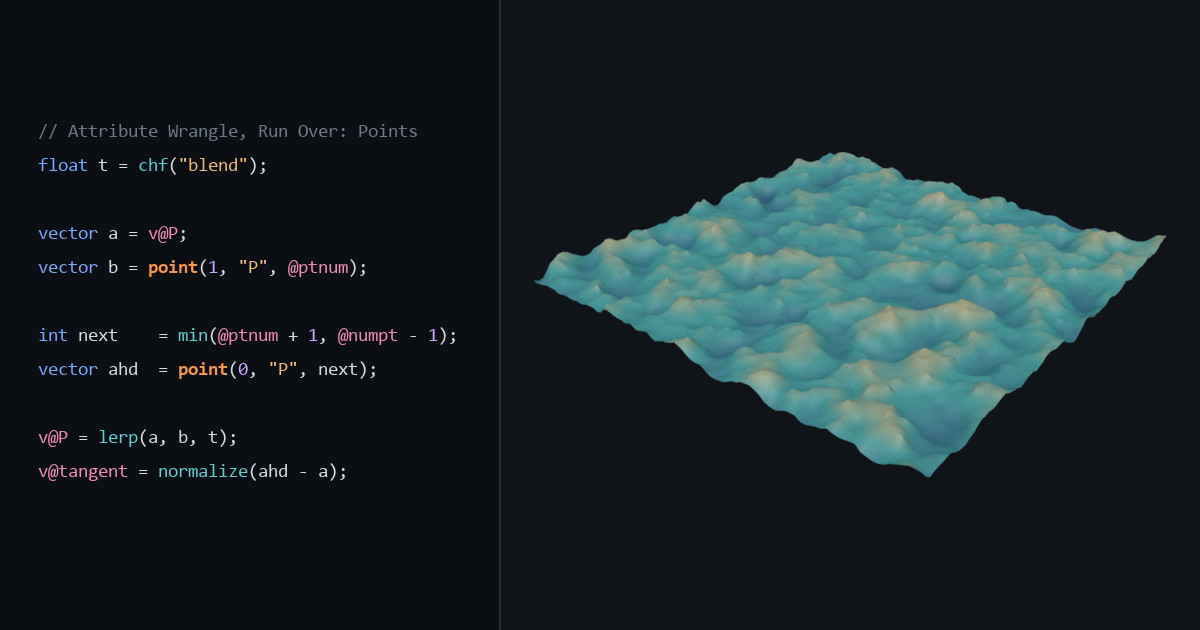
In GPU terms, reading another element's data by index is a gather. Writing into another element is a scatter. Here's a gather that blends a flat grid toward a displaced copy of itself and writes out a per-point tangent:
// Attribute Wrangle, Run Over: Points
// Input 0: Grid SOP.  Input 1: same grid -> Mountain SOP (same count + order)
float t = chf("blend");                     // a slider, read with chf

vector a = v@P;                             // my row, input 0
vector b = point(1, "P", @ptnum);           // same row, input 1
// shorthand for the line above: vector b = v@opinput1_P;

// Gather from a *different* row: the next point, clamped at the end
int next    = min(@ptnum + 1, @numpt - 1);
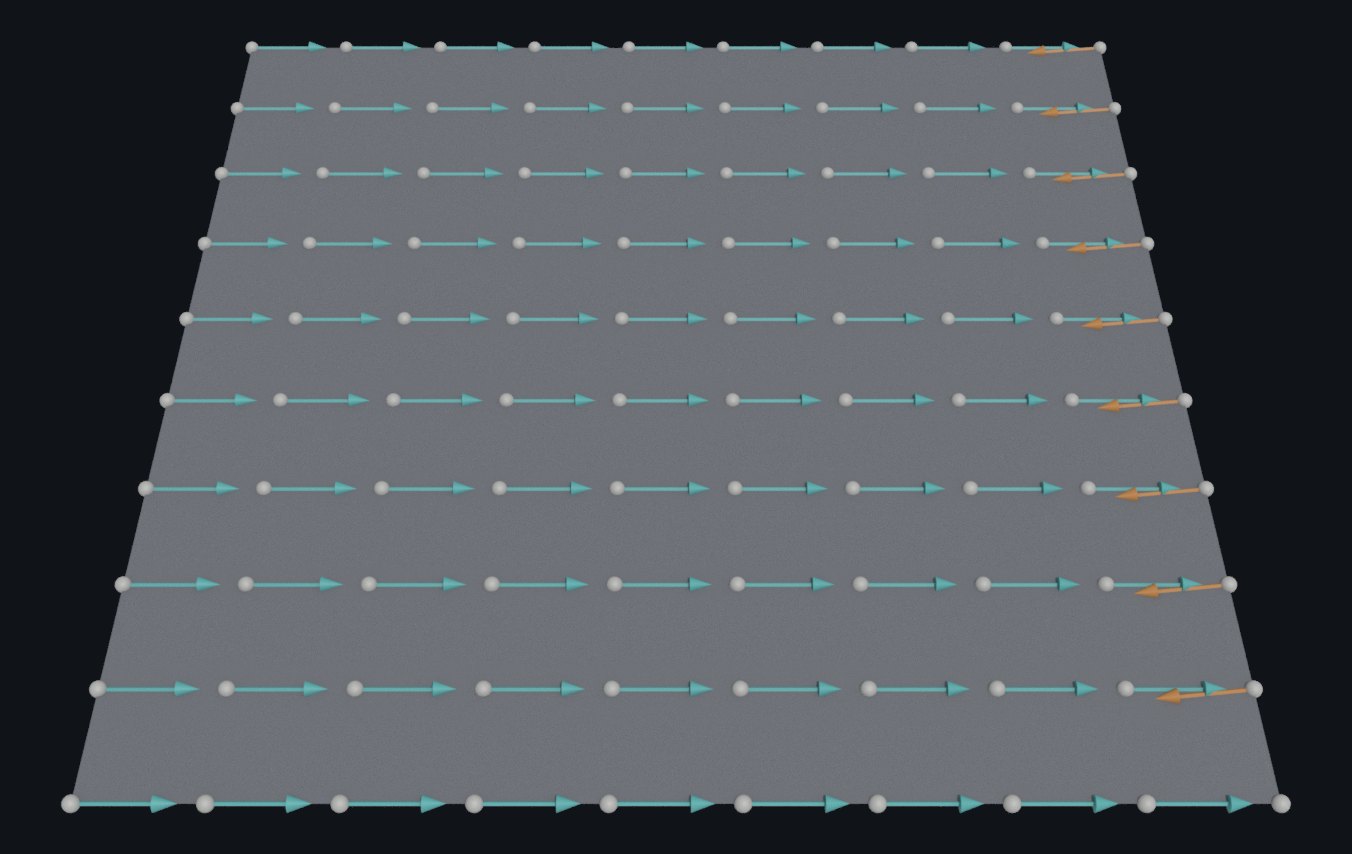
vector ahd  = point(0, "P", next);

// A missing attribute doesn't throw an error; you get a zero value back
float h = point(1, "height", @ptnum);       // 0.0 if "height" isn't there

v@P = lerp(a, b, t);
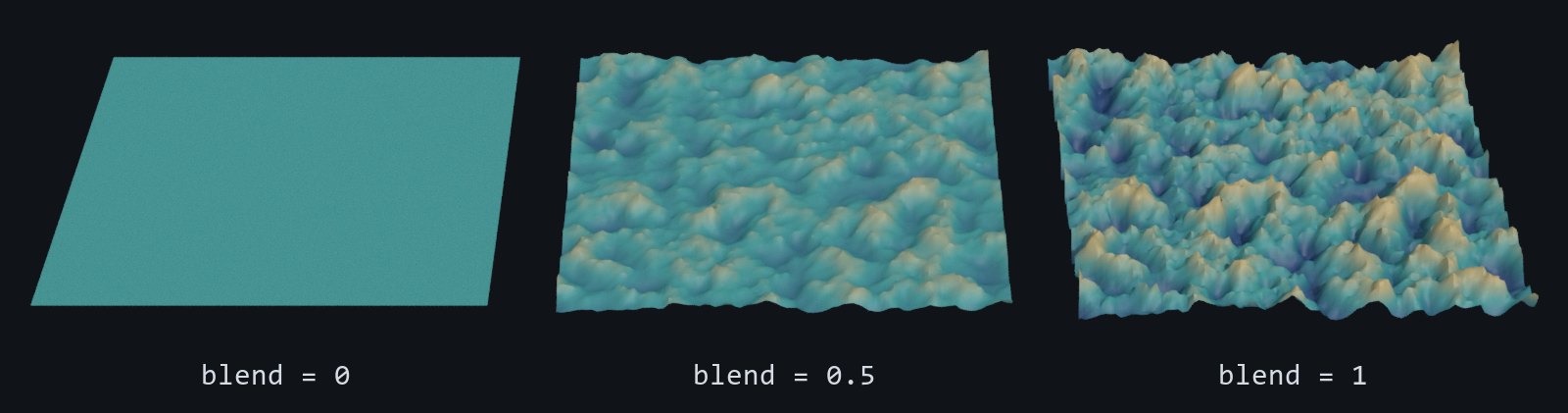
v@tangent = normalize(ahd - a); // last point: zero vectorTo run it: drop a Grid, branch it into a Mountain SOP, and wire both into an Attribute Wrangle, the grid into input 0 and the mountain into input 1. Leave Run Over on Points, paste the code, and click the Create spare parameters button to the right of the code editor to get the blend slider. As in the first post, the new slider starts at 0, which outputs the flat grid unchanged, so drag it toward 1. The Mountain's default displacement is small on the default 10 × 10 grid, so raise its Height to see the blend clearly.
The same thing in NumPy makes the memory model obvious:
import numpy as np

def gather(P0, P1, t=0.5):
    """P0, P1: (N, 3) arrays of positions from input 0 and input 1."""
    out = P0 + (P1 - P0) * t                          # @opinput1_P: same index, input 1
    nxt = np.minimum(np.arange(len(P0)) + 1, len(P0) - 1)
    d = P0[nxt] - P0                                  # point(0, "P", next): a gather
    n = np.linalg.norm(d, axis=1, keepdims=True)
    tangent = np.divide(d, n, out=np.zeros_like(d), where=n > 0)   # normalize()
return out, tangentpoint() is fancy indexing. @opinput1_P is elementwise alignment. That's the whole mental model.
Why gather, not scatter
VEX can scatter with setpointattrib, which writes an attribute on any point you name. Here's the same tangent as a scatter, with each point pushing a value into the point before it:
// Attribute Wrangle, Run Over: Points
// The same tangent as a scatter: each point writes into the point before it
if (@ptnum > 0) {
    int prev = @ptnum - 1;
    setpointattrib(0, "tangent", prev, normalize(v@P - point(0, "P", prev)));
}It gives the same tangents, and it isn't a data race: Houdini queues every setpointattrib write and applies them after all points have run, so the result is deterministic. It still costs you in three ways:
- It's slower. SideFX's docs say setting the current element through
@is faster than thesetattribfamily. On a million-point grid in our test, the scatter version took roughly 20 times as long to cook as the gather. - It overrides your
@writes. The queued writes land last, sosetpointattribbeats any@tangent = ...on the same attribute. - Collisions need a mode. When several points write to the same point with the default
"set"mode, only one value survives. Pass"add"(or"min","max","mult") to combine them.
So gather whenever each output point can say where its inputs are, which covers most per-point work. Keep scatter for jobs that really are one-to-many, such as splatting values onto neighbors, and choose the mode on purpose.
What trips you up, and what clicks
point(0, "P", next)doesn't see the node's own edits. Input 0 is the geometry as it came into the node. Every invocation reads the same frozen buffer, and@writes go only to the current point's output row. Addv@P.y += 1;to a wrangle andpoint(0, "P", @ptnum)still reads the old height. It's double-buffering, the same ping-pong pattern you'd use in a compute shader so that thread 7 doesn't read half-updated data from thread 6, and it's why there are no race conditions to think about. If you need the updated values, read them in a second wrangle downstream.@opinput1_fails silently when counts don't match. Feed input 1 a grid with fewer points and nothing errors or warns. The extra points read (0, 0, 0), so the blend pulls them toward the origin, all the way there atblend= 1. A misspelled attribute name inpoint()behaves the same way: you get a zero. Coming from Python, where a bad key raisesKeyError, this takes adjusting.haspointattrib(1, "height")returns 1 or 0 if you want to check first. One more wrinkle: the wrangle's Attribute to Match parameter defaults toid, so if both inputs carry anidattribute,@opinput1_pairs points byidinstead of by number.point()always uses the index you give it.- The type prefix is not decoration. Write
@tangent = normalize(ahd - a);without thevand Houdini createstangentas a float, keeping only the x component of your vector. The node shows a warning ("Implicit cast from vector to float") but still cooks. Prefix everything you create, even when Houdini could infer the type; Tomori's tutorial does the same ("I prefer explicit declaration"). Do it onopinputreads too: the SideFX docs say the automatic typing doesn't cover them. (In our Houdini 22 test@opinput1_Pcame through as a vector anyway, but the docs don't promise it.) - The
op:path trick works, but hides a dependency.point("op:../mountain1", "P", @ptnum)reads from a node that isn't wired in, with an absolute or a relative path. Houdini does track it for cooking: change the mountain and the wrangle recooks. But there's no wire in the network, so someone reading the graph can't see where the data comes from. Tomori's tutorial adds that the network editor's dependency-link display doesn't show these references; that note dates from early 2018, so check it on your build. We'd rather bring the geometry in with an Object Merge and a real wire. Explicit dataflow beats spooky action at a distance, same as with global variables.
Try it yourself
- Install Houdini Apprentice, the free, non-commercial edition from SideFX. It has everything in this post.
- Rebuild the grid and mountain setup above and keyframe
blendfrom 0 to 1. - Change
nextto read the previous point instead, clamped at 0 withmax(@ptnum - 1, 0). What happens to the tangents at the start of each row? (Hint: the Grid numbers its points row by row, so the previous point isn't always a neighbor.) - Stretch goal: replace
@ptnumin the input-1 read with@numpt - 1 - @ptnum. You've just reversed an array with a gather and no loop.
No Houdini? Do step 4 in NumPy with P1[::-1], or in Blender's geometry nodes with the Sample Index node, which reads a value from another geometry at any index, much like point().
Functions used: chf, point, min, max, lerp, normalize, setpointattrib, haspointattrib. Each one links to its entry in the Simstim VEX reference.
Sources
- jtomori/vex_tutorial, Juraj Tomori's VEX tutorial ("Reading attributes")
- SideFX: Using VEX expressions (type prefixes, other inputs, setting attributes)
- SideFX: Attribute Wrangle (Attribute to Match)
- SideFX VEX docs: point, setpointattrib, haspointattrib
- Blender Manual: Sample Index Node
Related
 HoudiniStage in, stage out: Houdini's Solaris treats every node as a function over a USD sceneIn Houdini's Solaris, every LOP node takes a composed USD stage and returns one, and its edits land in one in-memory layer at the top. A 31-line usd-core model of that contract, the Python LOP that does it for real, the same network checked in Houdini 22, and why a Layer Break decides what gets saved.
 Houdinisplit() is a tokenizer: building cache paths from strings in Houdini VEXVEX strings look like Python's, but split() merges separators and drops empty fields, len() counts bytes, and a wrangle expands $ before the compiler sees it. A per-piece cache path built from the scene file name, and the traps along the way, checked in Houdini 22.
 LatestMaterialX is an IR for materials: build a typed shader graph in Python, then lower it to GLSL and OSLA MaterialX material is a typed dataflow graph stored as XML, which a library type-checks and compiles to several shading languages. With only pip install MaterialX, build a checkerboard material in Python, watch the validator reject a float wired into a color, and generate GLSL and OSL from the same file.