Week in TD, Sept 21–27, 2026: Gaussian splats are a struct of arrays, and Blender 5.3 agrees
Native 3D Gaussian splats landed in Blender 5.3 in the week of Sept 21–27, 2026, joining OpenUSD 26.03 and Houdini 22. What a splat file actually stores, and a short NumPy decoder checked against Blender's and Houdini's own importers.
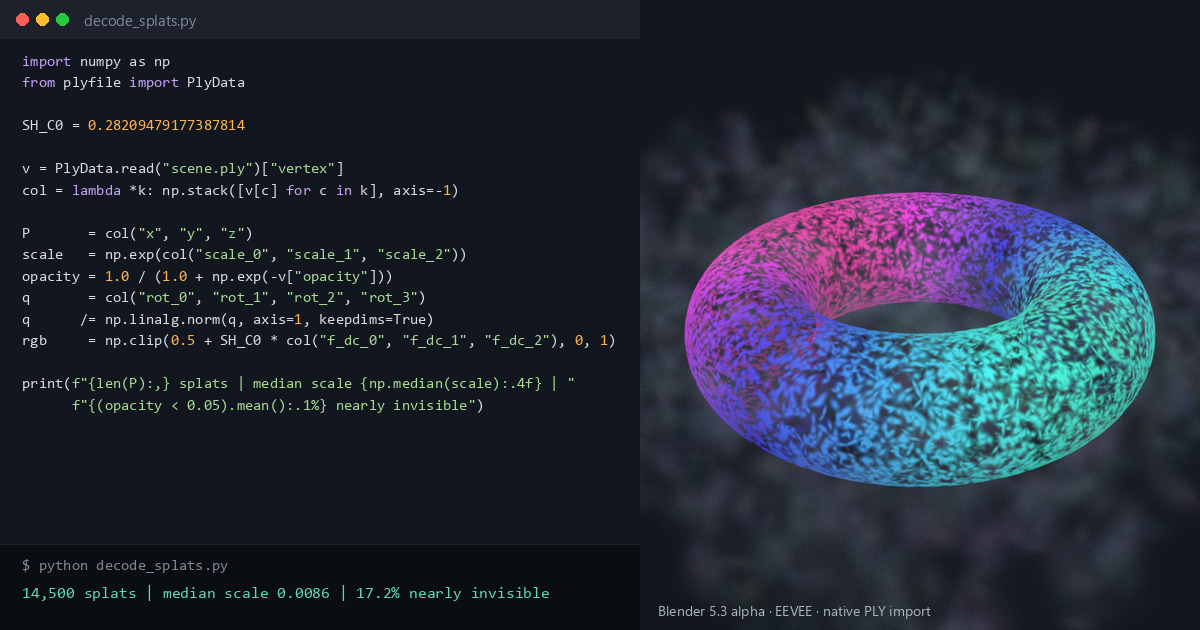
TL;DR 3D Gaussian splats, the scene-capture format that came out of radiance-field research, are a big table: one row per splat, with a position, three scales, a rotation, an opacity and colour coefficients. In the week of Sept 21–27, 2026, Blender's developer notes showed native splat support landing in Blender 5.3, so OpenUSD 26.03, Houdini 22 and Blender now all treat splats as first-class data. We cover what a splat file actually stores and decode one in about 15 lines of NumPy, checked against Blender's and Houdini's own importers.
Blender in 60 seconds
Blender is a free, open-source 3D suite. Its Geometry Nodes system is a visual dataflow language: geometry flows through a graph of nodes, and most of Blender can be scripted from Python through bpy. Geometry is stored as typed attributes on domains (points, edges, faces and so on). If you know Houdini, this is the same idea as its points and attributes: a structure of arrays where every point is a row and every attribute is a column. A PointCloud is Blender's geometry type made only of points, with no edges or faces.
The news: the week of Sept 21–27, 2026
Blender's weekly developer notes dated Sept 21, 2026 grouped a run of commits, landed on Blender's main branch between Sept 8 and 18, that add up to one feature: native 3D Gaussian splats in Blender 5.3. Checked against the commits and the 5.3 release notes:
- A type on the PointCloud data-block. A point cloud is now either Points (unchanged) or 3D Gaussian Splats. In Python that's
PointCloud.type, which readsGAUSSIAN_SPLATfor splats. - Import. PLY import detects splat files from their attributes, and there's a new importer for SPZ, a compressed splat format (all versions up to 4). Geometry Nodes gets Import SPZ and Set Point Cloud Type nodes, and the Import PLY node now outputs a point cloud when the file holds splats (its output socket was renamed Geometry).
- USD. Blender imports OpenUSD's
ParticleField3DGaussianSplatschema. - Rendering. Workbench, EEVEE and Cycles all render splats, with a default emissive shader. The Cycles version is based on Xin Sun et al.'s paper on stochastic ray tracing of transparent 3D Gaussians.
At the time, 5.3 was in alpha, with beta due on Sept 30 and release planned for Nov 10, 2026.
Update, Oct 17, 2026: 5.3 is now in beta (bug fixes only), the splat code is on the 5.3 release branch, and release is still planned for Nov 10. Import of glTF splats (the KHR_gaussian_splatting extension) landed on Oct 1 and is in the 5.3 notes too.
On its own that's an app feature. What makes it news for people who write code is that three pieces of a typical TD pipeline now agree:
- OpenUSD 26.03 (released Feb 24, 2026) added the UsdVolParticleField schema family, including
ParticleField3DGaussianSplat, as proposed by the AOUSD Emerging Geometry Interest Group. Its imaging examples include a reference splat renderer, the Hydra render delegate hdParticleField, and a PLY-to-USD converter script. - Houdini 22 (July 2026) added a splat toolset: training splats in TOPs, generating them from Karma renders, and deforming, relighting and rendering them. SideFX's H22 page calls splats "fundamentally points with attributes". Houdini has been able to convert splat PLYs for Karma XPU since Houdini 21, with the Bake GSplats SOP.
- Blender 5.3 stores them as a typed point cloud and imports the USD schema.
So a splat is no longer something only a plugin understands. It's a data structure with a schema, like a mesh.
What's actually in the table
Splats sound volumetric and exotic. They're really a flat array of small, oriented, semi-transparent 3D Gaussians: soft ellipsoids with no hard edge. The reference implementation of the original paper (Kerbl et al., 2023) writes them to PLY with these columns per splat:
- Position:
x,y,z, plain floats. - Normals:
nx,ny,nz, written as zeros by the reference code. Ignore them. - Colour:
f_dc_0tof_dc_2, the constant (degree 0) spherical-harmonic (SH) coefficient for red, green and blue. The colour is 0.5 + C0 · f_dc, where C0 ≈ 0.2821 is the constant SH basis value. - View-dependent colour:
f_rest_0tof_rest_44, SH degrees 1 to 3. That's 15 coefficients per channel (fewer if the file was trained to a lower degree), stored channel by channel: all 15 red, then all green, then all blue. - Opacity:
opacity, stored as a logit. Apply a sigmoid to get alpha. - Scale:
scale_0toscale_2, the natural log of the Gaussian's standard deviation along each of its local axes. Apply exp() to get it back. - Rotation:
rot_0torot_3, a quaternion with the real part first (w, x, y, z), not unit length. Normalise it.
That's 62 float32 values, 248 bytes per splat.
Those encodings come from training. exp() of any number is positive and a sigmoid of any number lies between 0 and 1, so the optimiser can adjust the raw values freely, and the reference code saves them before applying those functions. Read scale_0 as a size and you get a negative number: a standard deviation of 0.01 is stored as about -4.6. And a scale is a standard deviation, not a radius. A Gaussian has no edge; the reference rasteriser draws each one out to three standard deviations.
On disk, a binary PLY is an array of structs: the 62 values of one splat sit together. Blender, Houdini and USD all store splats the other way round, one array per attribute. For a C or GPU programmer, that's a textbook struct of arrays feeding a sort-and-blend rasteriser: splats are sorted by depth and alpha-blended in order, like old-school transparent particles. The USD schema even carries a sortingModeHint (fallback zDepth; the other options are cameraDistance and, since OpenUSD 26.05, rayHitDistance). The schema page says hints like this usually reflect choices made during training.
Each tool decodes on import, but not all the way:
- Blender 5.3's PLY importer applies exp() to the scales and the sigmoid to the opacity, and normalises the rotation. It stores the opacity as the fourth component of a float4 attribute,
radiance:base, after the threef_dcvalues, which it keeps as SH coefficients, not colours. The higher bands become float3 attributesradiance:sh_0toradiance:sh_14, one per coefficient, regrouped from PLY's channel-by-channel layout. - OpenUSD's PLY-to-USD script does the same: exp, sigmoid, normalise, and the DC term stays an SH coefficient in
radiance:sphericalHarmonicsCoefficients. - Houdini's Bake GSplats SOP goes a step further. It writes
Cdas a colour, converted from sRGB to linear by default, and opacity asGS_Alpha, plus the scales and anorientquaternion. The SH terms (GS_SPH_R,GS_SPH_G,GS_SPH_B) are optional and off by default.
Decoding a splat file (NumPy)
This reads the standard uncompressed 3DGS PLY that the reference code writes. Some tools write compressed PLY variants that pack the values differently, and this script won't read those. Install with pip install numpy plyfile, then point it at a file:
import numpy as np
from plyfile import PlyData

SH_C0 = 0.28209479177387814             # Y_0^0: the constant SH basis value, 1 / (2 sqrt(pi))

v = PlyData.read("scene.ply")["vertex"]   # one row per splat, columns = attributes
col = lambda *k: np.stack([v[c] for c in k], axis=-1)

P       = col("x", "y", "z")
scale   = np.exp(col("scale_0", "scale_1", "scale_2"))   # stored as log(sigma)
opacity = 1.0 / (1.0 + np.exp(-v["opacity"]))            # stored as logit(alpha)
q       = col("rot_0", "rot_1", "rot_2", "rot_3")        # w, x, y, z
q      /= np.linalg.norm(q, axis=1, keepdims=True)       # not unit length on disk
rgb     = np.clip(0.5 + SH_C0 * col("f_dc_0", "f_dc_1", "f_dc_2"), 0, 1)  # DC band only

print(f"{len(P):,} splats | median scale {np.median(scale):.4f} | "
f"{(opacity < 0.05).mean():.1%} nearly invisible")We ran it on a small test file written in the reference layout from known values: 8 splats, 3 of them below 5% alpha. Every decoded array matched the values we started from to float32 precision, and it printed:
8 splats | median scale 0.0175 | 37.5% nearly invisibleThe median runs over all three axes of every splat. The last number is the useful one: captures often contain near-transparent "floaters", and culling by opacity is a common first cleanup step.
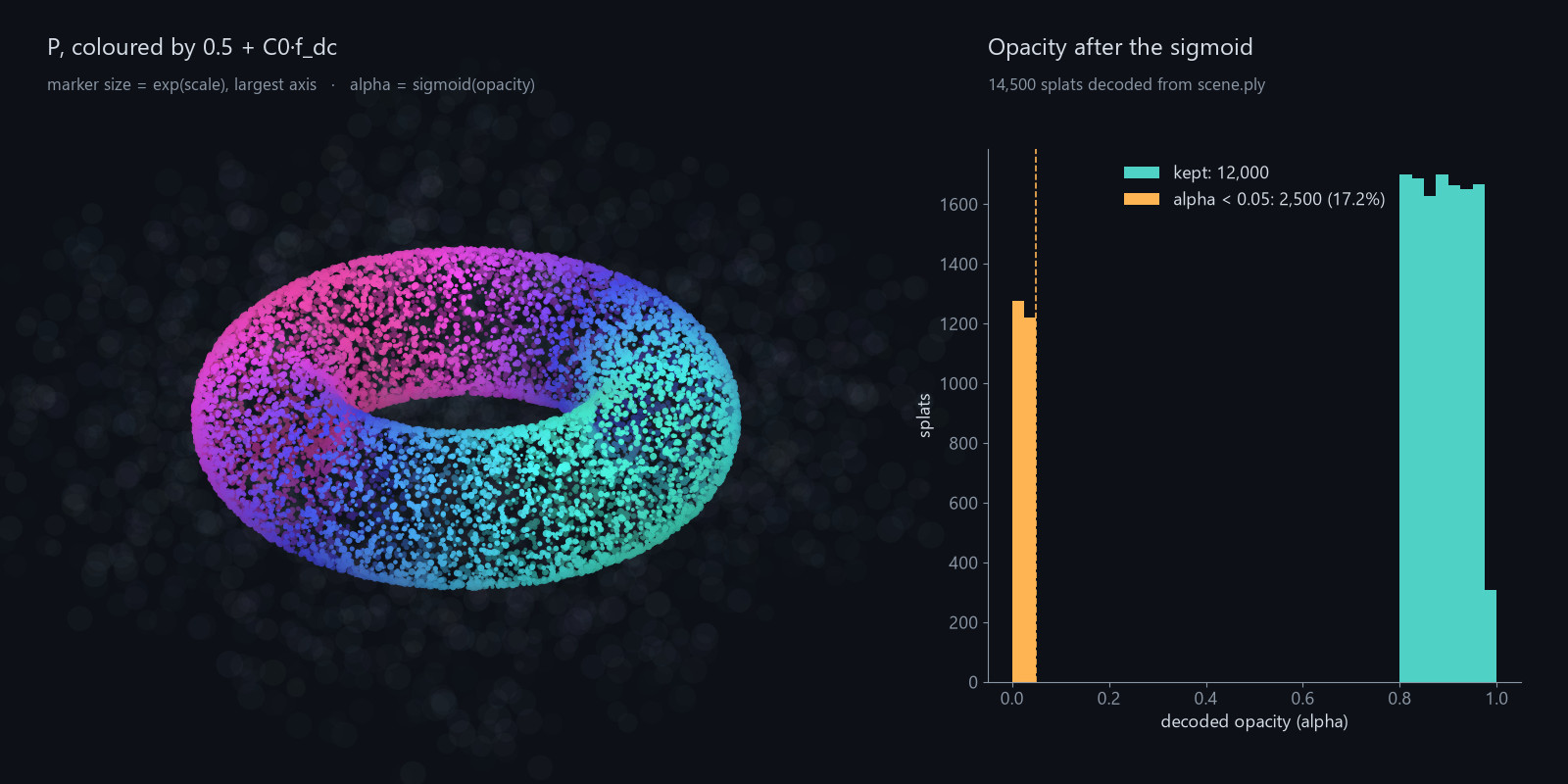
In Houdini, read the PLY with a File SOP and run it through a Bake GSplats SOP, which applies the activations. The cull is then one line in a point wrangle:
// Attribute Wrangle (Run Over: Points), after Bake GSplats
if (f@GS_Alpha < 0.05) removepoint(0, @ptnum);Two easy mistakes here. On the raw File SOP output, f@opacity is still a logit, so a 0.05 threshold culls everything below about 51% alpha: on our test file it kept 3 splats instead of 5. After Bake GSplats, opacity is gone, so f@opacity reads 0 and the wrangle deletes every point.
In Blender's Geometry Nodes, the same cull is a Named Attribute node reading radiance:base as a Color, a Separate Color node for its Alpha, a Compare node (Less Than 0.05) and a Delete Geometry node. Read radiance:base as a Float instead and you get a wrong answer with no warning: on our test file that kept 7 splats instead of 5. The result keeps its 3D Gaussian Splats type.
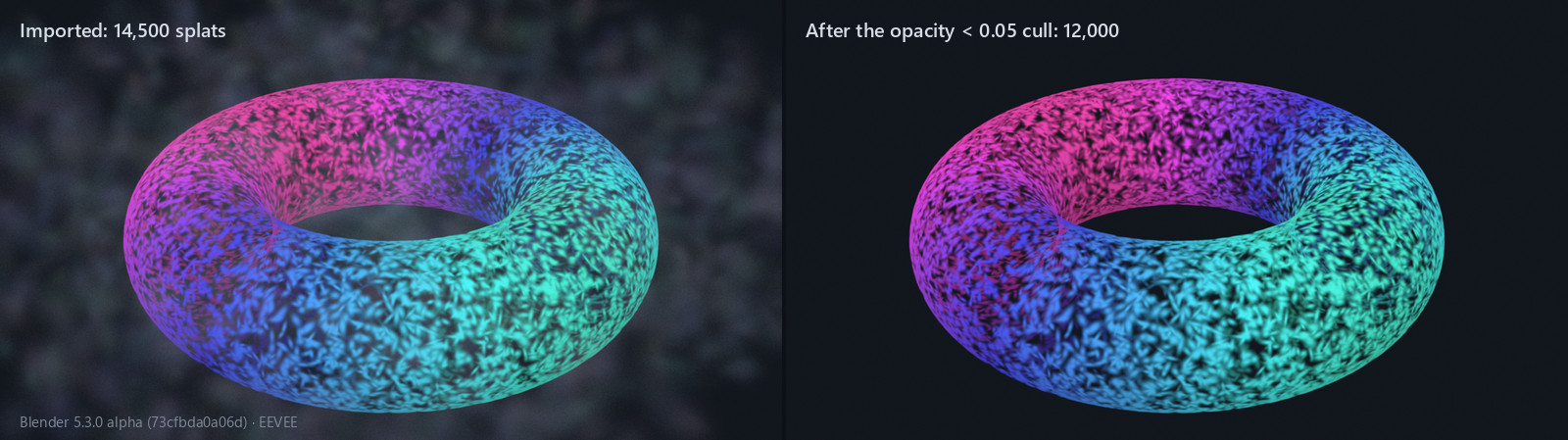
And a quick check in Blender's Python console. Import a splat PLY with File → Import → Stanford PLY (.ply), then run:
import bpy
pc = bpy.context.active_object.data          # PointCloud data-block
print(pc.type)                               # GAUSSIAN_SPLAT
for a in pc.attributes:
print(f"{a.name:20} {a.data_type:14} {a.domain}")On a 5.3 alpha build from Sept 25, 2026, with our test file (SH up to degree 3), it printed:
GAUSSIAN_SPLAT
position             FLOAT_VECTOR   POINT
radiance:base        FLOAT4         POINT
scale                FLOAT_VECTOR   POINT
rotation             QUATERNION     POINT
radiance:sh_0        FLOAT_VECTOR   POINT
...
radiance:sh_14 FLOAT_VECTOR POINTWhat trips you up, and what clicks
It's easy to file splats under renderer news. For a TD they're a data interchange problem, with the usual traps of any attribute-heavy format:
- Raw or decoded? The same file gives different numbers in each tool. The PLY holds pre-activation values. Blender and USD hold the decoded scale and opacity but the raw SH coefficients, and Houdini also turns the DC term into a linear colour. Know which one you're looking at before you compare.
- Transforms. Rotating a splat means rotating its orientation and its SH coefficients, not just its position. Blender's PLY importer puts the axis conversion on the object's transform, and the 5.3 notes say Apply Transform doesn't yet handle the scale, rotation and SH attributes, so leave the transform on the object. Houdini's help says to run Bake GSplats before transforming splats, because it converts them to attribute types that transform correctly.
- Axes. The 5.3 notes say splat PLYs typically use Z forward and -Y up, which you set in the PLY importer's Forward Axis and Up Axis options. SPZ files are converted automatically, but the notes warn that not every tool writes SPZ in the convention the importer expects.
- Colour space. Splats are usually trained on sRGB images. Blender 5.3 assumes that, and its notes say rendering isn't fully correct because Cycles and EEVEE work in linear space, mostly visible in low-opacity, high-radiance areas. Houdini's Bake GSplats linearises
Cdby default. - No export yet. Blender 5.3 imports splats but can't export them. That's why the USD schema matters more than any single importer: a schema is the contract that lets someone build the missing pieces.
Also in the Sept 21 Blender notes
- Runtime OpenColorIO config switching. It's the core mechanism behind a 5.3 feature: a project can pick its own OpenColorIO config (Blender's default, ACES 1.3, ACES 2.0 or a custom one).
- Stable .blend files, merged on Sept 15. The goal is that opening a .blend file and saving it again gives a byte-for-byte identical file; it isn't a new file format. The commit's author re-saved Blender's regression-test files three times in a row with a script: 1,107 gave identical files on every save, 652 settled after the first save, and 251 kept changing. Opening a file in the GUI still changes UI data easily. If you hash, cache or deduplicate .blend files in a pipeline, this is the change to watch: a file nobody edited stops looking edited.
Try it yourself
- Free: Blender 5.3 (in beta as of Oct 17, 2026, with daily builds at builder.blender.org; release planned for Nov 10). Import a public 3DGS
.plywith Forward Axis Z and Up Axis -Y, and inspect the attributes in the Spreadsheet editor. - Free: run the NumPy script on the same file and compare. Blender's scale column should match the script's scale array, and the fourth component of
radiance:baseshould match its opacity. The first three are rawf_dcvalues, so apply 0.5 + C0 · f_dc yourself before comparing colours. - Free:
pip install usd-core(26.8 hasUsdVol.ParticleField3DGaussianSplat), runpy3dgsPlyToUsd.pyfrom OpenUSD's hdParticleField example folder on the same file, and import the.usdainto Blender 5.3. We made that round trip with our test file, and the values matched. - Houdini Apprentice (free, non-commercial): File SOP, then Bake GSplats, then the wrangle above.
Exercise: write a filter that drops splats with opacity below 0.05 or a largest scale more than 3× the median, then write the survivors back out as PLY. Hint: index the raw rows (v.data[keep]) instead of writing your decoded arrays, so the file keeps its on-disk encodings and still imports as a splat.
Functions used: removepoint. It links to its entry in the Simstim VEX reference.
Sources
- Blender weekly notes, 21 September 2026, Blender Developer Forum
- Blender 5.3 release notes: Rendering (splat attributes, import, limitations), Pipeline & I/O (USD and glTF splat import), Core (project OpenColorIO configs)
- Blender 5.3 milestone (release schedule)
- Blender commits: PointCloud type and attribute names, PLY splat import, Cycles splat rendering, USD splat import, runtime OpenColorIO config switching, glTF splat import
- Blender PR #163518: initial support for stable .blend files
- OpenUSD v26.03 release and OpenUSD changelog (26.03 schema and hdParticleField; 26.05
rayHitDistance) - OpenUSD: ParticleField3DGaussianSplat schema
- AOUSD: OpenUSD v26.03, Alliance for OpenUSD
- OpenUSD hdParticleField example (includes
py3dgsPlyToUsd.py) - SideFX: H22 Gaussian Splats
- SideFX docs: Bake GSplats SOP, removepoint
- 3D Gaussian Splatting for Real-Time Radiance Field Rendering, Kerbl et al., 2023
- Reference code: gaussian_model.py (PLY layout and activations), sh_utils.py (C0), general_utils.py (quaternion order), forward.cu (three-sigma extent)
- Stochastic ray tracing of transparent 3D Gaussians, Xin Sun et al., 2025
- usd-core and plyfile on PyPI
Related
 HoudiniStage in, stage out: Houdini's Solaris treats every node as a function over a USD sceneIn Houdini's Solaris, every LOP node takes a composed USD stage and returns one, and its edits land in one in-memory layer at the top. A 31-line usd-core model of that contract, the Python LOP that does it for real, the same network checked in Houdini 22, and why a Layer Break decides what gets saved.
 Houdinisplit() is a tokenizer: building cache paths from strings in Houdini VEXVEX strings look like Python's, but split() merges separators and drops empty fields, len() counts bytes, and a wrangle expands $ before the compiler sees it. A per-piece cache path built from the scene file name, and the traps along the way, checked in Houdini 22.
 LatestMaterialX is an IR for materials: build a typed shader graph in Python, then lower it to GLSL and OSLA MaterialX material is a typed dataflow graph stored as XML, which a library type-checks and compiles to several shading languages. With only pip install MaterialX, build a checkerboard material in Python, watch the validator reject a float wired into a color, and generate GLSL and OSL from the same file.