USD layers are git for scene data: resolving “strongest opinion wins” in 25 lines of Python
OpenUSD stacks layers of partial edits and resolves them when you read the scene. With only pip install usd-core, build a two-layer scene, override one value, and ask USD which file each value came from.
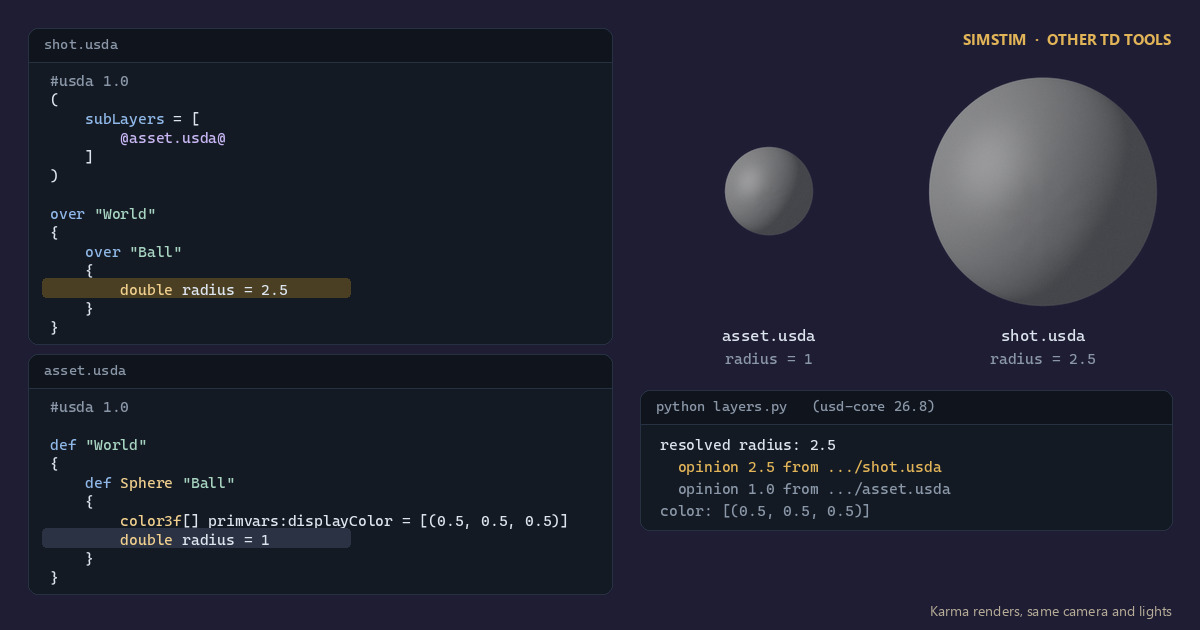
TL;DR Pixar's Universal Scene Description (USD) doesn't store a scene as one file. It stacks layers of partial edits and resolves them at read time, much like a merge that never gets flattened. Using nothing but
pip install usd-core, we build a two-layer scene, override one value, and ask USD which file each value came from.
OpenUSD in 60 seconds
USD is an open-source scene description format and C++/Python library from Pixar. Houdini (through Solaris/LOPs), Blender, Unreal, Maya and Omniverse all read and write it. The terms you need:
- Stage: the composed scene you query. Think of it as the working tree.
- Layer: one file (
.usdais text,.usdcis binary). A layer holds opinions, not a finished scene. - Prim: a node in the scene hierarchy, addressed by a path like
/World/Ball, which works like a filesystem path. - Attribute: a typed value on a prim, such as
radiusordisplayColor. defvsover:defdeclares that a prim exists.oversays "if this prim exists somewhere weaker, change these fields."
The rule that makes this work is that each layer contributes opinions, and when several layers hold an opinion on the same attribute, the strongest one wins. USD calls this process composition. The Alliance for OpenUSD's Core Specification 1.0, ratified in December 2025, includes a normative specification of the composition algorithm, so it isn't just "whatever Pixar's code does" anymore.
The core idea: a scene is a stack of diffs
Most of us learned to treat a 3D scene file as a document: open, edit, save, and hope nobody else touched it. USD treats the scene as the result of a function over a stack of files. Modeling publishes asset.usda. Layout, animation and lighting each write their own thin layer on top, and nobody edits anyone else's file.
If you write code, the closest model is a list of dicts merged at lookup time, strongest first:
# Mental model only. Real USD composition is far richer (references, variants, inherits...).
layers = [{"radius": 2.5}, {"radius": 1.0, "color": (0.5, 0.5, 0.5)}]  # strong -> weak
def resolve(key):
    return next(layer[key] for layer in layers if key in layer)
print(resolve("radius"), resolve("color")) # 2.5 (0.5, 0.5, 0.5)This is the real thing. Save it as layers.py, run pip install usd-core, then run python layers.py. No DCC or GPU needed.
# Two layers, one scene: USD's "strongest opinion wins" in ~25 lines.
from pxr import Usd, UsdGeom, Gf

# 1. The asset layer: what modeling publishes.
asset = Usd.Stage.CreateNew("asset.usda")
ball = UsdGeom.Sphere.Define(asset, "/World/Ball")           # writes a "def"
ball.GetRadiusAttr().Set(1.0)
ball.GetDisplayColorAttr().Set([Gf.Vec3f(0.5, 0.5, 0.5)])
asset.GetRootLayer().Save()

# 2. The shot layer: sublayers the asset, then overrides one value.
shot = Usd.Stage.CreateNew("shot.usda")
shot.GetRootLayer().subLayerPaths.append("asset.usda")        # weaker layer
over = shot.OverridePrim("/World/Ball")                       # writes an "over"
UsdGeom.Sphere(over).GetRadiusAttr().Set(2.5)
shot.GetRootLayer().Save()

# 3. Resolve: ask the composed stage, then ask *why*.
radius = shot.GetAttributeAtPath("/World/Ball.radius")
print("resolved radius:", radius.Get())                       # 2.5
for spec in radius.GetPropertyStack(Usd.TimeCode.Default()):  # strongest first
    print("  opinion", spec.default, "from", spec.layer.identifier)
print("color:", UsdGeom.Sphere(over).GetDisplayColorAttr().Get())  # from asset
print(shot.GetRootLayer().ExportToString())Output with usd-core 26.8 (paths shortened):
resolved radius: 2.5
  opinion 2.5 from .../shot.usda
  opinion 1.0 from .../asset.usda
color: [(0.5, 0.5, 0.5)]The printed shot.usda is the most useful part. It holds no sphere and no color, just a pointer to the asset underneath and one changed value:
#usda 1.0
(
    subLayers = [
        @asset.usda@
    ]
)

over "World"
{
    over "Ball"
    {
        double radius = 2.5
    }
}That file is a diff. It stays small and readable, and because it lives in its own file, the modeler can republish the asset without clobbering the shot's edit, and the other way round.
What trips you up, and what clicks
- An
overis not a copy. It's natural to assume that overriding a prim duplicates it into the stronger layer. It doesn't. Anoverwith nothing to land on composes to an undefined prim: the stage skips it when you traverse, and nothing renders. The prim only becomes real becauseasset.usdahas adeffor it underneath. Read.usdafiles as patches rather than scenes, and the format makes sense. - Sublayer order is strength order, and it's easy to get backwards. In
subLayerPaths, earlier entries are stronger. That's the opposite of CSS, where a later stylesheet wins. GetPropertyStackanswers "why is this value 2.5?" That's the question pipeline TDs spend their days on. The property stack lists every opinion, strongest first, along with the layer it lives in. It'sgit blamefor an attribute.- Sublayers are only one arc. USD has several composition arcs: local opinions (including sublayers), inherits, variants, relocates, references, payloads and specializes. Their strength order is the mnemonic LIVERPS; older material says LIVRPS, from before relocates were added. Today covered only the L. References are a natural next step, because they let one asset appear a thousand times without a thousand copies.
Why a TD cares
This is the same non-destructive thinking as a procedural node graph, applied to whole departments instead of points. Houdini's Solaris context is a node-graph front end for authoring exactly these layers: in a LOP network, each node effectively writes opinions like the one above.
Try it yourself
pip install usd-core(it runs on plain CPython, no DCC needed) and run the script.- Add a third layer,
lighting.usda, that overridesdisplayColorto red, and insert it intoshot.usda'ssubLayerPathsbeforeasset.usda. Then check the property stack. One catch: on its own,lighting.usdadoesn't knowBallis a sphere, soUsdGeom.Sphere(over).GetDisplayColorAttr().Set(...)fails with "Empty typeName". Give the attribute its type yourself:over.CreateAttribute("primvars:displayColor", Sdf.ValueTypeNames.Color3fArray, custom=False).Set([Gf.Vec3f(1, 0, 0)])(importSdffrompxr). - Now move it after
asset.usda. Predict the color before you run it. - Free viewers:
usdviewisn't in the usd-core wheel, but Blender (File → Import → Universal Scene Description), Houdini Apprentice's Solaris context and Unreal Engine (with the USD Importer plugin) can all openshot.usda.
Python API used: Usd.Stage.CreateNew, UsdGeom.Sphere.Define, Usd.Stage.OverridePrim, Sdf.Layer.subLayerPaths, Usd.Attribute.GetPropertyStack.
Sources
- OpenUSD: Hello World tutorial
- OpenUSD: Referencing Layers tutorial
- OpenUSD glossary (LIVERPS, Over, PropertyStack)
- OpenUSD Core Spec 1.0 is Here, Alliance for OpenUSD, December 17, 2025
- usd-core on PyPI
Related
 HoudiniStage in, stage out: Houdini's Solaris treats every node as a function over a USD sceneIn Houdini's Solaris, every LOP node takes a composed USD stage and returns one, and its edits land in one in-memory layer at the top. A 31-line usd-core model of that contract, the Python LOP that does it for real, the same network checked in Houdini 22, and why a Layer Break decides what gets saved.
 Houdinisplit() is a tokenizer: building cache paths from strings in Houdini VEXVEX strings look like Python's, but split() merges separators and drops empty fields, len() counts bytes, and a wrangle expands $ before the compiler sees it. A per-piece cache path built from the scene file name, and the traps along the way, checked in Houdini 22.
 LatestMaterialX is an IR for materials: build a typed shader graph in Python, then lower it to GLSL and OSLA MaterialX material is a typed dataflow graph stored as XML, which a library type-checks and compiles to several shading languages. With only pip install MaterialX, build a checkerboard material in Python, watch the validator reject a float wired into a color, and generate GLSL and OSL from the same file.