Color is a compiler problem: OpenColorIO from Python, no DCC required
OpenColorIO turns two color-space names into an optimized processor you can run over a NumPy buffer or emit as GPU shader code. With only pip install opencolorio numpy, convert a texture into ACEScg, put an HDR ramp on an sRGB screen, and look at what the library compiled.
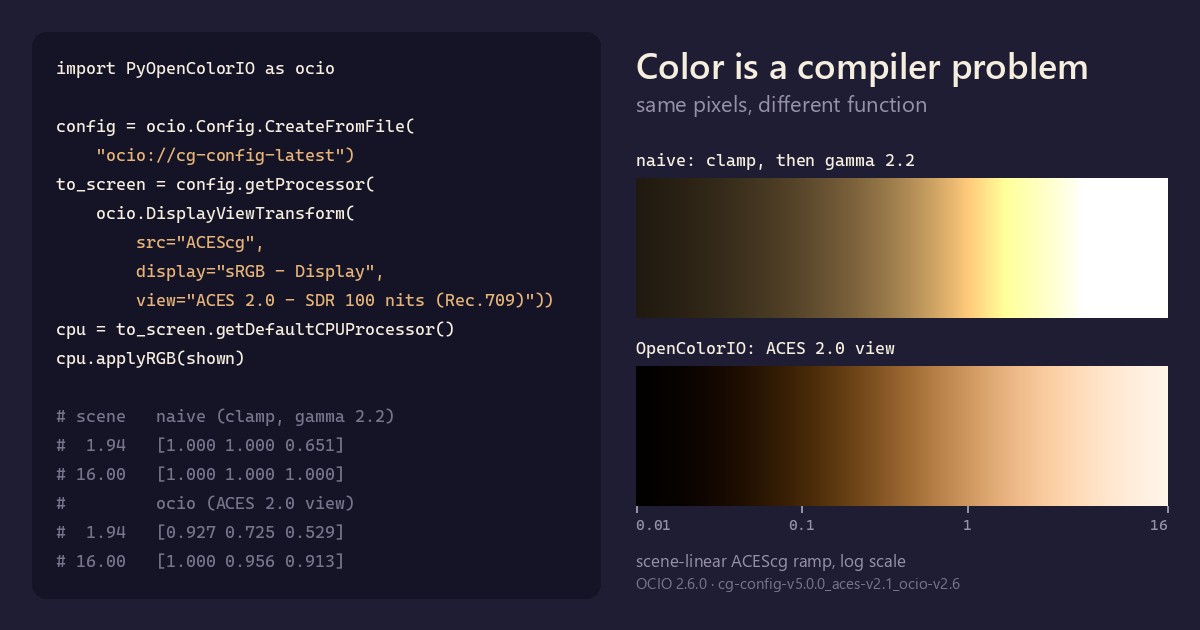
TL;DR A pixel value means nothing until you know its color space, and every app in a pipeline has to agree on how to convert between spaces. OpenColorIO (OCIO) is the open-source library that Houdini, Blender, Nuke, Maya, Unreal and many others use to do it. You give it two names; it plans the chain of math between them, optimizes it, and hands back a processor you can run over a NumPy buffer or emit as shader code, much like a compiler. With nothing but
pip install opencolorio numpy, we convert a texture into ACEScg, put an HDR ramp on an sRGB screen, and look at what OCIO compiled.
OpenColorIO in 60 seconds
A renderer such as Karma, Cycles or Arnold works in scene-linear values: amounts of light, where doubling the number doubles the light and nothing stops at 1.0. A highlight at 16 is ordinary. A monitor wants display-referred values: 0 to 1, encoded for sRGB, Rec.709 or an HDR standard. And an 8-bit texture painted in Photoshop is usually sRGB-encoded: a curve squeezes the values so that 8 bits go further. A value of 0.5 means something different in each of the three.
OCIO, an Academy Software Foundation project, owns the conversions. A studio ships one config, and every app in the pipeline reads the same file, so they agree. A config declares:
- Color spaces: named encodings such as
ACEScg(a wide-gamut scene-linear working space),sRGB Encoded Rec.709 (sRGB), or camera logs likeARRI LogC4. A space can have aliases:sRGB - Textureandsrgb_txboth name the sRGB texture space. - Roles: names for jobs, such as
scene_linear,texture_paintanddata, so a tool can ask for "the working space" without hard-coding the one a show picked. - Displays and views: for each kind of screen, the ways you may look at an image. Display and view are separate choices.
Since OCIO 2.2, configs can also be built into the library and opened with an ocio:// URI, with no files at all. OCIO 2.6.0 carries two families, each in five versions from ACES 1.3 to ACES 2.1: the CG config (25 color spaces, aimed at DCC apps) and the Studio config (57, adding camera spaces such as ARRI LogC4). Both ocio://default and ocio://cg-config-latest resolve to cg-config-v5.0.0_aces-v2.1_ocio-v2.6.
The OCIO site's list of supported applications includes Houdini, Blender, Nuke, Maya, Katana and Unreal Engine. Houdini 22 and Blender 5.2 even bundle the Python module, so import PyOpenColorIO works inside both. That matters later.
The core idea: names in, kernel out
OCIO's API is shaped like a compiler:
- Config: the source program, a set of named spaces and the transforms between them.
- Processor:
config.getProcessor(src, dst)resolves the names and plans the chain of ops. The OCIO docs call building one "likely a blocking operation": do it once per render setup, not once per scanline. - CPUProcessor / GPUProcessor:
getDefaultCPUProcessor()orgetDefaultGPUProcessor()optimizes and finalizes the chain for a target. On the CPU you callapplyRGBon a buffer. On the GPU, OCIO writes shader code for GLSL, HLSL, Metal and, since 2.5, Vulkan.
You name the endpoints and never write the math yourself, which matters because the math is where people get it wrong. Save this as ocio_demo.py, run pip install opencolorio numpy, then python ocio_demo.py. No DCC or GPU needed.
# ocio_demo.py: pip install opencolorio numpy, then python ocio_demo.py
import numpy as np
import PyOpenColorIO as ocio

# A built-in config, compiled into the library: no files, no $OCIO.
config = ocio.Config.CreateFromFile("ocio://cg-config-latest")
print("OCIO", ocio.__version__, "| config:", config.getName())

# 1. Ask for a conversion by name. OCIO plans the chain of ops.
proc = config.getProcessor("sRGB - Texture", "ACEScg")

# 2. Finalize it for the CPU. This is the step that optimizes the chain.
cpu = proc.getDefaultCPUProcessor()

# 3. Run it over a whole float32 buffer, in place.
#    A 2x2 "texture" of 8-bit swatches: red, green, blue, gray.
img = np.array([[[255, 0, 0], [0, 255, 0]],
                [[0, 0, 255], [128, 128, 128]]], dtype=np.float32) / 255.0
cpu.applyRGB(img)
print(img.reshape(-1, 3).round(4))

# What did it compile to?
def ops(p):
    return [type(t).__name__ for t in p.createGroupTransform()]

print("planned:  ", ops(proc))
print("optimized:", ops(proc.getOptimizedProcessor(ocio.OPTIMIZATION_DEFAULT)))Output with OCIO 2.6.0 (Python 3.12, NumPy 2.5.4):
OCIO 2.6.0 | config: cg-config-v5.0.0_aces-v2.1_ocio-v2.6
[[0.6131 0.0702 0.0206]
 [0.3395 0.9164 0.1096]
 [0.0474 0.0135 0.8698]
 [0.2159 0.2159 0.2159]]
planned:   ['ExponentWithLinearTransform', 'MatrixTransform', 'MatrixTransform']
optimized: ['ExponentWithLinearTransform', 'MatrixTransform']Read the numbers first. Pure red, green and blue come back as the columns of a 3×3 matrix: the conversion from linear Rec.709 primaries to ACEScg's. The gray swatch shows two more things. It stays gray, because the matrix includes the white-point adaptation. And 128/255 ≈ 0.502 decodes to 0.2159: a texture value halfway up the 8-bit range is about 22% of the light, not 50%.
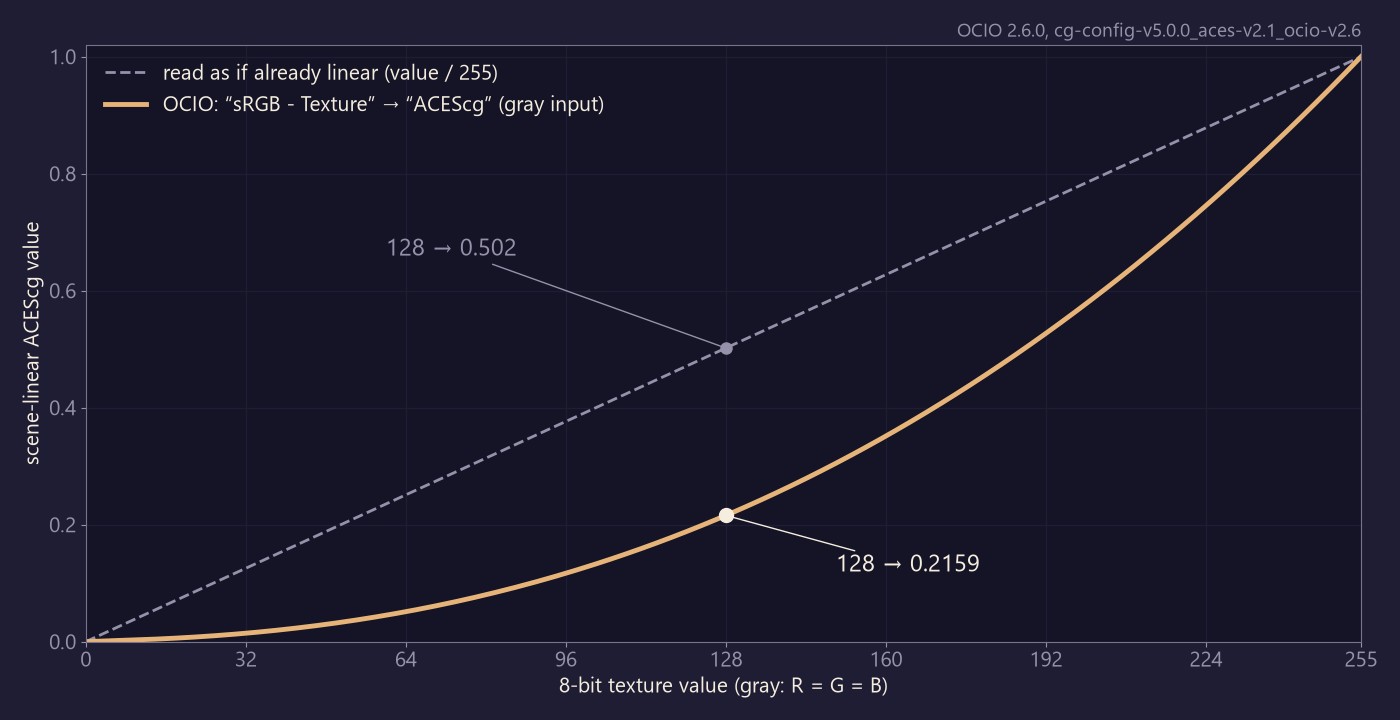
Then read the plan. OCIO planned three ops: the sRGB decode curve, a matrix from linear Rec.709 into the config's reference space (ACES2065-1), and a matrix from there into ACEScg. The optimizer multiplied the two matrices into one, the color version of constant folding. On a longer chain it pays more: the ACES 2.0 view in the next section plans 9 ops and optimizes them to 5.
From scene-linear to the screen: displays and views
Converting between scene-linear spaces is matrices and curves. Getting unbounded light onto a 0–1 screen is a design decision, and a config names those decisions as views. Add this to the end of ocio_demo.py:
# An exposure ramp in scene-linear ACEScg, 0.01 to 16, tinted orange.
ramp = np.geomspace(0.01, 16.0, 8, dtype=np.float32)
pixels = np.stack([ramp, ramp * 0.6, ramp * 0.2], axis=-1)

# Naive: clamp each channel to 0-1, then apply a 2.2 gamma.
naive = np.clip(pixels, 0.0, 1.0) ** (1 / 2.2)

# OCIO: name the source space, the display and the view.
to_screen = config.getProcessor(ocio.DisplayViewTransform(
    src="ACEScg",
    display="sRGB - Display",
    view="ACES 2.0 - SDR 100 nits (Rec.709)"))
shown = pixels.copy()
to_screen.getDefaultCPUProcessor().applyRGB(shown)

np.set_printoptions(precision=3, floatmode="fixed")
for s, n, o in zip(ramp, naive, shown):
print(f"{s:6.2f} naive {n} ocio {o}")It prints:
  0.01  naive [0.123 0.098 0.059]  ocio [0.008 0.003 0.000]
  0.03  naive [0.199 0.158 0.096]  ocio [0.071 0.027 0.003]
  0.08  naive [0.321 0.255 0.155]  ocio [0.225 0.127 0.019]
  0.24  naive [0.519 0.411 0.250]  ocio [0.461 0.291 0.105]
  0.68  naive [0.838 0.664 0.403]  ocio [0.723 0.508 0.289]
  1.94  naive [1.000 1.000 0.651]  ocio [0.927 0.725 0.529]
  5.58  naive [1.000 1.000 1.000]  ocio [1.000 0.878 0.761]
 16.00  naive [1.000 1.000 1.000]  ocio [1.000 0.956 0.913]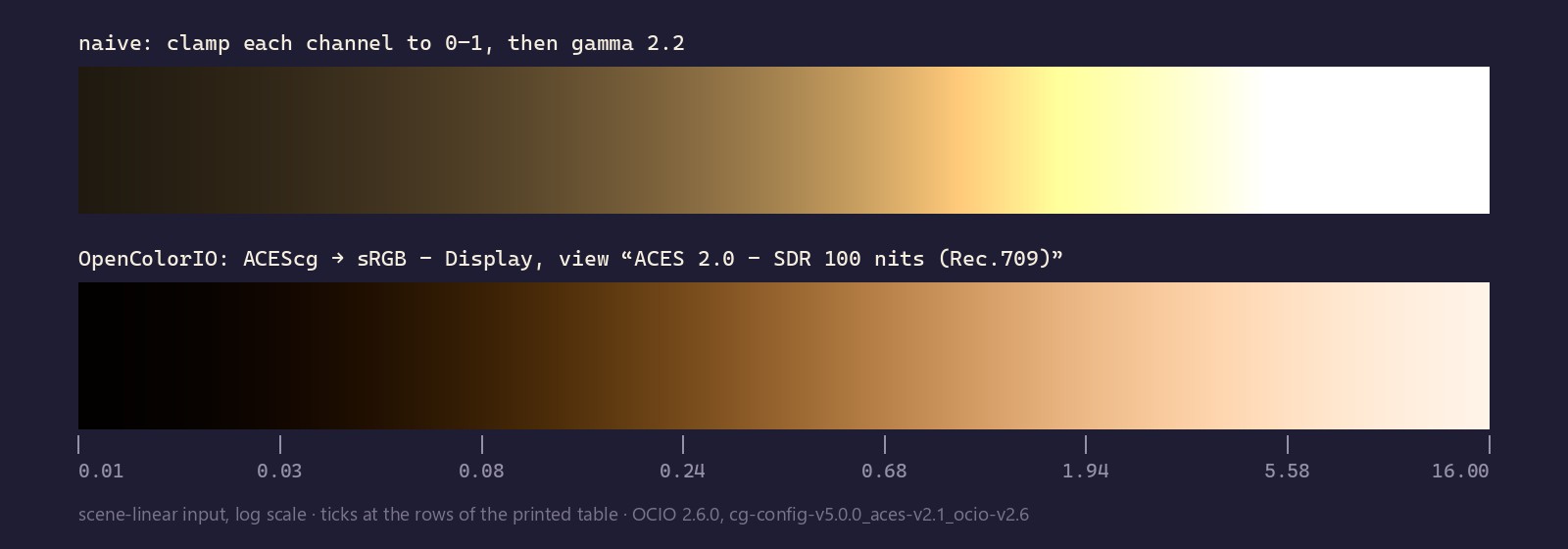
The naive version has two bugs you can see. Everything from about 2.0 up collapses to flat white, so highlight detail is gone. On the way there, the hue shifts from orange to yellow, because red clips first and green follows: at 1.94, red and green are both 1.000. It also ignores that the input is ACEScg, a wider gamut than an sRGB screen can show. The ACES 2.0 view rolls off instead: red reaches 1.000 only at 5.58, and at 16 the color is near white but still warm.
Display and view are separate arguments. sRGB - Display is the screen, and ACES 2.0 - SDR 100 nits (Rec.709) is one way of looking at it. On this config, config.getDefaultDisplay() and config.getDefaultView("sRGB - Display") return exactly these two. The four-argument shorthand config.getProcessor("ACEScg", "sRGB - Display", "ACES 2.0 - SDR 100 nits (Rec.709)", ocio.TRANSFORM_DIR_FORWARD) builds the same processor.
The same processor as a shader
This is the part that makes OCIO pipeline infrastructure rather than a filter. The processor you just ran on the CPU can also emit GPU code. Add:
desc = ocio.GpuShaderDesc.CreateShaderDesc(language=ocio.GPU_LANGUAGE_GLSL_4_0)
to_screen.getDefaultGPUProcessor().extractGpuShaderInfo(desc)
glsl = desc.getShaderText().splitlines()
print(len(glsl), "lines;", [line for line in glsl if "OCIOMain" in line])
print("textures to upload:", [t.textureName for t in desc.getTextures()])308 lines; ['vec4 OCIOMain(vec4 inPixel)']
textures to upload: ['ocio_reach_m_table_0', 'ocio_gamut_cusp_table_0']OCIO wrote 308 lines of GLSL with one entry point, OCIOMain. The ACES 2.0 view also needs two small 1D lookup tables (363 entries each), which the host uploads as textures; getTextures() lists them. The texture-to-ACEScg processor from the first block compiles to 35 lines with no textures. This is how a viewport, a compositor and a game engine can show the same look: none of them reimplements the math, because OCIO generates it for each backend from the one config.
What trips you up, and what clicks
- Names, not file paths.
"sRGB - Texture"isn't a file. It's one of seven aliases ofsRGB Encoded Rec.709 (sRGB)in this config. In tool code, ask for roles rather than concrete names:config.getColorSpace(ocio.ROLE_SCENE_LINEAR).getName()returnsACEScghere. A show can then change its working space without anyone editing your tool. - Data isn't color. Roughness, normal and mask textures belong in
Raw(thedatarole), andconfig.getProcessor("Raw", "ACEScg").isNoOp()isTrue, which is what you want. Tag the same roughness map assRGB - Textureand a 0.5 becomes 0.214, quietly bending your shading. - Hand it the whole buffer, as contiguous float32. The OCIO docs say it is "far more efficient to call 'apply' on batches of pixels at a time". In Python,
applyRGBwraps a NumPy array in aPackedImageDescand processes it in place; pass a list and you get a new list back. A float64 array raisesUnsupported data type: float64, and a channel slice likergba[..., :3]raises "function only supports C-contiguous (row-major) arrays". For RGBA, callapplyRGBAon the full array; alpha passes through. latestmoves, and your DCC lags. Under pip's OCIO 2.6.0,ocio://cg-config-latestiscg-config-v5.0.0_aces-v2.1_ocio-v2.6. Inside Houdini 22.0.368 and Blender 5.2, whose bundled module reports 2.5.0, it iscg-config-v4.0.0_aces-v2.0_ocio-v2.5. Pinning the v5 name doesn't help there: OCIO 2.5.0 answers "Could not find 'cg-config-v5.0.0_aces-v2.1_ocio-v2.6' in the built-in configurations". A config written out withconfig.serialize()under 2.6 starts withocio_profile_version: 2.6, and Blender 5.2 refuses to load it. Pin the newest name every app in your pipeline knows, hereocio://cg-config-v4.0.0_aces-v2.0_ocio-v2.5, which gives the same numbers as above for every block in this post under 2.6.0.- The default CPU path uses fast math.
getDefaultCPUProcessor()optimizes atOPTIMIZATION_DEFAULT, which includesOPTIMIZATION_FAST_LOG_EXP_POW, an approximate power function. On a 512×512 random texture, the sRGB-to-ACEScg result is within 2.1e-5 of a float64 reference; built with that flag off throughproc.getOptimizedCPUProcessor(flags), it is within 7.3e-7. Think-ffast-math: fine for pixels, but know it before you diff against reference numbers. - The Python API mostly stays put, with one recent exception. Since 2.5,
getActiveDisplays()andgetActiveViews()return iterators, not lists. Wrap them inlist()before you index them.
Inside Houdini: the same names in VEX
Houdini exposes OCIO to VEX as well. ocio_transform converts between named spaces and ocio_transformview applies a display and view, so both Python examples translate directly into a wrangle:
v@tex = ocio_transform("sRGB - Texture", "ACEScg", set(128, 128, 128) / 255.0);
v@red = ocio_transform("sRGB - Texture", "ACEScg", {1, 0, 0});
v@shown = ocio_transformview("ACEScg", "sRGB - Display",
"ACES 2.0 - SDR 100 nits (Rec.709)", {16, 9.6, 3.2});In Houdini 22.0.368, on a single point, that gives a gray of 0.2159, a red of (0.6131, 0.0702, 0.0206) and a shown value of (1.0, 0.9562, 0.9129). Those are the Python numbers again, this time from Houdini's own ACES 2.0 config.
Release check
OCIO 2.6.0 was tagged on GitHub and uploaded to PyPI on October 1, 2026 (UTC); its release notes say "delivered in September 2026". It is the base version for the CY2027 VFX Reference Platform. The headline features are read and write support for SMPTE ST 2136-1 CLF (the standardized Common LUT Format), a check for "HDR display compatible" configs, helpers for the ASWF Color Interop ID, display and view aliases, and the built-in ACES 2.1 Studio and CG configs used above. The notes add that the ACES Output Transforms are unchanged in 2.1, that the configs gain Apple Log 2 color spaces, and that their AMF transform IDs are preliminary and will change in 2.6.1. They also credit Sam Richards with adding OCIO support to FFmpeg 8.1, which brings color-managed transcodes outside any DCC.
On security: OCIO 2.5.2 (May 13, 2026) fixed CVE-2026-42450, rated high. It covers stack buffer overflows in the .spi3d, .spi1d, .cube and Discreet .lut parsers, and affects every earlier 1.x and 2.x release. A LUT file is untrusted input. If your tools load LUTs, run 2.5.2 or later; pip's 2.6.0 qualifies.
Try it yourself
- Run
pip install opencolorio numpy(the 2.6.0 wheels cover CPython 3.10 to 3.14 on Windows, macOS and Linux) and run the script. Then list what's there:[cs.getName() for cs in config.getColorSpaces()]andlist(config.getActiveDisplays()). Swap inocio.Config.CreateFromBuiltinConfig("studio-config-latest"), the same asCreateFromFile("ocio://studio-config-latest"), and count again. - Loop over
config.getViews("sRGB - Display")and push a neutral[16, 16, 16]through each view with aDisplayViewTransform. Predict first: only one of the four views returns values inside 0–1. Which one, and what will a real screen do with the others? - Rebuild the texture conversion by hand. Decode with
np.where(v <= 0.04045, v / 12.92, ((v + 0.055) / 1.055) ** 2.4), then apply the matrix; the optimized processor'sMatrixTransformhas it, andgetMatrix()returns it as a flat 4×4. Compare with OCIO onnp.random.default_rng(1).random((512, 512, 3), dtype=np.float32). With the four-decimal matrix from the output above, the largest difference is about 1.1e-4; with the exact matrix, about 2.1e-5. Trap 5 explains the rest: build the CPU processor withocio.OptimizationFlags(int(ocio.OPTIMIZATION_DEFAULT) & ~int(ocio.OPTIMIZATION_FAST_LOG_EXP_POW))and watch it shrink. - Stretch: extract the GLSL for
proc, the texture conversion, instead ofto_screen. It has no textures to upload, soOCIOMaindrops straight into a fragment shader. The ACES 2.0 view needs its two lookup tables uploaded first. - In a DCC: the script runs unchanged under the Python bundled with Houdini 22 (Apprentice is free) and Blender 5.2. The first line then reports 2.5.0 and the v4.0.0 config, and every number after it matches. Or start Blender with the environment variable
OCIO=ocio://studio-config-latest, and its Color Management panel (Render properties) switches tosRGB - Displaywith the ACES 2.0 view. Houdini's own settings are under Edit > Preferences > OCIO, or Edit > OCIO Settings in the old UI.
Python API used: Config.CreateFromFile, Config.CreateFromBuiltinConfig, Config.getProcessor, DisplayViewTransform, Processor.getDefaultCPUProcessor, Processor.getOptimizedProcessor, CPUProcessor.applyRGB, GpuShaderDesc.CreateShaderDesc, GPUProcessor.extractGpuShaderInfo.
Sources
- OCIO 2.6 release notes
- OpenColorIO v2.6.0 release, GitHub
- OpenColorIO v2.5.2 release (CVE-2026-42450), GitHub
- OCIO 2.5 release notes (Vulkan, iterator change)
- OCIO 2.2 release notes (built-in configs)
- Developing with OCIO
- OCIO API: Processors
- OCIO API: Enums (optimization flags)
- OCIO CG Config for ACES
- OCIO Studio Config for ACES
- OpenColorIO: Supported Applications
- opencolorio on PyPI
- SideFX: OCIO in Houdini
- SideFX VEX: ocio_transform
- SideFX VEX: ocio_transformview
- Blender Manual: OpenColorIO
- Epic: Color Management with OpenColorIO in Unreal Engine
Related
 HoudiniStage in, stage out: Houdini's Solaris treats every node as a function over a USD sceneIn Houdini's Solaris, every LOP node takes a composed USD stage and returns one, and its edits land in one in-memory layer at the top. A 31-line usd-core model of that contract, the Python LOP that does it for real, the same network checked in Houdini 22, and why a Layer Break decides what gets saved.
 Houdinisplit() is a tokenizer: building cache paths from strings in Houdini VEXVEX strings look like Python's, but split() merges separators and drops empty fields, len() counts bytes, and a wrangle expands $ before the compiler sees it. A per-piece cache path built from the scene file name, and the traps along the way, checked in Houdini 22.
 LatestMaterialX is an IR for materials: build a typed shader graph in Python, then lower it to GLSL and OSLA MaterialX material is a typed dataflow graph stored as XML, which a library type-checks and compiles to several shading languages. With only pip install MaterialX, build a checkerboard material in Python, watch the validator reject a float wired into a color, and generate GLSL and OSL from the same file.