Loops in VEX: the outer loop is invisible, write the inner one yourself
A Houdini VEX wrangle already runs once per point in parallel, so the for, foreach, while and do loops you write are the serial inner loop of a kernel. An upward smoothing pass, a hill climb that runs a different number of steps on every point, and the traps: division by zero gives 0, nearpoints() includes the point itself, and For-Each Number doesn't feed back.
TL;DR In Houdini's VEX, your code already runs once per point in parallel, the way a GPU kernel runs once per thread. The
for,foreach,whileanddoloops you write are the serial inner loop inside each of those invocations. This post covers the loop forms, an upward-smoothing pass over each point's neighbors and awhileloop that runs a different number of steps on every point. It also covers the traps: VEX turns division by zero into 0,nearpoints()includes the point itself, and repeating a wrangle takes a feedback loop, not a For-Each Number.
Houdini in 60 seconds
Houdini builds geometry with a graph of nodes called SOPs. An Attribute Wrangle runs a snippet of VEX, Houdini's C-like language, once for every point of its input, spread across threads. Inside the snippet, v@P is the current point's position and @ptnum is its index. This post follows the "Loops" section of Juraj Tomori's VEX tutorial.
The core idea: two loops, only one of which you write
Tomori's "Loops" section doesn't loop over the mesh. Its loops run inside code that Houdini is already looping over:
for each point p (implicit, parallel, Houdini's job):
    your snippet runs
for / foreach / while / do (explicit, serial, your job)In CUDA terms, @ptnum is the global thread index and your loops are per-thread work: walking the neighbors, accumulating a sum, climbing until something stops changing.
VEX gives you the usual C toolkit:
for (int i = 0; i < n; i++) { ... }, the classic form. As in C,iexists only inside the loop.foreach (int nb; nbs) { ... }, which visits each value of an array.nbis a copy, so assigning to it doesn't change the array; index into the array for that.foreach (int idx; int nb; nbs) { ... }, which gives you the index and the value together, like Python'senumerate. SideFX's Loops and flow control page writes this form with a comma,foreach (idx, nb; nbs), but that only compiles when both variables are declared beforehand. With the types inline, use semicolons.while (cond) { ... }anddo { ... } while (cond);. Thedobody always runs at least once, and the trailing semicolon is required.breakandcontinue, which behave the way they do in C.
A real example: one step of upward-biased smoothing
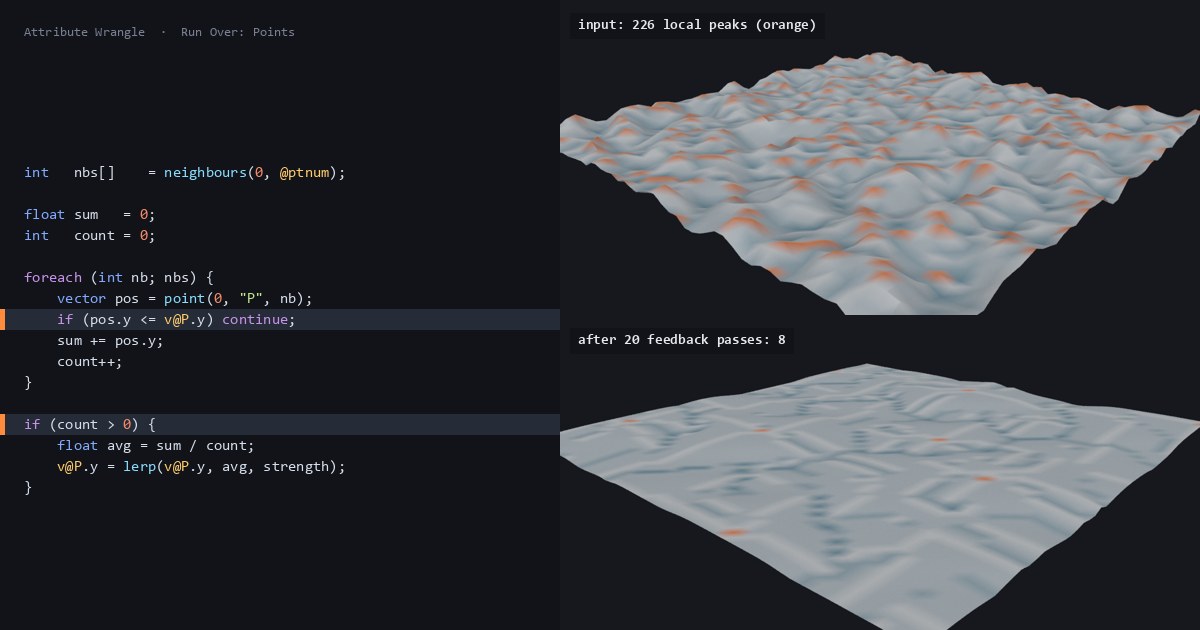
Tomori's last loop example averages each point with the neighbors above it. Here's our version. Each point's height moves part of the way toward the average height of its connected neighbors, counting only neighbors higher than itself, so low points get pulled up.
// Attribute Wrangle, Run Over: Points
// Input 0: a connected mesh (Grid -> Mountain)
float strength = chf("strength");
int   nbs[]    = neighbours(0, @ptnum); // points that share an edge with this one

float sum   = 0;
int   count = 0;

foreach (int nb; nbs) {
    vector pos = point(0, "P", nb);
    if (pos.y <= v@P.y) continue;       // skip neighbors at or below this point
    sum += pos.y;
    count++;
}

if (count > 0) {                        // a local peak has no higher neighbors
    float avg = sum / count;
    v@P.y = lerp(v@P.y, avg, strength);
}
i@upper_nbs = count; // debug: inspect it in the Geometry SpreadsheetTo run it: Grid (Rows and Columns 50) → Mountain → Attribute Wrangle with Run Over on Points. Paste the code and click Create spare parameters to get the strength slider. Like every new slider (the first post in this series explains why), it starts at 0, which changes nothing, so set it to 0.5. One pass moves 2,274 of the 2,500 points. The other 226 are local peaks, with upper_nbs at 0.
Only the height changes. Lerp the whole of v@P instead and points also slide sideways toward their higher neighbors: over 20 repeated passes at 0.5 they drifted 0.77 units sideways on average, up to 1.55, and the grid's edges pulled in.
The same operation in NumPy, written as an explicit double loop so you can see the structure:
import numpy as np

def smooth_up(P, nbrs, strength=0.5):
    """P: (n, 3) positions. nbrs[p]: the points that share an edge with p."""
    newP = P.copy()                          # read from P, write to newP
    for p in range(len(P)):                  # Houdini's implicit, parallel loop
        up = [P[n, 1] for n in nbrs[p] if P[n, 1] > P[p, 1]]   # your explicit loop
        if up:
            newP[p, 1] = P[p, 1] + strength * (np.mean(up) - P[p, 1])
return newPFed the same neighbor lists, it matches Houdini's output to within float rounding. The newP = P.copy() line matters: every point reads the old positions and the results go into a new array, which is exactly what the wrangle does.
A loop that runs a different number of times on every point
A for over a fixed count does the same work everywhere. A while loop doesn't have to. This one climbs from each point to a local peak, one edge at a time, always stepping to the highest neighbor:
// Attribute Wrangle, Run Over: Points (same Grid -> Mountain input)
// Climb from this point to a local peak, one edge at a time.
int cur   = @ptnum;
int steps = 0;
while (1) {
    vector here = point(0, "P", cur);
    float  best = here.y;
    int    next = cur;
    foreach (int nb; neighbours(0, cur)) {
        vector pos = point(0, "P", nb);
        if (pos.y > best) { best = pos.y; next = nb; }
    }
    if (next == cur) break;               // no higher neighbor: a peak
    cur = next;
    steps++;
}
i@peak  = cur;
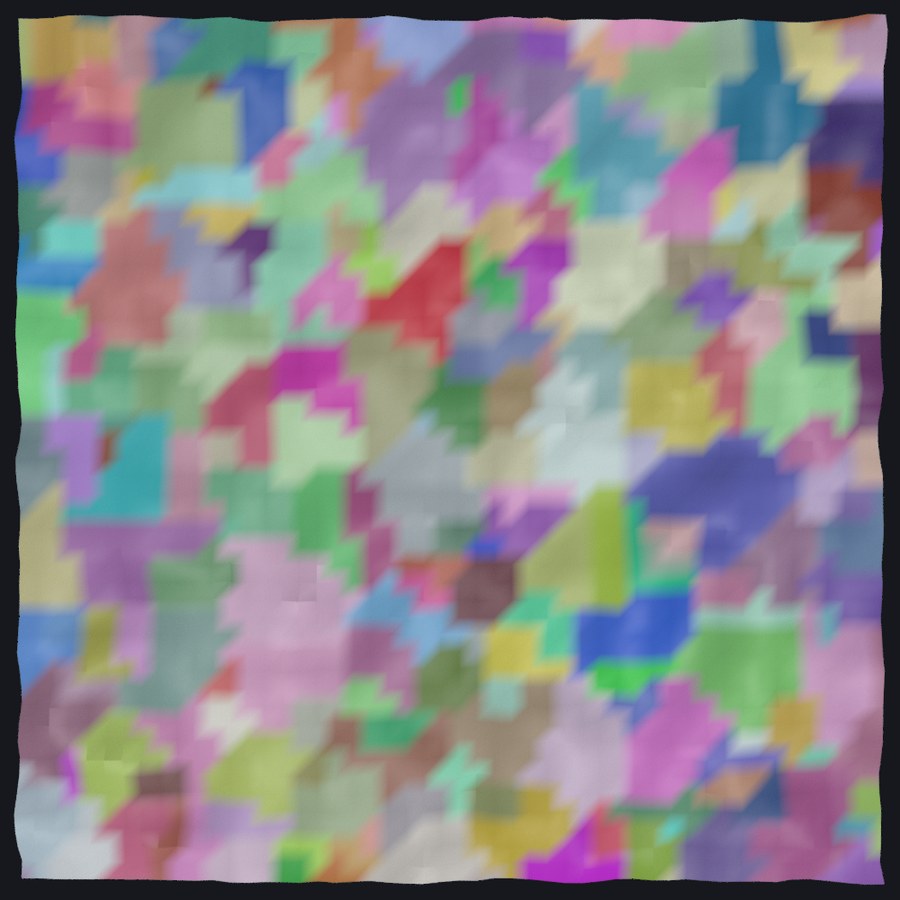
i@steps = steps;On the 50 × 50 mountain the loop runs from 0 steps (on the 226 peaks themselves) to 8, with an average of 2.3, and every point ends on one of those 226 peaks. Each point's inner loop runs only as long as that point needs.
This is still the inner loop: Tomori's next section, "Stopping For-Each SOP from VEX", covers the outer case, where a whole chain of nodes repeats until a condition holds.
What trips you up, and what clicks
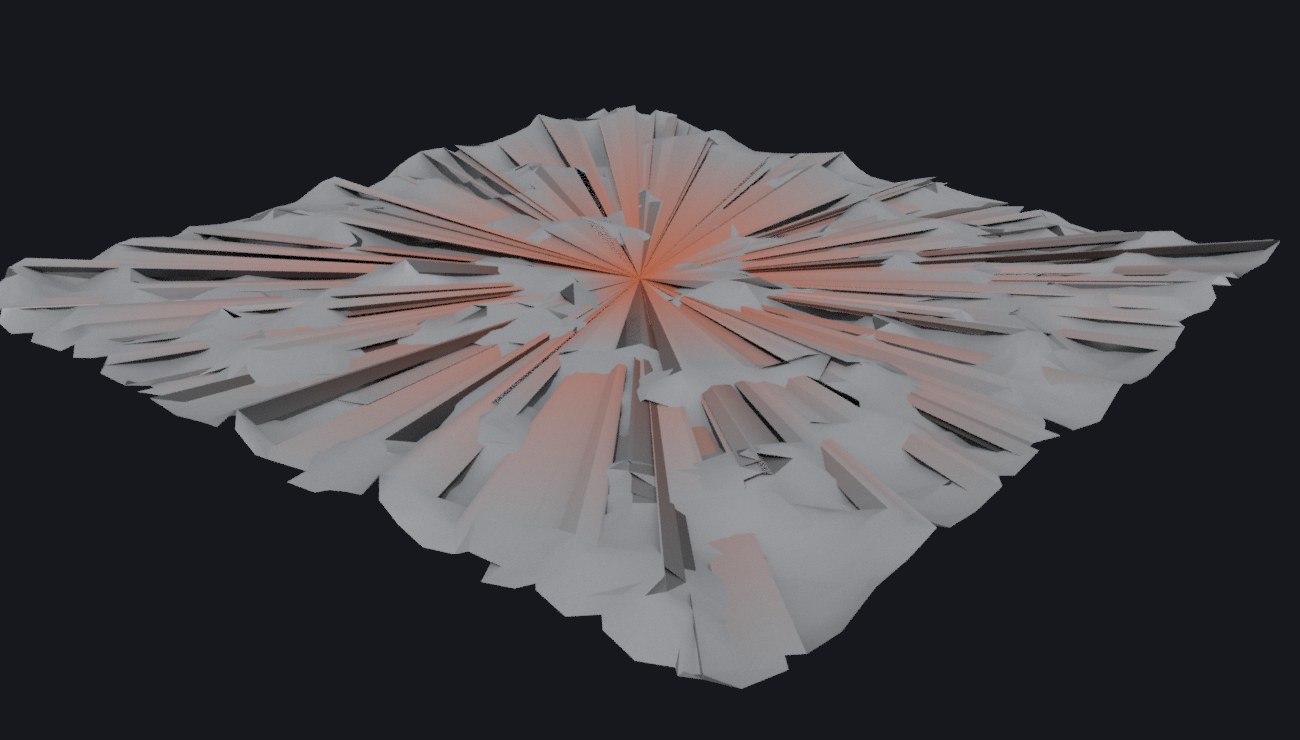
Division by zero gives zero. Tomori's version of the smoothing loop divides the sum by count with no guard and assigns the result to v@P. On a local peak, count is 0. VEX doesn't stop or warn. In our Houdini 22 test, integer, float and vector division by zero all returned 0, so every one of the 226 peaks on our mountain jumped to the origin. The SideFX docs don't say what division by zero returns, so treat that as observed behavior, not a promise. Either way, the if (count > 0) above is what keeps the peaks in place.
nearpoints() includes the point itself. Tomori's foreach example averages over nearpoints(0, v@P, 0.5). The search is centered on the point's own position, so the point is always in its own results (first, in our test, at distance zero) and gets mixed into the average. Sometimes that's what you want. neighbours() is different: it follows the mesh's edges, never returns the point itself, and lists the neighbors in no particular order.
The loop never sees this pass's moves. Every point(0, ...) call reads the node's input, not positions that other points have already moved in the same pass. That's the frozen-input rule from Gather, don't scatter. To smooth again, run the wrangle again on its own output.
For-Each Number doesn't repeat a wrangle; For-Loop with Feedback does. Both are loop blocks from the Tab menu. For-Each Number starts every iteration from the original input and merges the results: put the smoothing wrangle in one, set 20 iterations, and you get 20 copies of the once-smoothed mesh, 50,000 points. For-Loop with Feedback passes each iteration's output into the next one. With 20 iterations at strength 0.5, it raises the lowest point from −0.32 to 0.105 and the average height from −0.02 to 0.23, while the highest peak stays at 0.33. (The difference is the Block Begin's Method: Fetch Input versus Fetch Feedback.)
Tomori added the Loops examples to his tutorial in February 2018, the Houdini 16.5 era. They compile and run unchanged in Houdini 22.
Try it yourself
- Install Houdini Apprentice, the free, non-commercial edition from SideFX.
- Change
continuetobreakand explain the newupper_nbsvalues. Hint:neighbours()returns points in no particular order, sobreakstops at whichever lower neighbor happens to come first. - Put the smoothing wrangle in a For-Loop with Feedback block with 20 iterations and watch the valleys fill.
- After the hill climb, add a wrangle with
v@Cd = rand(i@peak);to give each peak's catchment area its own color.
No Houdini? Build a height field and neighbor lists in NumPy and run smooth_up() on them. In Blender, write the same pass with the bmesh module and compare how much of the loop structure you write yourself.
Functions used: chf, neighbours, point, lerp, nearpoints, rand. Each one links to its entry in the Simstim VEX reference.
Sources
- jtomori/vex_tutorial, Juraj Tomori's VEX tutorial ("Loops", "Stopping For-Each SOP from VEX")
- SideFX: Loops and flow control
- SideFX VEX docs: foreach, neighbours, nearpoints, point
- SideFX node docs: Block Begin, Block End (Fetch Feedback, Merge Each Iteration)
Related
 HoudiniStage in, stage out: Houdini's Solaris treats every node as a function over a USD sceneIn Houdini's Solaris, every LOP node takes a composed USD stage and returns one, and its edits land in one in-memory layer at the top. A 31-line usd-core model of that contract, the Python LOP that does it for real, the same network checked in Houdini 22, and why a Layer Break decides what gets saved.
 Houdinisplit() is a tokenizer: building cache paths from strings in Houdini VEXVEX strings look like Python's, but split() merges separators and drops empty fields, len() counts bytes, and a wrangle expands $ before the compiler sees it. A per-piece cache path built from the scene file name, and the traps along the way, checked in Houdini 22.
 LatestMaterialX is an IR for materials: build a typed shader graph in Python, then lower it to GLSL and OSLA MaterialX material is a typed dataflow graph stored as XML, which a library type-checks and compiles to several shading languages. With only pip install MaterialX, build a checkerboard material in Python, watch the validator reject a float wired into a color, and generate GLSL and OSL from the same file.