If statements that run on a million points at once: conditionals in VEX
A Houdini VEX wrangle runs your if/else once per point, so a few lines classify a whole terrain, much like NumPy's np.select. A terrain classifier, plus the traps a C or Python programmer walks into: no bool, truncated float conditions, && that doesn't short-circuit, and exact vector ==.
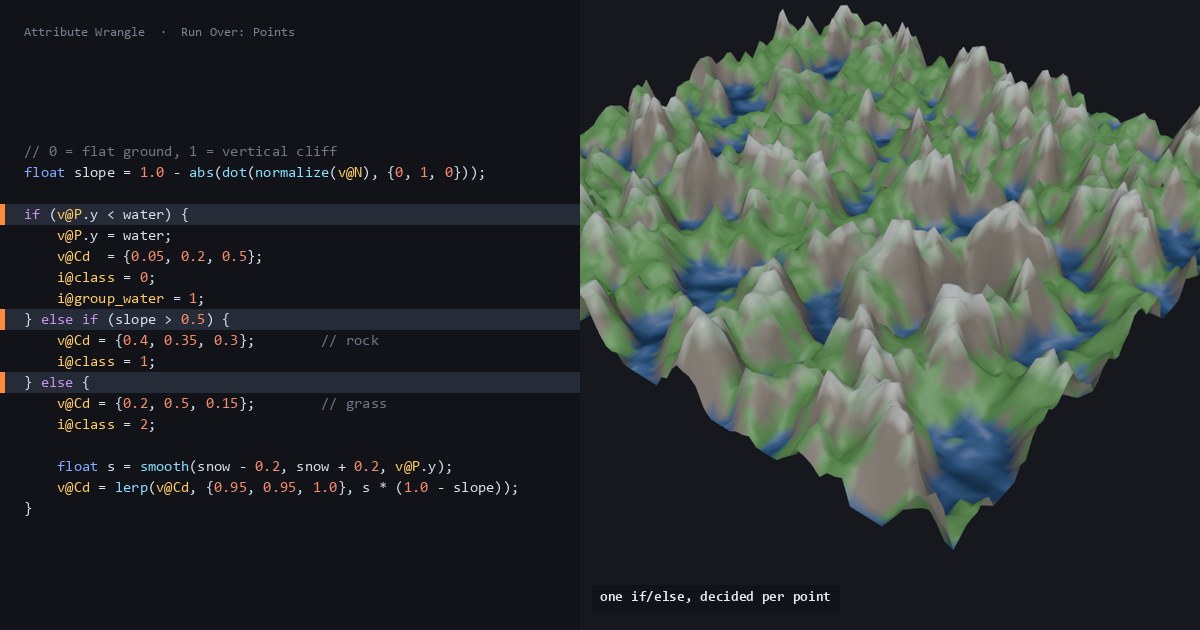
TL;DR VEX, Houdini's C-like language, runs your snippet once for every point of a mesh, in parallel. An ordinary
if/elsechain therefore decides separately for each point, and the result looks like NumPy'snp.select: a few lines classify a terrain into water, rock, grass and snow. The syntax is C's, but with differences that bite: there is nobool, a float condition is truncated to an int,&&and||don't short-circuit, and==on vectors is exact. For anything visual, a smooth blend usually beats a hard branch.
Houdini in 60 seconds
Houdini builds geometry with a graph of nodes called SOPs. An Attribute Wrangle is a SOP that runs a snippet of VEX once per point, in parallel, and inside it v@P, v@N and v@Cd are the current point's position, normal and color. Gather, don't scatter has the longer version of that model. This post is about what happens when the per-point snippet branches. It follows the "Conditions" section of Juraj Tomori's VEX tutorial.
The core idea: one if, decided per point
Conditionals look the way a C programmer expects: if, else if, else, braces for blocks, the ternary cond ? a : b, and &&, || and !. One C rule carries over unchanged: without braces, an if controls a single statement, up to the first semicolon, and indentation means nothing. In if (x) a = 1; b = 2; the b = 2 runs on every point. Every point runs the chain for itself, so neighboring points can take different branches.
VEX has no bool type. Comparisons return an int, 1 or 0, and true and false are just 1 and 0. That's why i@above = v@P.y > 0; is legal and useful: it writes a 0/1 attribute that later nodes can read. The flip side is that a condition must be an int, and a float gets converted to one by truncation. if (f@mask) with a mask of 0.5 is false, because 0.5 becomes 0. In our test every value from 0.25 to 0.75 failed and 1.0 passed. The compiler warns about it ("Implicit cast from float to int"), but the node still cooks, and in our runs the warning didn't always appear. Write the comparison you mean: if (f@mask > 0).
Here's a terrain classifier. Build Grid (Rows and Columns 100) → Mountain (Height 3) → Normal (Add Normals to: Points; the default is Vertices) → Attribute Wrangle, leave Run Over on Points, and paste this in:
// Attribute Wrangle, Run Over: Points
// Input: Grid -> Mountain -> Normal (point normals)
float water = chf("water_level");
float snow  = chf("snow_line");

// 0 = flat ground, 1 = vertical cliff
float slope = 1.0 - abs(dot(normalize(v@N), {0, 1, 0}));

if (v@P.y < water) {
    v@P.y = water;                  // flatten into a lake surface
    v@Cd  = {0.05, 0.2, 0.5};
    i@class = 0;
    i@group_water = 1;              // puts this point in the group "water"
} else if (slope > 0.5) {
    v@Cd = {0.4, 0.35, 0.3};        // rock
    i@class = 1;
} else {
    v@Cd = {0.2, 0.5, 0.15};        // grass
    i@class = 2;
    // snow without a branch: blend toward white across a 0.4-unit band
    float s = smooth(snow - 0.2, snow + 0.2, v@P.y);
    v@Cd = lerp(v@Cd, {0.95, 0.95, 1.0}, s * (1.0 - slope));
}

// ternary: pscale 0 on the lake, larger on steeper ground
f@pscale = v@P.y <= water ? 0.0 : 0.02 + 0.03 * slope;Click the Create spare parameters button to the right of the code editor to get the two sliders. As the first post in this series explains, new sliders start at 0, so type in a water level of −0.3 and a snow line of 0.4. On the 10,000-point grid that gives 2,297 lake points, 2,150 rock and 5,553 grass, 1,611 of which pick up some snow. The Mountain's height matters here: at its default Height of 1, no point on this grid is steeper than 0.5, so there's no rock at all.
The same logic as whole-array NumPy:
import numpy as np

def classify(P, N, water, snow):
    """P, N: (n, 3) arrays of point positions and point normals."""
    slope = 1.0 - np.abs(N[:, 1] / np.linalg.norm(N, axis=1))
    t = np.clip((P[:, 1] - (snow - 0.2)) / 0.4, 0.0, 1.0)
    s = t * t * (3 - 2 * t)                                # smooth()
    grass, white = np.array([0.2, 0.5, 0.15]), np.array([0.95, 0.95, 1.0])
    snowy = grass + (white - grass) * (s * (1 - slope))[:, None]
    lake = P[:, 1] < water
    Cd = np.select([lake[:, None], (slope > 0.5)[:, None]],   # (n, 1) masks
                   [np.array([0.05, 0.2, 0.5]), np.array([0.4, 0.35, 0.3])],
                   default=snowy)
    P = P.copy()
    P[lake, 1] = water
    pscale = np.where(P[:, 1] <= water, 0.0, 0.02 + 0.03 * slope)
return P, Cd, pscalenp.select is the closest match for an if / else if / else chain: the first condition that holds wins, and anything that matches none falls through to the default. The analogy is about the result, though, not the work. NumPy computes snowy for every point, lake and cliff included, and then picks. In VEX, as far as your code can tell, each point runs only the branch it takes: in our test, a function with a side effect in the else branch never ran on the points that took the if.
What trips you up, and what clicks
&& and || don't short-circuit. In C, if (cheap && expensive()) skips expensive() when cheap is false. In VEX, both sides run:
int touched(int n) { n += 1; return 1; }   // VEX passes arguments by reference

int hits = 0;
if (@ptnum < 0 && touched(hits)) { }       // the left side is false on every point...
i@hits = hits; // ...but hits comes out 1 on every pointIn Houdini 22 hits is 1 everywhere, and || behaves the same way. A SideFX developer confirmed this on the forum in 2022 and asked people not to rely on it either way, because SideFX would like to change it. So when the right-hand side is expensive or has side effects, nest it: if (@ptnum < 0) { if (touched(hits)) { } } leaves hits at 0. The ternary ?: already evaluates only the side it picks. Guards around array reads matter less than in C, because VEX returns 0 for an index past the end instead of crashing. Negative indices count from the end, Python-style, so a[-1] is the last element, not an error.
== on vectors is exact. v@Cd == {0, 0, 1} (straight from Tomori's examples) compares all three components for exact equality. That works on a color you wrote a few lines earlier, but arithmetic breaks it quickly:
vector c    = {0.2, 0.5, 0.15};
vector back = hsvtorgb(rgbtohsv(c));   // a round trip through HSV
i@same  = back == c;                   // 0: off by about 1e-8
i@close = distance(back, c) < 1e-4; // 1SideFX's language reference documents the comparison operators for ints, floats and strings only; == on vectors compiles and works as shown, but it isn't on that page. If what you really want is a category, store an int such as i@class above and branch on that. Branching on a color means matching on a display value.
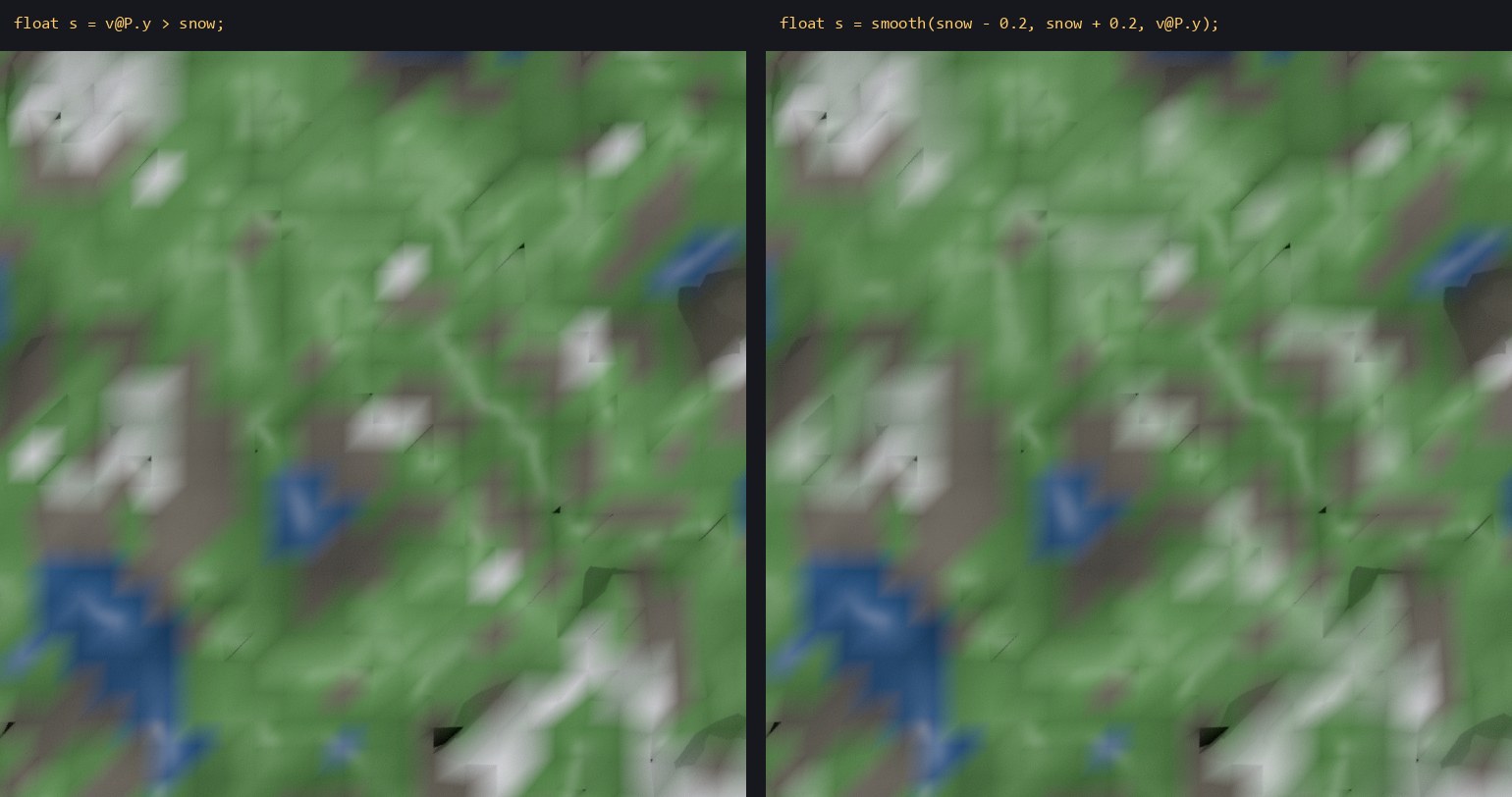
A hard if makes a hard edge. Replace the smooth() line with float s = v@P.y > snow; and every grass point is either snowy or not, so the snow line can only fall between neighboring points and follows the grid. smooth() returns 0 at or below its first argument, 1 at or above its second, and an S-curve in between (3t² − 2t³, the same curve as GLSL's smoothstep). With lerp the color fades across the band instead of switching. Shader writers prefer smoothstep to step for the same reason: for anything visual, a branch is a step function.
A group write isn't an attribute write. i@group_water = 1 is a virtual attribute: it puts the point in a point group called water and creates no attribute. Points that never reach that line simply stay out of the group. An ordinary attribute behaves differently: write f@flag = 1; in one branch only and every point gets a flag attribute, set to 0 wherever that branch didn't run. Both are useful, but they differ, so know which one you're writing.
Tomori added the Conditions examples to his tutorial in February 2018, the Houdini 16.5 era. They compile and run unchanged in Houdini 22, v@Cd == {0,0,1} included.
Try it yourself
- Install Houdini Apprentice, the free, non-commercial edition from SideFX.
- Build the classifier above, then add a fourth class, "beach", for points less than 0.1 above
water_levelon flat ground (slope < 0.2). Do it twice, once as anotherelse ifbefore the rock test and once as asmooth()band, and compare the edges in the viewport. - Swap the snow blend for the hard
ifshown above and look at the snow line up close.
No Houdini? Feed classify() a NumPy height field and its normals. In Blender's geometry nodes, build the same logic with Compare and Switch nodes; Blender's manual notes that when a Switch gets fields, both inputs may be evaluated before it picks, which is the np.select model rather than VEX's.
Functions used: chf, abs, dot, normalize, smooth, lerp, rgbtohsv, hsvtorgb, distance. Each one links to its entry in the Simstim VEX reference.
Sources
- jtomori/vex_tutorial, Juraj Tomori's VEX tutorial ("Conditions")
- SideFX: VEX language reference (operators, comparisons, data types, arguments passed by reference)
- SideFX: Loops and flow control (the
ifstatement) - SideFX: Using VEX expressions (group membership through
@group_<name>) - SideFX: Arrays (out-of-bounds reads, negative indices)
- SideFX VEX docs: smooth, lerp
- SideFX forum: Expression Short Circuiting (reply from SideFX staff, December 2022)
- NumPy: numpy.select
- Khronos: smoothstep (GLSL reference page)
- Blender Manual: Switch Node, Compare Node
Related
 HoudiniStage in, stage out: Houdini's Solaris treats every node as a function over a USD sceneIn Houdini's Solaris, every LOP node takes a composed USD stage and returns one, and its edits land in one in-memory layer at the top. A 31-line usd-core model of that contract, the Python LOP that does it for real, the same network checked in Houdini 22, and why a Layer Break decides what gets saved.
 Houdinisplit() is a tokenizer: building cache paths from strings in Houdini VEXVEX strings look like Python's, but split() merges separators and drops empty fields, len() counts bytes, and a wrangle expands $ before the compiler sees it. A per-piece cache path built from the scene file name, and the traps along the way, checked in Houdini 22.
 LatestMaterialX is an IR for materials: build a typed shader graph in Python, then lower it to GLSL and OSLA MaterialX material is a typed dataflow graph stored as XML, which a library type-checks and compiles to several shading languages. With only pip install MaterialX, build a checkerboard material in Python, watch the validator reject a float wired into a color, and generate GLSL and OSL from the same file.