Same wrangle, now on the GPU: what Houdini's OpenCL SOP makes you declare
A four-line VEX ripple ported to Houdini's OpenCL SOP returns the same points, once every attribute's type, access mode and fallback is declared on a #bind line. What VEX infers or creates for you, the binding contract that replaces it, and timings measured on one GPU.
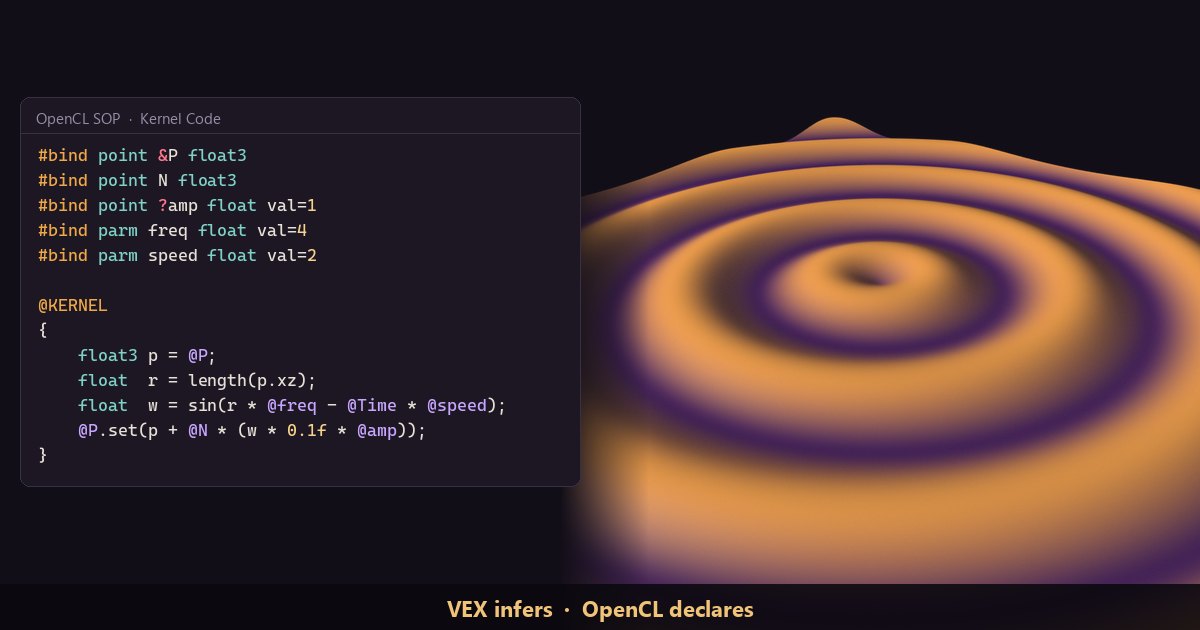
TL;DR Houdini runs per-point code in two languages: VEX on CPU threads, and OpenCL C on the GPU through the OpenCL SOP. We ported a four-line VEX ripple to an OpenCL kernel and got the same points back, to within 4e-7. The math barely changed. Most of the work was writing down, on
#bindlines, what VEX had been inferring or creating for us: each attribute's type, whether it is read or written, what happens when it is missing, and which parameters exist. For this light kernel the GPU was slower than VEX at every size we measured.
Houdini in 60 seconds
Houdini builds geometry with a graph of nodes. The geometry nodes are called SOPs: each takes geometry in and passes geometry out. Geometry is made of points (positions), primitives (polygons, curves, volumes), vertices (a primitive's references to its points) and one detail record for the whole object. Any of these can carry attributes: named, typed arrays such as P (position), N (normal) or Cd (color). Think of a struct-of-arrays with one column per attribute.
A wrangle is a node that holds a snippet of VEX, Houdini's C-like language. Its Run Over setting picks the element type, and the snippet runs once per element, in parallel, in no guaranteed order. If you've written a GLSL shader or a CUDA kernel, you know the shape: one function, many invocations. The OpenCL SOP runs the same kind of per-element function, written in OpenCL C, on an OpenCL device, normally the GPU.
The first post in VEX Fundamentals read sliders with chf, and Gather, don't scatter read other points with point. This post takes a small deformer written that way and moves it to OpenCL.
The VEX version
The effect is a ripple that pushes points along their normals. The input is a Grid SOP (size 10 × 10, 200 rows and columns) followed by a Normal SOP with Add Normals to set to Points.
// Attribute Wrangle, Run Over: Points
float @amp = 1;                         // if amp is missing, create it with 1
float r = length(set(@P.x, 0, @P.z));   // distance from the origin in XZ
float w = sin(r * chf("freq") - @Time * chf("speed"));
@P += @N * w * 0.1 * @amp;Click the create-spare-parameters button next to the code, then type 4 into freq and 2 into speed. New sliders start at 0, and with both at 0 the grid stays flat. Scrub the timeline and the rings travel outward.
Now count what you didn't write. VEX knows P and N are vectors because they are well-known names, and that amp is a float from the float @amp declaration. It sees that P is written and N only read, wraps the snippet in a kernel function and binds each attribute as a parameter. It also creates attributes for you. The output gains an amp attribute set to 1 on every point, and on a grid with no normals at all, reading @N still returns (0, 1, 0) and an N attribute appears on the output.
In NumPy terms the whole effect is one vectorized expression:
import numpy as np

def ripple(P, N, t, amp=1.0, freq=4.0, speed=2.0):
    r = np.hypot(P[:, 0], P[:, 2])           # length(p.xz)
    w = np.sin(r * freq - t * speed)
return P + N * (w * 0.1 * amp)[:, None] # amp: one number, or one per pointThe OpenCL version
Add an OpenCL SOP from the Tab menu, on a branch next to the wrangle. The Tab-menu tool turns on Use Code Snippet and Enable @-Binding for you and fills Kernel Code with a starter kernel that binds P. Replace it with this kernel, then turn on Include Time on the Options tab:
// OpenCL SOP, Run Over: First Writeable Attribute. Options tab: Include Time on.
#bind point &P float3          // & = write. The first writeable binding sets the work size
#bind point N float3           // read-only, and it must exist
#bind point ?amp float val=1   // ? = optional: a single value of 1 if amp is missing
#bind parm freq float val=4    // a node parameter, the same for every work item
#bind parm speed float val=2

@KERNEL
{
    float3 p = @P;                         // this work item's point
    float  r = length(p.xz);               // swizzle: float3 to float2
    float  w = sin(r * @freq - @Time * @speed);
    @P.set(p + @N * (w * 0.1f * @amp));    // a write is a method call
}At frame 12 the two branches agree point for point. The largest difference on the 40,000-point grid was 3.3e-7, which is float rounding, and the NumPy function agrees with both to within 3e-7. Give the grid an amp attribute upstream and they still agree, with each point now scaled by its own amp.
The binding contract, line by line
OpenCL has no auto-binding and no v@/f@ type prefixes. Every @ name must be declared, either as a #bind line or as an entry on the node's Bindings tab. (A wrangle can opt into part of this: its Enforce Prototypes toggle makes VEX require attributes to be declared before use.) A #bind line names the kind of thing to bind, then the name with its decorations, then an OpenCL type and optional flags.
- The class.
#bind point,#bind prim,#bind vertexand#bind detailbind geometry attributes.#bind parmbinds one value that is the same for every work item, like a shader uniform. Ramps, volumes and VDBs have their own classes. - The type. A VEX
vectorisfloat3, a float isfloat, an int isint, and array attributes arefloat[]orint[]. Nothing is inferred from the name. - Access. Bindings are read by default and not written.
&adds write,?makes the binding optional, and!means don't read: the buffer isn't uploaded and starts out holding garbage, so write every element. Only writeable bindings are copied back to the geometry; the rest are assumed unchanged. The decoration belongs to the name, before or after it (&CdandCd&both work). Write#bind point Cd float3 &and Houdini warns "Unknown token '&'" and leavesCdread-only. - Missing attributes. A plain binding must exist. Feed this kernel a grid with no
Nand the node stops with "Invalid attribute 'N'". An optional binding with a default, like?amp ... val=1, is replaced by a single parameter holding that value, so@ampworks either way.HAS_ampis defined only when the attribute exists, and@amp.boundgives the same answer inside the kernel. - Parameters.
#bind parm freq float val=4hands the kernel a 4 with no further setup. The button next to the code, Create spare parameters for each #bind, adds sliders (freq_val,speed_val, andamp_valfor the optional attribute's default) that drive entries on the Bindings tab. From then on those entries win over the#bindlines. The sliders run from 0 to 1 but start at yourval=values. - Globals are opt-in.
@Timefails with "@Time is unavailable: Turn on Include Time." until you turn that toggle on, and@Iterationneeds Include Iteration.@elemnumis the work item's index. - Writes are method calls.
@Preads and@P.set(v)writes. Both@P = vand@P.y += 1.0ffail to compile with "expression is not assignable".
Behind those lines is an ordinary kernel. The Generate Kernel button on the Generated Code tab shows what the compiler receives. Here is the start of it for this snippet, without the macro definitions:
kernel void kernelName(
    float _bound_time,
    int _bound_P_length,
    global float * restrict _bound_P,
    int _bound_N_length,
    global float * restrict _bound_N,
#ifdef HAS_amp
    int _bound_amp_length,
    global float * restrict _bound_amp,
#else
    float _bound_amp,
#endif
    float  _bound_freq,
    float  _bound_speed
)
{
    int _bound_idx = get_global_id(0);
    if (_bound_idx >= _bound_P_length)
        return;
    // ...then your @KERNEL body, where @P is vload3(_bound_idx, _bound_P)
    // and @P.set(v) is vstore3(v, _bound_idx, _bound_P)
}Each binding became kernel arguments: a length plus a flat global float * buffer (P is stored as xyzxyz…), or a single value. The optional amp has two signatures, picked at compile time. Run Over: First Writeable Attribute sizes the launch from the first writeable binding, here P, and rounds the count up, which is why the bounds check is there. SideFX's docs warn that the exact expansion may change, so read it to understand the macros, not to copy it.
What VEX was doing for you
- Creating attributes. VEX creates any attribute a snippet mentions. The OpenCL SOP never does. A required binding that's missing is an error, and an optional one that's missing is quietly swapped for its default. Create attributes upstream (Attribute Create, or the Normal SOP) and keep the kernel to pure compute. Watch for one trap: in Houdini 22 the Normal SOP's Add Normals to defaults to Vertices. A
#bind point Nbinding fails on vertex normals with the same "Invalid attribute 'N'", while VEX's@Nstill reads (0, 1, 0). - Precision. A wrangle has one VEX Precision setting (Auto, 32-bit or 64-bit) for everything. OpenCL types have fixed widths:
half,floatanddouble. The SOP addsfprealandexint, which follow its Precision parameter (Auto, 16-bit, 32-bit or 64-bit). We checked withsizeof: at 64-bit, a binding typedfpreal3is stored as doubles, while one typedfloat3stays 32-bit. To run one kernel at several precisions, writefpreal3. At 16-bit the kernel didn't compile on our GPU, as the docs warn for most drivers. And afloat3occupies the space of four floats, which matters as soon as you put one in a struct. - Neighbor lookups. VEX's
pointreads from the node's input, a snapshot that never sees the wrangle's own writes, andsetpointattribwrites are thread-safe. In OpenCL,@P.getAt(i)reads the live buffer the kernel is writing to. It is bounds-checked: an index out of range returns 0.@P.setAt(i, v)comes with no thread-safety guarantee at all. If you read a neighbor'sPwhile another work item writes it, the answer depends on timing. The fix is a second buffer: write to a scratch attribute in the kernel, then copy it back in a Write Back Kernel, a second kernel that runs after the first has finished, with the same bindings. With @-binding on, you write it as a@WRITEBACKblock and turn on Use Write Back Kernel. Without that toggle the block is skipped, with no error or warning. - Run Over. A wrangle can run over Detail, once, which is handy for setup code. The OpenCL SOP's Run Over menu has no Detail entry, only First Writeable Attribute, First Writeable Volume, First Writeable VDB and Detail Attribute of Worksets. The docs' advice is that GPUs don't handle serial execution well and kernels should always target many elements.
- Syntax habits. OpenCL C follows C99. Function parameters are separated by commas (
float a, int b, not VEX'sfloat a; int b), there's noforeach, andselecttakes its condition last, the reverse of VEX.
Is it faster?
Not for this kernel. We timed both branches on one workstation: Houdini 22.0.368, VEX on a 12-core Core i9-10920X, OpenCL on an NVIDIA Quadro RTX 5000. Each figure is the median of 10 forced cooks at different frames, from two separate runs:
- 40,000 points: VEX 0.6 to 1.2 ms, OpenCL 1.5 to 1.9 ms.
- 1 million points: VEX about 3 ms, OpenCL about 10 ms.
- 4 million points: VEX about 10 ms, OpenCL 45 to 52 ms.
The ripple does a handful of operations per point, and on every cook the SOP has to copy P and N to the card and P back. SideFX's guide says the GPU only pays off when the data stays there. Every SOP brings its geometry back to the CPU after it cooks, unless a chain of OpenCL nodes sits inside a Compiled Block. The Iterations parameter also helps: it re-runs the kernel with the buffers left on the card.
Give each point real work and the result flips. With 256 chained sin calls per point, VEX took 277 ms on a million points and the GPU took 15 ms, about 19 times faster. The ratio held at four million points (1,056 ms against 56 ms). Houdini's built-in CPU OpenCL device came in between, at 62 ms for a million points. Time your own kernel with the Performance Monitor before you port anything.
Try it yourself
- Install Houdini Apprentice, the free, non-commercial edition.
- Build Grid (size 10 × 10, 200 rows and columns) into Normal (Add Normals to: Points). Branch it into an Attribute Wrangle with the VEX above and an OpenCL SOP with the kernel above, turn on Include Time and scrub the timeline.
- Exercise: color the points by
w. Add#bind point &Cd float3and a@Cd.set(...)that mapswto a color. The node stops with "Invalid attribute 'Cd'" until you createCdupstream with an Attribute Create SOP (Name: Cd, Class: Point, Size: 3). Then make the binding optional with&?Cdand bypass the Attribute Create. The node cooks and noCdcomes out: the writes go nowhere, without a warning. Wrap the write in#ifdef HAS_Cdso the code says what happens. - Stretch goal: smooth the grid. Make it bumpy first (a wrangle with
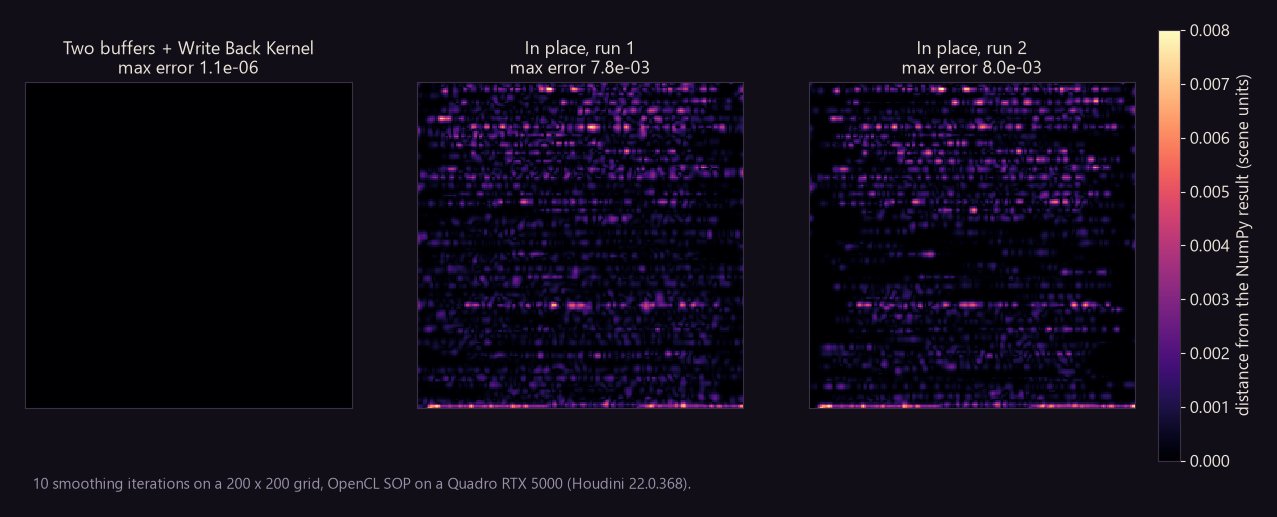
@P.y = 0.5 * rand(@ptnum);), then average each point with its neighbors over 10 Iterations. Hints:#bind point nb int[] name=topo:neighboursgives every point its neighbor list (@nb.entries,@nb.comp(j)),@P.getAt()reads a neighbor, and each work item writes only its own point. WritePin place first and run it twice: on our GPU the two results differed. Then write to a scratchPnewattribute and copy it back in@WRITEBACK. Our two-buffer version matched a NumPy reference to 1e-6, while the in-place one was off by up to 0.008 (figure above).
No Houdini? Run the NumPy ripple over a grid from np.mgrid and plot it with matplotlib.
Functions used (VEX side): length, set, sin, chf, point, setpointattrib, rand. Each one links to its entry in the Simstim VEX reference. In the kernel, length, sin and mix are OpenCL C built-ins, and the @ names are Houdini's macros, not VEX.
Sources
- OpenCL for VEX users, SideFX Houdini 22 docs:
#bindsyntax, decorations and access flags,@methods, global bindings, precision, types, andsetAtthread safety - OpenCL SOP, SideFX: Run Over, Iterations, Write Back Kernel, Precision, Generate Kernel
- Normal SOP, SideFX: Add Normals to
- Attribute Wrangle SOP, SideFX: Run Over, VEX Precision, Enforce Prototypes
- setpointattrib, SideFX VEX docs
- Houdini Apprentice, SideFX
Related
 HoudiniStage in, stage out: Houdini's Solaris treats every node as a function over a USD sceneIn Houdini's Solaris, every LOP node takes a composed USD stage and returns one, and its edits land in one in-memory layer at the top. A 31-line usd-core model of that contract, the Python LOP that does it for real, the same network checked in Houdini 22, and why a Layer Break decides what gets saved.
 Houdinisplit() is a tokenizer: building cache paths from strings in Houdini VEXVEX strings look like Python's, but split() merges separators and drops empty fields, len() counts bytes, and a wrangle expands $ before the compiler sees it. A per-piece cache path built from the scene file name, and the traps along the way, checked in Houdini 22.
 HoudiniOut of range returns 0: arrays and array attributes in Houdini VEXVEX arrays slice like Python lists, but an out-of-range read quietly returns 0, a write past the end grows the array, and arrays can't nest. Per-point neighbor lists sorted by distance, read back from other points, and the traps that turn a bad index into point 0.