Linting game assets: a 40-line Python script that audits normal maps in an Unreal project
Unreal's editor exposes every asset's typed settings to Python. A short linter finds normal maps stored with colour settings, fixes them through the editor's own property path, and fails a headless build when it finds one. Run in Unreal Engine 5.8.2.
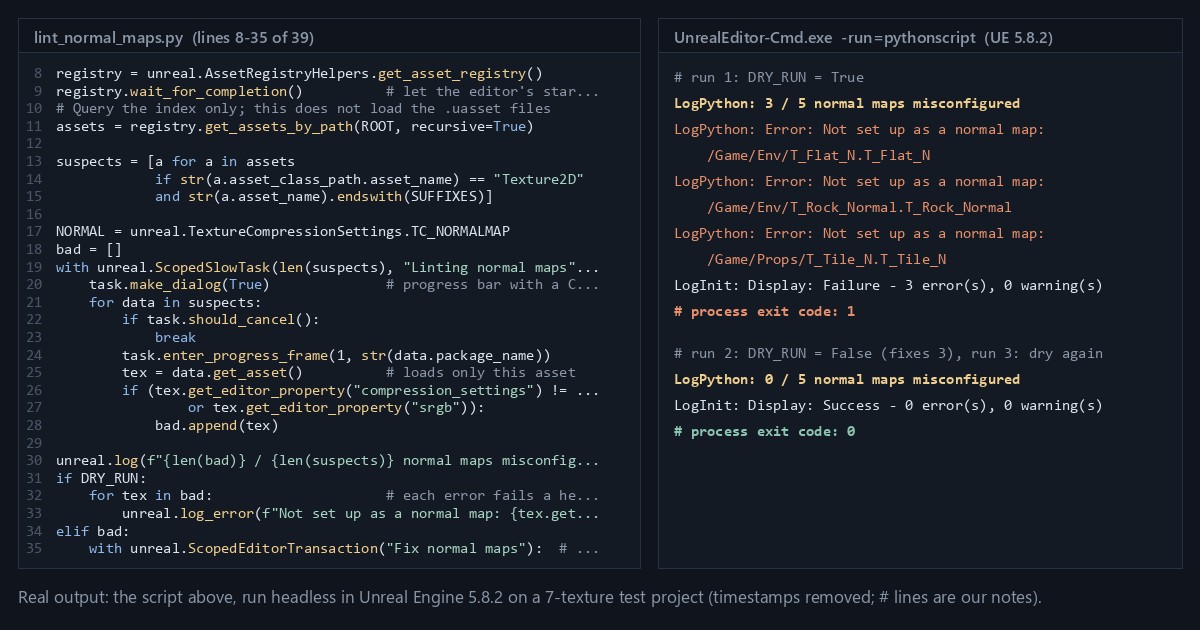
TL;DR Game engines store art as typed objects with properties, and Unreal's editor exposes those properties to Python. This post builds a small linter that walks a project's asset index, finds normal maps stored with colour settings, and fixes them through the editor's own property-change path. Run headless on a build machine, it fails the build when it finds one. It's the same pattern as a code linter, running over textures.
We ran everything below in Unreal Engine 5.8.2, headless, on a throwaway project with seven generated test textures. The output blocks are copied from those runs.
Unreal in 60 seconds
Unreal Engine is a game engine with a large desktop app attached, called the editor. Everything you import (meshes, textures, sounds) becomes an asset: a serialized C++ object (a UObject) saved in a .uasset file under a virtual path such as /Game/Props/T_Brick_N, where /Game is the project's Content folder. Each asset has typed properties. A texture has a compression setting, an sRGB flag, a texture group and more. The Asset Registry is the editor's index of every asset. You can query it without loading the files, a bit like reading a package manifest without importing the modules.
With the Python Editor Script Plugin turned on, the editor embeds a Python interpreter (3.11.8 in 5.8) and exposes a module called unreal that mirrors the engine's reflected C++ API. Epic's 5.8 docs still call Python scripting Experimental, and the plugin itself is marked Beta. Our Unreal Python setup post covers turning it on and the places a script can run.
The bug this solves
A normal map is a texture that stores vectors, not colours. Each pixel's RGB is a direction (x, y, z) packed into the 0–1 range. If the texture is flagged sRGB, the GPU runs those values through the sRGB curve before the shader sees them, and every vector the shader decodes is bent. A flat pixel, (128, 128, 255), should decode to straight up. Through the sRGB curve it comes back tilted 39 degrees. Nothing fails at import. The lighting just looks a little wrong, and the cause is one checkbox on one texture.
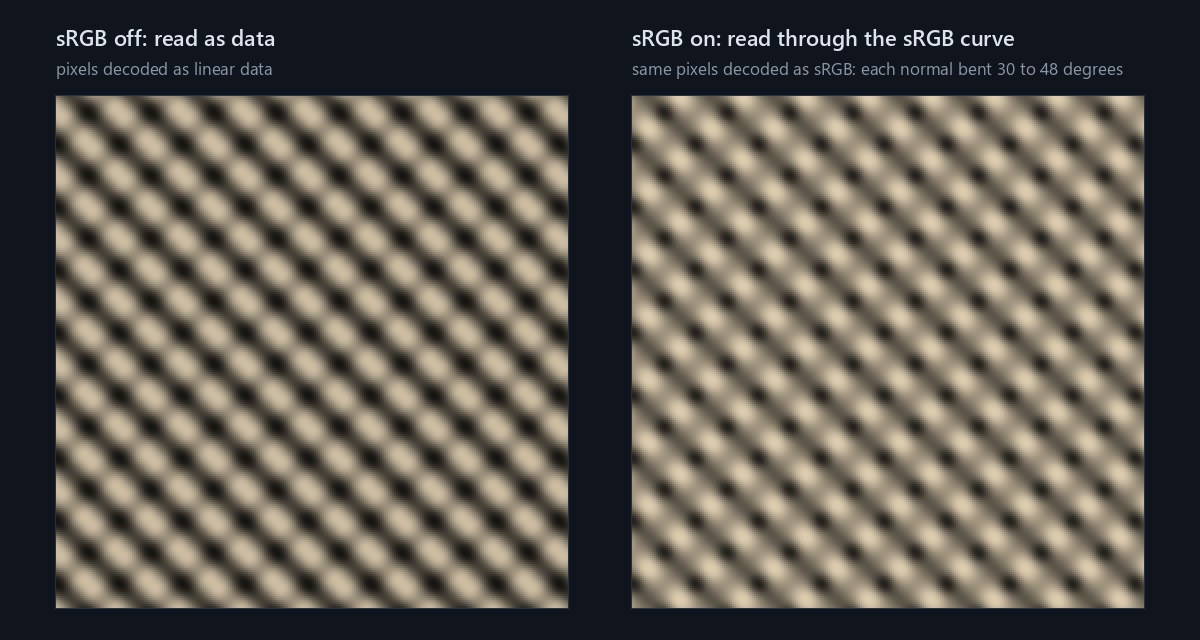
If you know Houdini, this is the same issue as attribute type info. Tag a vector attribute as a colour with setattribtypeinfo and a Transform SOP leaves it alone; tag the same values as a normal and they rotate with the geometry. The data is identical, the metadata differs, and everything downstream follows the metadata.
Unreal's importer already guards against the common case. It looks at the pixels, and when an image looks like a normal map it sets three things: compression to Normalmap, sRGB off, and the texture group to WorldNormalMap. In our test it recognised normal-map pixels saved as T_Wall.png, and it treated colour pixels saved as T_Plaster_Normal.png as a colour texture: the file name played no part. The linter is for the rest: images the detector doesn't recognise, and settings someone changes later.
The linter
# lint_normal_maps.py: run in the Unreal Editor (5.8) or headless (see below)
import unreal

ROOT = "/Game"                          # Content Browser folder to scan
SUFFIXES = ("_N", "_Normal", "_nrm")    # endswith() is case-sensitive
DRY_RUN = True                          # report only; set False to fix

registry = unreal.AssetRegistryHelpers.get_asset_registry()
registry.wait_for_completion()          # let the editor's startup scan finish
# Query the index only; this does not load the .uasset files
assets = registry.get_assets_by_path(ROOT, recursive=True)

suspects = [a for a in assets
            if str(a.asset_class_path.asset_name) == "Texture2D"
            and str(a.asset_name).endswith(SUFFIXES)]

NORMAL = unreal.TextureCompressionSettings.TC_NORMALMAP
bad = []
with unreal.ScopedSlowTask(len(suspects), "Linting normal maps") as task:
    task.make_dialog(True)              # progress bar with a Cancel button
    for data in suspects:
        if task.should_cancel():
            break
        task.enter_progress_frame(1, str(data.package_name))
        tex = data.get_asset()          # loads only this asset
        if (tex.get_editor_property("compression_settings") != NORMAL
                or tex.get_editor_property("srgb")):
            bad.append(tex)

unreal.log(f"{len(bad)} / {len(suspects)} normal maps misconfigured")
if DRY_RUN:
    for tex in bad:                     # each error fails a headless run
        unreal.log_error(f"Not set up as a normal map: {tex.get_path_name()}")
elif bad:
    with unreal.ScopedEditorTransaction("Fix normal maps"):  # one undo entry
        for tex in bad:
            tex.set_editor_property("compression_settings", NORMAL)
            tex.set_editor_property("srgb", False)
unreal.EditorAssetLibrary.save_loaded_asset(tex)To run it, save it as lint_normal_maps.py, then in the editor choose Tools > Execute Python Script and pick the file. Leave DRY_RUN = True the first time and read the Output Log. On our test project the dry run printed:
LogPython: 3 / 5 normal maps misconfigured
LogPython: Error: Not set up as a normal map: /Game/Env/T_Flat_N.T_Flat_N
LogPython: Error: Not set up as a normal map: /Game/Env/T_Rock_Normal.T_Rock_Normal
LogPython: Error: Not set up as a normal map: /Game/Props/T_Tile_N.T_Tile_NWith DRY_RUN = False it fixed and saved those three textures, and a second dry run reported 0 / 5 normal maps misconfigured.
Two details are worth noticing. The registry query is cheap because it reads the index. get_asset() is the expensive part, so the script filters by class and name before loading anything. And the fix uses set_editor_property instead of plain attribute assignment. tex.compression_settings = NORMAL does change the value, but it skips the editor's change notifications. In our run that left sRGB on and the package unmodified, and save_loaded_asset (which by default saves only modified packages) returned True without writing the file. Through set_editor_property, the same change marked the package for saving, and Unreal switched sRGB off by itself when the compression became Normalmap. Epic's docs recommend set_editor_property for exactly this reason.
For comparison, here is the same rule as plain Python over a JSON-style manifest:
SUFFIXES = ("_N", "_Normal", "_nrm")
manifest = {"textures": [
    {"name": "T_Brick_N",     "srgb": False, "compression": "normal"},
    {"name": "T_Rock_Normal", "srgb": True,  "compression": "default"},
    {"name": "T_Tile_N",      "srgb": False, "compression": "default"},
    {"name": "T_Brick_D",     "srgb": True,  "compression": "default"},
]}
bad = [t["name"] for t in manifest["textures"]
       if t["name"].endswith(SUFFIXES) and (t["srgb"] or t["compression"] != "normal")]
print(bad) # ['T_Rock_Normal', 'T_Tile_N']The logic is the same. What Unreal adds is that the "manifest" is live, typed and backed by the real files.
Run it on a build machine
The same file runs without the editor UI:
UnrealEditor-Cmd.exe C:\Projects\MyGame\MyGame.uproject -run=pythonscript -script=C:\Tools\lint_normal_maps.py -unattended -nullrhiThe commandlet counts logged errors. With the dry run's three unreal.log_error lines it finished with Failure - 3 error(s), 0 warning(s) and exit code 1. On the fixed project it finished with Success - 0 error(s), 0 warning(s) and exit code 0. A raised Python exception also gave a non-zero exit code. That exit code is all a CI job needs, and linting stops being something one person remembers to do. Plain unreal.log lines go to the project's Saved/Logs file rather than the console unless you add -stdout.
What trips you up
- It isn't a wrangle. In a VEX wrangle you write the body and Houdini runs it once per point, in parallel. Here there's no implicit Run Over. It's an ordinary serial Python loop, and you write the iteration yourself.
- Loading everything is the classic mistake.
EditorAssetLibrary.list_assetshands you every path in a folder, and loading each one pulls every asset into memory. Query metadata, filter, then load: the same advice as not runningSELECT *and filtering in the client. For these two settings you can skip loading altogether.SRGBandCompressionSettingsare markedAssetRegistrySearchablein the engine'sTexture.h, so the index stores them:data.get_tag_value("SRGB")returns"True"or"False",data.get_tag_value("CompressionSettings")returns names like"TC_Normalmap", anddata.is_asset_loaded()stays False. The script loads anyway becauseget_editor_propertyworks for any property, not only the searchable ones. asset_classis deprecated. Older snippets comparedata.asset_class == "Texture2D". Since UE 5.1, classes are identified by a full path (/Script/Engine.Texture2D), exposed asasset_class_path. In 5.8 the old property still exists, but it returnsNoneand logs aDeprecationWarning, so the comparison is always False and the script quietly finds nothing.- Name suffixes are a heuristic. A linter that trusts naming conventions has the same blind spots as the conventions. Python's
str.endswith()is case-sensitive, so ourT_Moss_normalwas never checked even though its settings were wrong. Unreal's importer already reads the pixels, so the natural next step is to enforce the settings at import time, for example from a callback onImportSubsystem.on_asset_post_import, rather than cleaning up afterwards. - Ctrl+Z may not undo the fix.
ScopedEditorTransactiongroups the changes into one undo entry, but undo only restores objects flagged as transactional. In our 5.8.2 project, the textures that had been imported (by script) as colour images were not: theobj flagsconsole command listed them asPublic Standalone, with noTransactional. One undo reverted the textures the importer had recognised as normal maps and left those alone, and those are exactly the textures this linter exists to fix. Undo after saving also changes only the copy in memory: the files on disk keep the fix until you save again. Treat the dry run and source control as your undo.
Try it yourself
Unreal Engine is free to download through the Epic Games Launcher. Create a blank project, turn on the plugin (see the setup post) and import a few textures. A real normal map will probably be recognised and set up correctly, so break one on purpose: open it, set Compression Settings to Default and tick sRGB. Run the script in dry-run mode, then with DRY_RUN = False, then dry again and watch the count drop to zero.
Exercise: add a second rule that flags any texture whose width or height isn't a power of two, using tex.blueprint_get_size_x() and tex.blueprint_get_size_y() (or the registry's Dimensions tag, which reads 300x200 without loading anything), and write a CSV report to unreal.Paths.project_saved_dir(). If you don't want to install Unreal, write the same rules in plain Python over a folder of PNGs with Pillow. The rules are the part that carries over.
Unreal Python API used: unreal.AssetRegistryHelpers.get_asset_registry, AssetRegistry.wait_for_completion, AssetRegistry.get_assets_by_path, AssetData.get_asset, unreal.ScopedSlowTask, unreal.ScopedEditorTransaction, EditorAssetLibrary.save_loaded_asset and unreal.log_error.
Sources
- Scripting the Unreal Editor Using Python, Epic Games (5.8)
- Unreal Python API reference (5.8): AssetRegistry, AssetData, Texture2D, TextureCompressionSettings, ScopedSlowTask, ScopedEditorTransaction, EditorAssetLibrary, ImportSubsystem
- unreal.AssetData in 5.1, where
asset_class_pathappears andasset_classis marked deprecated - setattribtypeinfo, SideFX Houdini docs (how transform nodes treat each type info)
- sRGB, Wikipedia (the sRGB transfer function used for the 39-degree figure)
Related
 HoudiniStage in, stage out: Houdini's Solaris treats every node as a function over a USD sceneIn Houdini's Solaris, every LOP node takes a composed USD stage and returns one, and its edits land in one in-memory layer at the top. A 31-line usd-core model of that contract, the Python LOP that does it for real, the same network checked in Houdini 22, and why a Layer Break decides what gets saved.
 Houdinisplit() is a tokenizer: building cache paths from strings in Houdini VEXVEX strings look like Python's, but split() merges separators and drops empty fields, len() counts bytes, and a wrangle expands $ before the compiler sees it. A per-piece cache path built from the scene file name, and the traps along the way, checked in Houdini 22.
 LatestMaterialX is an IR for materials: build a typed shader graph in Python, then lower it to GLSL and OSLA MaterialX material is a typed dataflow graph stored as XML, which a library type-checks and compiles to several shading languages. With only pip install MaterialX, build a checkerboard material in Python, watch the validator reject a float wired into a color, and generate GLSL and OSL from the same file.