One typo, one new column: making Houdini VEX strict
In a Houdini VEX wrangle, naming an attribute creates it, so a typo adds a new attribute instead of raising an error. Three fixes, from gentlest to strictest, all tested in Houdini 22: declared defaults, the Attributes to Create allow-list and Enforce Prototypes.
TL;DR In a Houdini VEX wrangle, naming an attribute is enough to create it. Type
v@CDwhen you meantv@Cdand you get a new attribute and no error; leave off the type prefix and the new attribute is a float. Ahaspointattribcheck can't prevent it either, because the wrangle binds every@name before any point runs. This post shows the trap, then three fixes from gentlest to strictest: default values declared in the snippet, the wrangle's Attributes to Create allow-list, and Enforce Prototypes, which makes you declare every@name up front.
Houdini in 60 seconds
The first post in this series read node parameters, and Gather, don't scatter read attributes from any point. This one is about what happens when the attribute you name isn't there. It follows five sections of Juraj Tomori's VEX tutorial: "Checking for attributes", "Automatic attribute creation", "Attribute default values", "Attributes to create" and "Enforce prototypes". First, the minimum Houdini you need.
- Houdini builds geometry with a graph of nodes called SOPs. Each one takes geometry in and passes geometry out.
- Geometry is made of points, primitives (polygons, curves and so on), vertices and one detail for the whole object. Any of them can carry attributes: named, typed columns of data.
Pis position,Cdis color, andpscalesets the size of each copy when you copy shapes onto points. - A wrangle is a node where you write VEX. With Run Over set to Points (the default), the snippet runs once per point, in parallel, like a GPU kernel.
v@Cdreads or writes the current point'sCd. The letter before the@is the type:f@float,i@int,v@vector,s@string. A list of well-known names (P,Cd,N,id,ptnumand a few more) get their type automatically. Any other name without a prefix is a float.
The problem: naming an attribute creates it
The SideFX docs put it in one line: if you write to an @ attribute that doesn't exist, Houdini creates it. In our Houdini 22 tests reading one does too: float x = f@foo; on its own adds a foo attribute, full of zeros, to every point. Nothing checks the name against what the geometry carries, so a typo isn't an error. It's a new column:
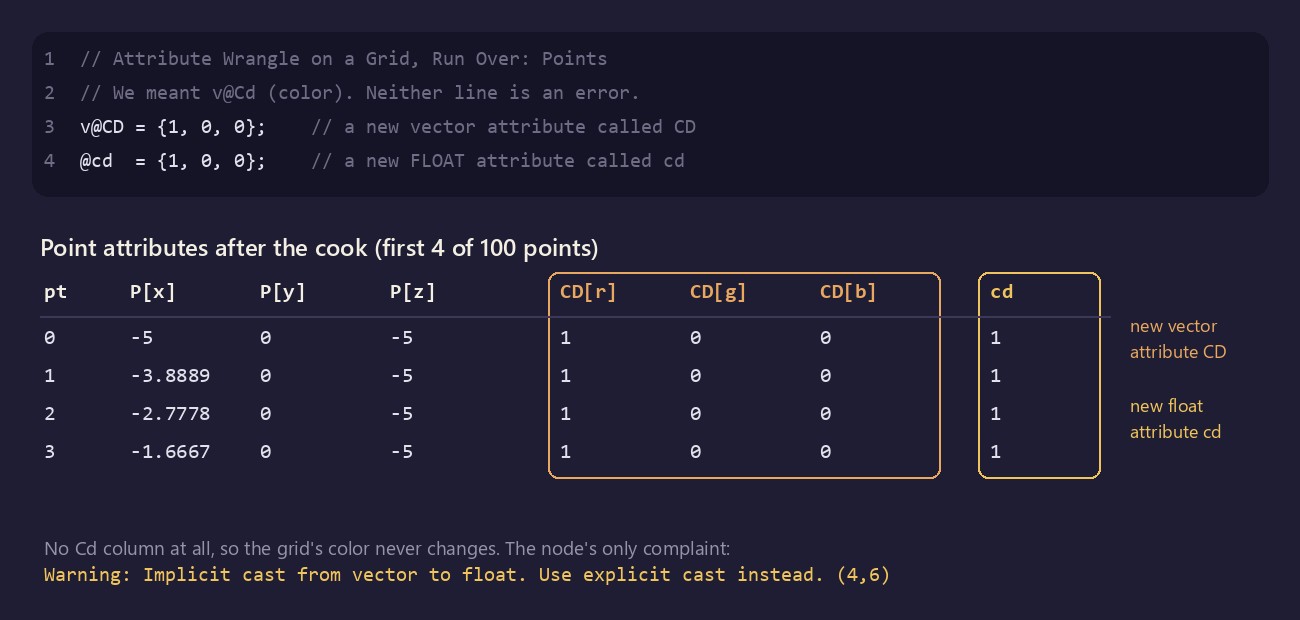
// Attribute Wrangle on a Grid, Run Over: Points
// We meant v@Cd (color). Neither line is an error.
v@CD = {1, 0, 0};    // a new vector attribute called CD
@cd = {1, 0, 0}; // a new FLOAT attribute called cdAttribute names are case-sensitive, so Cd, CD and cd are three different attributes. The first line creates a vector called CD, separate from the color, and the grid doesn't turn red. The second line is worse. cd isn't a known name and has no prefix, so it becomes a float that keeps only the 1 from {1, 0, 0}. The node shows a warning, "Implicit cast from vector to float. Use explicit cast instead.", and cooks anyway. Don't count on seeing even that. Houdini caches compiled snippets on disk, and when a later session of ours loaded the cached copy, the node cooked with no warning at all.
If you write Python, you've met this as collections.defaultdict. A plain dict raises KeyError for a missing key. A defaultdict inserts a default value and carries on, even when you only read:
from collections import defaultdict

pt = defaultdict(float)   # one point's attributes, none set yet
x = pt["foo"]             # a read: no KeyError, and "foo" now exists as 0.0
pt["pscale"] *= 2         # read-modify-write: created as 0.0, then doubled
print(dict(pt)) # {'foo': 0.0, 'pscale': 0.0}Checking first doesn't stop it
VEX can ask what the input carries. hasattrib(0, "point", "pscale") returns 1 if input 0 has a point attribute called pscale and 0 if it doesn't. haspointattrib(0, "pscale") is the shorter form for points, and the SideFX docs say the class-specific versions may be faster. The obvious guard looks safe:
// Attribute Wrangle on a Grid, which has no pscale attribute
if (haspointattrib(0, "pscale"))
f@pscale *= 2;The multiply never runs, but afterwards every point has a pscale of 0. The wrangle binds each @ name to an attribute when it compiles the snippet, before any point runs, and binding a missing attribute creates it. The if decides whether the arithmetic happens, not whether the attribute exists. Wire the result into a Copy to Points node and every copy is scaled to nothing.
If the attribute should exist only when the input had it, use the function forms. They act at run time, only on the lines that actually execute:
// Nothing is created when the input has no pscale
if (haspointattrib(0, "pscale")) {
    float s = point(0, "pscale", @ptnum);   // the float matters, see below
    setpointattrib(0, "pscale", @ptnum, s * 2);
}setpointattrib does create a missing attribute, but only when the call runs. Keep the typed local: point() is overloaded on its return type, and written inline as point(0, "pscale", @ptnum) * 2, VEX picks the int version, so a pscale of 0.5 came back as 0 in our test. The SideFX docs recommend @ over setpointattrib for the current point because it's faster, so keep this form for when the attribute really should stay absent. More often you want the attribute to exist, just not full of zeros. That's the first fix.
Fix 1: declare a default
Declare the attribute with a type and a value at the top of the snippet:
// Attribute Wrangle on a Grid
float @pscale = 1;

if (haspointattrib(0, "pscale"))
@pscale *= 2;That first line is a declaration, not an assignment. If the input already has pscale, the 1 is ignored and the existing values come through (and get doubled). If it doesn't, pscale is created with 1 on every point, and Copy to Points makes full-size copies again. Once declared, @pscale is a float without the f@ prefix.
Declarations follow strict rules. These come from the SideFX docs, and each one failed as described in our Houdini 22 tests:
- One per line, starting at the start of the line. A second declaration on the same line fails with "Trailing code after prototype not allowed".
- The value must be a literal constant.
chf("amp"),3*5,set(0, 1, 0)and@Frameall fail with "… is not a valid default for this prototype. It must be a literal constant like -1 or "" and of the correct type."
The default also belongs to the attribute, not to the line of code, which matters for points that arrive later. Here each point of a line spawns two children:
// Attribute Wrangle, Run Over: Points
// Input: a Line SOP with Points set to 10 (it runs up the Y axis)
vector @Cd     = {1, 0.25, 0};   // orange, for any point nobody colors
float  @pscale = 0.02;
int    @gen    = -1;             // -1 marks "not an original point"

@gen    = 0;                     // runs on the 10 original points only
@pscale = 0.05;
if (@ptnum % 3 == 0)
    @Cd = {0, 0.6, 1};           // every third original turns blue

// Two new points beside each original, built from a position:
// nothing is copied, so they get the declared defaults
for (int k = 1; k <= 2; k++)
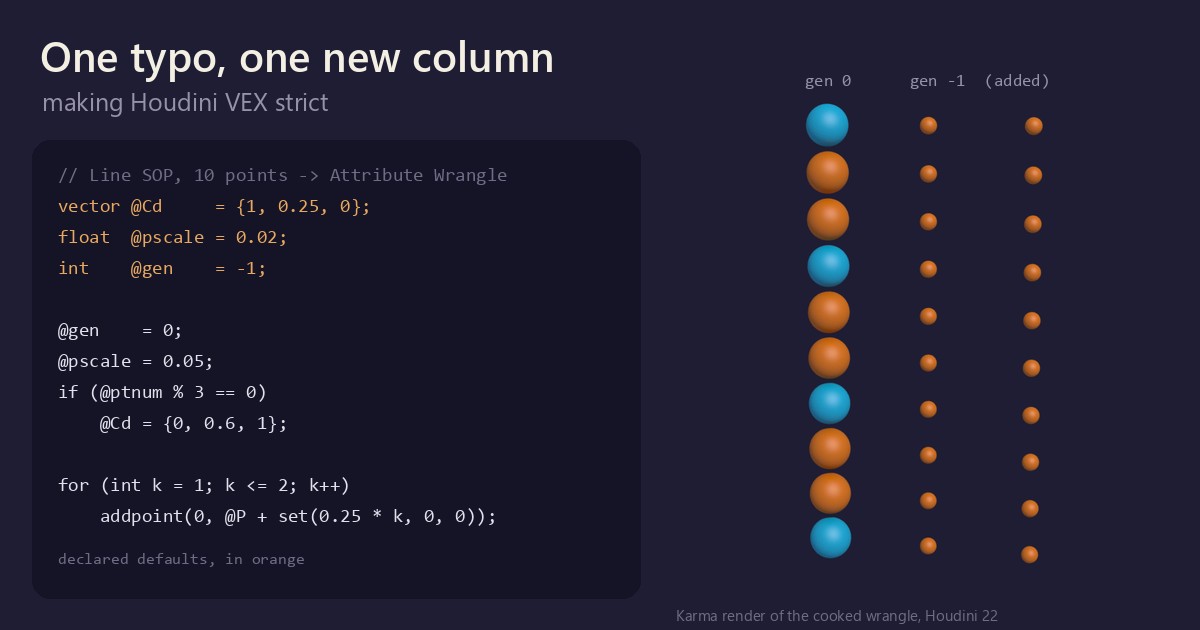
addpoint(0, @P + set(0.25 * k, 0, 0));To see it, wire a Sphere into the first input of a Copy to Points node and the wrangle into the second: each point gets a sphere sized by its pscale and colored by its Cd. If the copies come out uncolored, check the node's Attributes from Target list. Reset Attributes from Target fills in the default rows, and the first one copies Cd along with most other attributes.
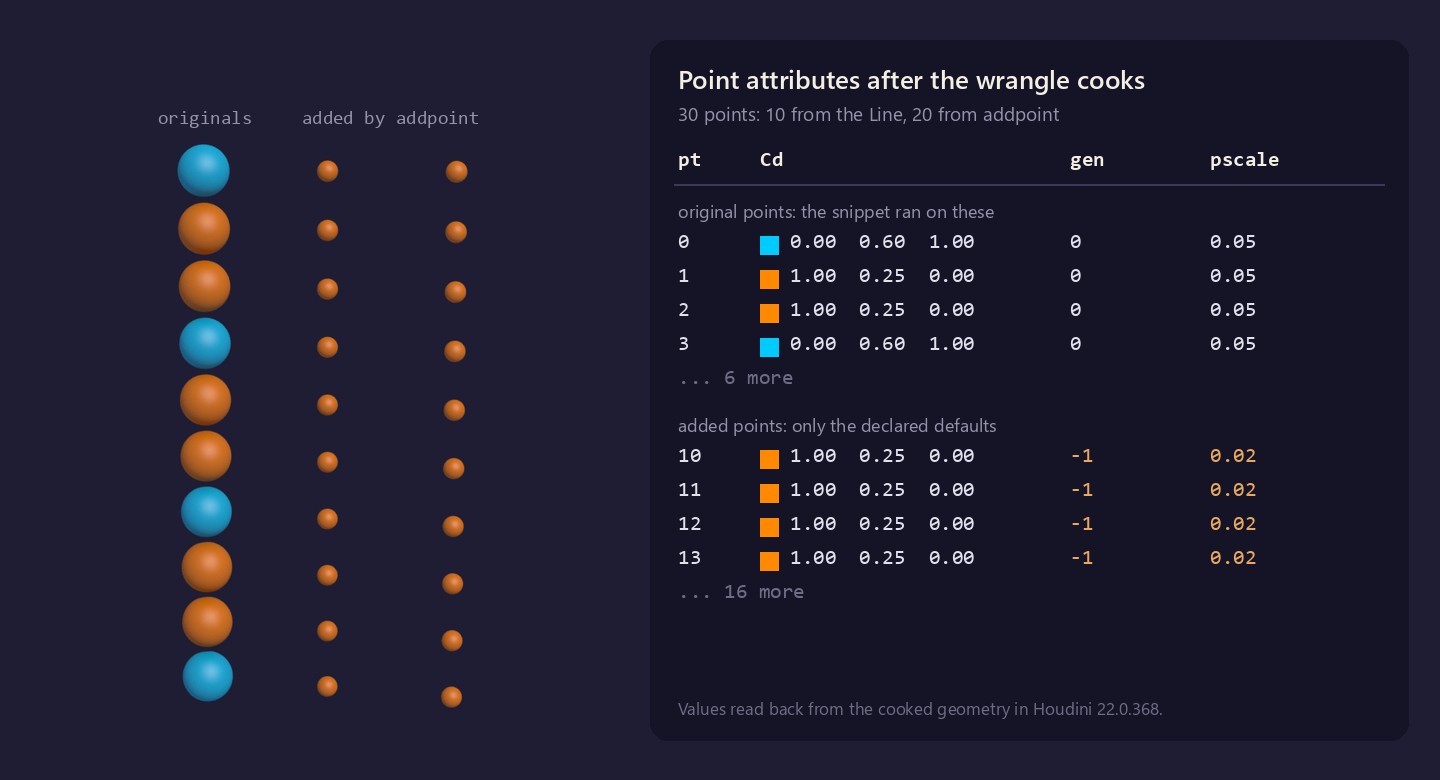
The ten originals get gen 0 and pscale 0.05, and every third one turns blue. The rest are orange: nothing wrote their color, so the declared value filled it in. The twenty new points are all orange, with gen -1 and pscale 0.02. The snippet never runs over them, because new geometry is added after every existing point has run, so the declared defaults are all they get. Delete the three declarations and the new points come out white, with pscale and gen at 0: Houdini gives a new Cd a default of white and other new number attributes a default of 0. The other form, addpoint(0, @ptnum), copies every attribute from an existing point, so defaults don't apply to it.
The default travels downstream, too. Merge this result with a plain Grid and all 100 grid points come through orange, with gen -1 and pscale 0.02, whichever Merge input the grid is on. In SQL terms, it's ADD COLUMN gen INT DEFAULT -1: the default is part of the column, so rows that never set it still get a defined value. A sentinel such as -1 works better than zero here, because 0 is a real gen.
Fix 2: an allow-list with Attributes to Create
Defaults make missing attributes sensible, but a typo still makes a new one. The wrangle's Attributes to Create parameter, just below the code editor, controls that. Its default, *, allows every name. Replace it with the names the snippet may write, separated by spaces, and writing any other name stops the node:
// Attribute Wrangle on a Grid
// Attributes to Create: Cd pscale gen
v@Cd     = {0, 0.6, 1};
f@pscael = 0.06; // typo: now a node errorThe node errors with "Read-only expression on left side of assignment", plus the line and column of the typo. The message doesn't mention the list. Names that aren't on it are bound read-only, so writing to one is a compile error.
That also tells you what the list really covers. The help describes it as a filter on creating attributes, but in Houdini 22 it applies to every write through @. With Cd pscale gen, v@P.y += 1; fails with the same error, and so does writing a pscale the input already had if pscale isn't on the list. If the snippet moves points, add P.
This is JavaScript's "use strict" for attributes. In sloppy mode, assigning to a misspelled variable creates a new global and carries on; in strict mode the same line throws ReferenceError: colr is not defined. JavaScript also throws when you read an undeclared name, but the allow-list leaves gaps:
- Reads still default to zero.
v@Cd = set(f@pscael, 0, 0);compiles, reads 0 and creates nothing. - Function writes bypass it.
setpointattrib(0, "foo", @ptnum, 1.0)still createsfoo. The list covers@names only. - An unwritten declaration disappears quietly.
float @height = 3;withheightoff the list creates nothing and reports nothing.
Fix 3: Enforce Prototypes
To close the read gap, turn on Enforce Prototypes, the checkbox just below Attributes to Create (off by default). Every @ name must then be declared, with the same syntax as the defaults above. That includes the built-ins @P, @ptnum, @Time and @Frame. In return you can drop every type prefix:
// Attribute Wrangle on a Grid, Run Over: Points
// Enforce Prototypes: on
vector @P;
int    @ptnum;
float  @Time;
float  @height = 0;      // a new attribute, default 0
int    @nbrs[];          // an array attribute: add []

@height = 0.25 * sin(@P.x * 2 + @Time * 3);
@P.y   += @height;
@nbrs   = neighbours(0, @ptnum);   // numbers of the connected points

// @heigth *= 2; // uncomment: a compile error, not a new attributeUncomment the last line and the node errors with "Reference to undefined variable: _bound_heigth" (the message spells @ names with a _bound_ prefix). A read such as float x = @heigth; fails the same way, and so does any built-in you forget: leave out int @ptnum; and the error names _bound_ptnum. A prefix doesn't count as a declaration either: f@height = 1; fails until float @height; is in the snippet.
This is Fortran's IMPLICIT NONE. Without it, Fortran gives an undeclared name a type from its first letter (I to N means INTEGER, anything else REAL), so a misspelled cuont is just a new REAL variable and the program compiles. VEX does the same with its own rule: an unknown name is a float. With IMPLICIT NONE, gfortran stops with "Symbol 'cuont' at (1) has no IMPLICIT type; did you mean 'count'?". Enforce Prototypes does that job for @ names. It costs a block of declarations, and in return that block lists everything the wrangle reads and writes, with types.
The two switches stack. With both on, a declared name that isn't on Attributes to Create still can't be written: you get the read-only error from Fix 2.
What trips you up, and what clicks
haspointattrib(0, …)asks about the input, not your output. Input 0 is the geometry as it came into the node (Gather, don't scatter explains why), so inf@made = 1; i@seen = haspointattrib(0, "made");every point getsseen0.- A declaration never overwrites. If the input already has the attribute, the declared value is ignored. Put a Color node upstream of
vector @Cd = {1, 0.25, 0};and its colors pass through untouched. When you mean to set a value, assign it. - String defaults only half work.
string @label = "abc";fills the points the snippet runs over, but points fromaddpointget an empty string. The SideFX docs list this as a known limitation, and Tomori's tutorial says the same. - Indenting a declaration changes its meaning. Indented, it's a local variable. With Enforce Prototypes off, that clashes with the automatic binding ("Multiple declarations of variable: _bound_mass"). With it on, it compiles without complaint and the attribute is never created.
- What clicks:
@nameis a declaration that looks like a variable. It names part of the wrangle's interface, so it's settled when the snippet compiles.haspointattrib,pointandsetpointattribare the runtime API. When whether an attribute exists depends on the input, use the functions. When you're stating what the node reads and writes, use@, and with Enforce Prototypes on, you state it once, at the top.
For a three-line wrangle the defaults are fine. For anything longer, or anything someone else will inherit, we'd declare a default for every attribute the node creates and turn on Enforce Prototypes. The allow-list earns its place when a wrangle should touch only a few attributes.
Try it yourself
- Install Houdini Apprentice, the free, non-commercial edition from SideFX.
- Wire a Grid into an Attribute Wrangle and type
@cd = {1, 0, 0};. Middle-click the node to read the warning, then open the Geometry Spreadsheet and find the floatcdcolumn. - Set Attributes to Create to
Cdand the node errors. Change the code tov@Cd = {1, 0, 0}; v@P.y += 1;and it still errors until you addPto the list. - Build the Line example, Merge it with a Grid, and check
genon the grid's points in the spreadsheet. - Turn on Enforce Prototypes for the Line example. Which two declarations does it need before it compiles? (Answer:
vector @P;andint @ptnum;.)
No Houdini? Run the defaultdict example above, then change defaultdict(float) to {} and watch the KeyError.
Functions used: hasattrib, haspointattrib, point, setpointattrib, addpoint, set, sin, neighbours. Each one links to its entry in the Simstim VEX reference.
Sources
- jtomori/vex_tutorial, Juraj Tomori's VEX tutorial ("Checking for attributes", "Automatic attribute creation", "Attribute default values", "Attributes to create", "Enforce prototypes")
- SideFX: Using VEX expressions (attribute creation, known types, prototypes and defaults, creating geometry)
- SideFX: Attribute Wrangle (Attributes to Create, Enforce Prototypes)
- SideFX VEX docs: hasattrib, haspointattrib, setpointattrib, addpoint
- Python docs: collections.defaultdict
- MDN: Strict mode (assigning to an undeclared variable)
- Fortran: Variables on fortran-lang.org (
implicit none) and Fortran variables on Wikibooks (the I to N rule)
Related
 HoudiniStage in, stage out: Houdini's Solaris treats every node as a function over a USD sceneIn Houdini's Solaris, every LOP node takes a composed USD stage and returns one, and its edits land in one in-memory layer at the top. A 31-line usd-core model of that contract, the Python LOP that does it for real, the same network checked in Houdini 22, and why a Layer Break decides what gets saved.
 Houdinisplit() is a tokenizer: building cache paths from strings in Houdini VEXVEX strings look like Python's, but split() merges separators and drops empty fields, len() counts bytes, and a wrangle expands $ before the compiler sees it. A per-piece cache path built from the scene file name, and the traps along the way, checked in Houdini 22.
 LatestMaterialX is an IR for materials: build a typed shader graph in Python, then lower it to GLSL and OSLA MaterialX material is a typed dataflow graph stored as XML, which a library type-checks and compiles to several shading languages. With only pip install MaterialX, build a checkerboard material in Python, watch the validator reject a float wired into a color, and generate GLSL and OSL from the same file.