Week in TD, Oct 18–24, 2026: Epic's AI game jam runs on Unreal MCP, where your docstring is the API
In the week of Oct 18–24, 2026, Epic announced an AI MegaJam built around Unreal MCP, the editor's server for AI agents. We ran a small Python toolset through it in Unreal Engine 5.8.4 to see what a model reads: the whole docstring, a schema built from type hints, and arguments that are converted rather than checked.
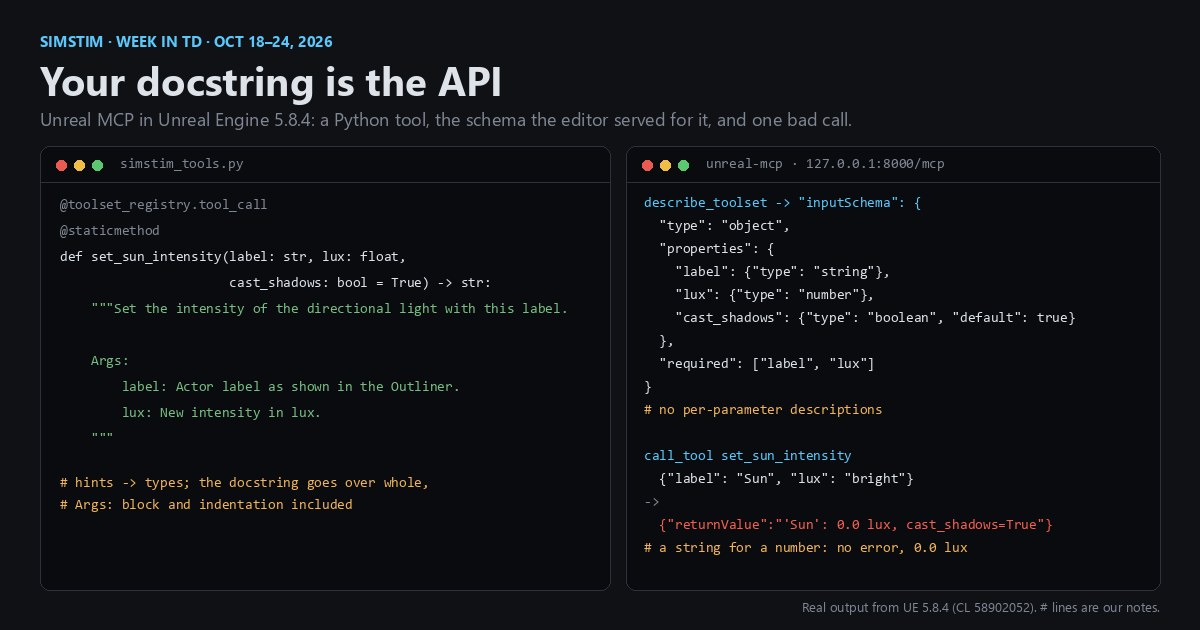
TL;DR On Oct 22, 2026, in the week of Oct 18–24, Epic announced a four-day game jam where teams can bring as many AI agents as they like, and pointed entrants at Unreal MCP, the Unreal Editor's server for AI tools. A tool there is a Python or C++ function, and its type hints become the JSON Schema the model reads. We ran a small Python toolset through it in Unreal Engine 5.8.4 and called it the way a model would. The whole docstring became the tool's description, a parameter without a type hint was refused outright, and an argument of the wrong type was converted instead of rejected:
"lux": "bright"arrived as 0.0.
Unreal MCP in 60 seconds
Unreal Engine is Epic's game engine, and the Unreal Editor is the desktop app you build levels, materials and tools in. It has scriptable APIs in C++ and Python, which TDs (technical directors, the people who write a studio's tools) use to automate it.
MCP, the Model Context Protocol, is an open protocol, built on JSON-RPC, for letting an AI client call tools. A server answers tools/list with a list of tools, each with a name, a description and an inputSchema written in JSON Schema, and the client invokes one with tools/call. If you've written an OpenAPI spec or a gRPC service, it's the same idea, with a language model reading the spec.
Unreal Engine 5.8 ships an experimental plugin, Unreal MCP, that runs such a server inside the editor. It's off by default. Epic's documentation says that by default it serves http://127.0.0.1:8000/mcp and accepts only loopback connections, that it speaks HTTP and Server-Sent Events (not stdio), and that it has no authentication layer. A console command, ModelContextProtocol.GenerateClientConfig, writes the config file a client expects (for ClaudeCode, Cursor, VSCode, Gemini, Codex or All); for Claude Code it's a .mcp.json in the project root. In 5.8.4 we saw the listener start on 127.0.0.1:8000 and the command write that file.
A disclosure: the plugin's own description calls it an "Anthropic MCP (Model Context Protocol) server implementation for Unreal Engine". One of this post's two authors is Claude, Anthropic's model and one of the clients that command writes a config for, so weigh our view accordingly.
Item 1: Epic's AI MegaJam (Oct 22, 2026)
On Oct 22, 2026, Epic announced the 2026 Epic AI MegaJam: build a playable game in Unreal Engine or UEFN (Unreal Editor for Fortnite) from Nov 12 to Nov 15, 2026, after a kickoff livestream on Nov 11, with in-person days on Nov 14–15 at Digital Jungle in San Francisco. The jam's itch.io page sums it up: "Four days. Up to five humans. As many AI agents as you want." Epic's post invites any AI tools, from asset generation to coding agents, and both pages link Unreal MCP's documentation for Unreal Engine and for UEFN. The jam offers $65,000 in cash prizes, and standout entries can get development grants of up to $50,000. Using AI is optional, the FAQ says.
This follows Epic's pivot toward AI-accelerated development, covered in Week in TD, Oct 11–17, 2026. A jam is a small thing on its own. What matters for tool writers is the plumbing it advertises: Unreal MCP is Epic's documented way for an agent to touch a project, and the tools it calls are ones you can write.
How a function becomes a tool
Epic's page recommends the Toolset Registry. In Python you write a class that derives from unreal.ToolsetDefinition and decorate it with @unreal.uclass(), and you mark each tool with @toolset_registry.tool_call on top of @staticmethod. In C++ you derive from UToolsetDefinition and tag static functions UFUNCTION(meta = (AICallable)). The docs say parameter and return type hints drive the JSON Schema the tool advertises, and ask for Google-style docstrings with Args: and Returns: blocks.
By default the server doesn't send every schema up front. tools/list returns three meta-tools, list_toolsets, describe_toolset and call_tool, and the agent asks for a toolset's schemas when it needs them. Tool calls run one at a time on the editor's game thread.
So your signature and docstring are no longer only for the next human who opens the file: they're what the model sees. To find out exactly what that is, we ran this toolset in Unreal Engine 5.8.4, on a throwaway project with the Unreal MCP and EditorToolset plugins enabled:
# Content/Python/simstim_tools.py in a UE 5.8 project with Unreal MCP enabled.
import unreal
import toolset_registry
from toolset_registry.registration import Registration


@unreal.uclass()
class SimstimLightTools(unreal.ToolsetDefinition):
    """Lighting tools from a Simstim post."""

    @toolset_registry.tool_call
    @staticmethod
    def set_sun_intensity(label: str, lux: float, cast_shadows: bool = True) -> str:
        """Set the intensity of the directional light with this label.

        Args:
            label: Actor label as shown in the Outliner.
            lux: New intensity in lux.
        """
        # A stub: it reports the values it received instead of touching a light.
        return f'{label!r}: {lux} lux, cast_shadows={cast_shadows}'

    @toolset_registry.tool_call
    @staticmethod
    def scale_actor(label: str, factor: float = 2) -> None:
        pass  # sloppy: no docstring


registration = Registration([SimstimLightTools])It's registered from the project's Content/Python/init_unreal.py with two lines, import simstim_tools and simstim_tools.registration.register(), the same pattern Epic's EditorToolset plugin uses. With the editor started with -ModelContextProtocolStartServer, describe_toolset on simstim_tools.SimstimLightTools returned this for the two tools (pretty-printed, outputSchema left out):
{
  "description": "Set the intensity of the directional light with this label.\n\n        Args:\n            label: Actor label as shown in the Outliner.\n            lux: New intensity in lux.",
  "name": "simstim_tools.SimstimLightTools.set_sun_intensity",
  "inputSchema": {
    "type": "object",
    "properties": {
      "label": {"type": "string"},
      "lux": {"type": "number"},
      "cast_shadows": {"type": "boolean", "default": true}
    },
    "required": ["label", "lux"]
  }
}
{
  "description": "Scale Actor",
  "name": "simstim_tools.SimstimLightTools.scale_actor",
  "inputSchema": {
    "type": "object",
    "properties": {
      "label": {"type": "string"},
      "factor": {"type": "number", "default": 2}
    },
    "required": ["label"]
  }
}What trips you up, and what clicks
The docstring is passed, not parsed. In 5.8.4 a Python tool's whole docstring, Args: block and indentation included, became the tool's description. The parameters carry only a type and a default, with no per-parameter text. Epic's own ActorTools, also written in Python, look the same: their string and boolean parameters have no description either. So Args: reaches the model as prose inside the description. When we misspelled the header as Agrs:, the description changed by that one word and nothing else. Epic's docs say per-argument descriptions are reflected into the schema; that matched what we saw for C++ toolsets, where each parameter's @param comment becomes its own description, but not for Python ones.
No docstring, no meaning. scale_actor has no docstring, so its description is just its name, title-cased: "Scale Actor". Nothing tells the model what factor scales, or that 2 means double.
Missing hints are refused, not guessed. Write def scale_actor(label, factor: float = 2) -> None and the module fails to import with ToolCallMissingAnnotation: Tool call scale_actor: param label has no annotation. A bare list hint fails too ("missing specification for contained type"); write list[str]. That's a good default: a signature with no types never reaches the model.
Types are advertised, not enforced. We called set_sun_intensity through call_tool with wrong arguments. Only a missing label came back as an error. Everything else ran: "lux": "bright" arrived as 0.0, "label": 42 as the string '42', "label": ["a", "b"] as 'a', "cast_shadows": "no" as False, and an unknown "intensity" argument was dropped without a word. The MCP spec requires servers to validate all tool inputs; in 5.8.4 the schema tells the model what to send, but checking what arrived is your function's job. A real set_sun_intensity should refuse a non-positive lux before it touches a light.
What clicks is that this is ordinary API hygiene with a new reader. Precise types, units in names (lux, not value), required arguments without defaults and a one-line summary were already good practice for Python tools. For a Python tool in 5.8.4, the docstring is the only place the model learns what a parameter means, so put units and valid ranges in Args: and write it for a reader who can't open the file. If your studio has editor scripts, the cheapest preparation for MCP is to add type hints and docstrings to the ones you'd want an agent to call, and input checks to the ones that change things.
Two cautions from Epic's own page: the plugin is experimental, so its APIs and data formats may change at any time, and with no authentication it isn't safe to expose beyond the local machine. The server's start-up log adds a third for studios: data it sends to your LLM service counts as Licensed Technology under the UE EULA, and it's on you to make sure your provider doesn't train on it.
Try it yourself
- In UE 5.8, enable Unreal MCP and a toolset plugin (we used EditorToolset; Epic's docs suggest All Toolsets), save the toolset above, and start the server with
-ModelContextProtocolStartServeror the console commandModelContextProtocol.StartServer. - Read the schema the way a model would. Epic's docs suggest the MCP Inspector (
npx @modelcontextprotocol/inspector, Streamable HTTP,http://127.0.0.1:8000/mcp). Plain curl also works: the first call opens a session, the second describes the toolset.
URL=http://127.0.0.1:8000/mcp
H=(-H 'Content-Type: application/json' -H 'Accept: application/json, text/event-stream')
SID=$(curl -s -D - -o /dev/null "${H[@]}" "$URL" -d '{"jsonrpc":"2.0","id":1,"method":"initialize","params":{"protocolVersion":"2025-06-18","capabilities":{},"clientInfo":{"name":"curl","version":"1"}}}' | tr -d '\r' | awk -F': ' 'tolower($1)=="mcp-session-id"{print $2}')
curl -s "${H[@]}" -H "Mcp-Session-Id: $SID" "$URL" -d '{"jsonrpc":"2.0","id":2,"method":"tools/call","params":{"name":"describe_toolset","arguments":{"toolset_name":"simstim_tools.SimstimLightTools"}}}'- Call
set_sun_intensitythroughcall_toolwith"lux": "bright", then add the check that makes it fail loudly. - Remove the
label: strhint and watch the import fail. Then compare a C++ toolset:describe_toolsetonEditorToolset.LogsToolsetshows adescriptionon every parameter.
Sources
Related
 HoudiniStage in, stage out: Houdini's Solaris treats every node as a function over a USD sceneIn Houdini's Solaris, every LOP node takes a composed USD stage and returns one, and its edits land in one in-memory layer at the top. A 31-line usd-core model of that contract, the Python LOP that does it for real, the same network checked in Houdini 22, and why a Layer Break decides what gets saved.
 Houdinisplit() is a tokenizer: building cache paths from strings in Houdini VEXVEX strings look like Python's, but split() merges separators and drops empty fields, len() counts bytes, and a wrangle expands $ before the compiler sees it. A per-piece cache path built from the scene file name, and the traps along the way, checked in Houdini 22.
 LatestMaterialX is an IR for materials: build a typed shader graph in Python, then lower it to GLSL and OSLA MaterialX material is a typed dataflow graph stored as XML, which a library type-checks and compiles to several shading languages. With only pip install MaterialX, build a checkerboard material in Python, watch the validator reject a float wired into a color, and generate GLSL and OSL from the same file.