Make for 3D: Houdini's TOPs are a build system whose targets are work items
Houdini's TOP networks (PDG) generate work items, cook them, skip the ones whose output files already exist, and gather results with partitions. We build the same idea in 28 lines of plain Python, then run it as a Python Processor TOP in Houdini 22 and see where the analogy holds.
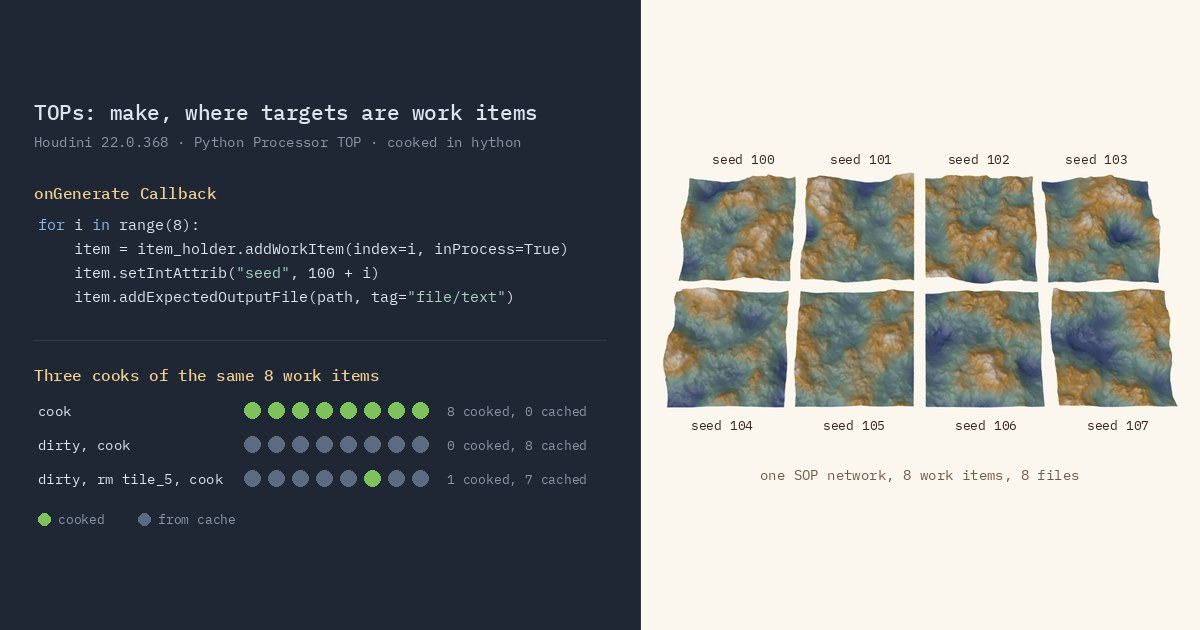
TL;DR Houdini has a whole node context, TOPs, that is not about geometry at all: it is a dependency graph of tasks, closer to
makeor a CI pipeline than to a 3D tool. Each task is a "work item" with attributes and expected output files, so PDG can farm items out in parallel and skip any whose outputs are already on disk. We build a 28-line Python toy with the same shape and run it, then build the same graph as a Python Processor TOP in Houdini 22. The caching maps over directly. The parallelism needs one change: in-process Python items share one interpreter lock.
Houdini in 60 seconds
Houdini organizes everything as node networks, and each network type is a "context". SOPs (surface operators) edit geometry: points, primitives, and attributes, which are named per-element columns such as position P. Wrangles run a small VEX program once per point. DOPs run simulations, LOPs build USD scenes, and VOPs are visual shader-style graphs.
TOPs (task operators) are different. Nothing flowing through a TOP network is geometry. What flows is work: "render frames 1 to 240", "simulate this variant", "convert these 500 textures". The engine underneath is called PDG, the Procedural Dependency Graph, and it has its own Python module, pdg, separate from the hou module that drives the rest of Houdini.
A build system where the targets are rows
If you have written a Makefile, most of PDG will feel familiar once the words are swapped.
- Work items are the targets. A work item is a small record: an index, a name, a bag of typed attributes (int, float, string, file and a few more), and a list of output files. The SideFX docs note that some work items exist only to carry attributes and never run anything.
- Processor nodes are the rules. They take each upstream work item and generate one or more children, which inherit the parent's attributes. A parent's
outputfiles become the child'sinputfiles automatically, the same way one rule's target becomes the next rule's prerequisite. - Partitioner nodes are the fan-in. A partition groups many work items into one and depends on all of them. Wait for All, the most common one, is the equivalent of a final link step that needs every object file.
- Schedulers decide where a work item's job runs: the Local Scheduler uses a process pool on your machine, while HQueue and Tractor schedulers send jobs to a render farm. The graph doesn't change when you swap one for another. Work items marked in-process skip them: PDG cooks those itself, inside Houdini.
- Expected output files make caching possible. If a work item declares the files it will write, PDG can check the disk before cooking. The
pdg.cacheModedocs describe the default, Automatic, as: "Work items will cook from cache files if they're found on disk, or cook normally if the cache files are missing."
One twist has no direct make equivalent. Work items can be static, known from parameters before anything runs (a frame range), or dynamic, created only once an upstream item has cooked (one item per tile a simulation happened to produce). The docs prefer static where possible, since a known item count gives better progress estimates. In Houdini 22 each processor sets this with its Generate When menu.
The toy version in plain Python
Here is the whole idea without Houdini: generate items with attributes and an expected output path, cook only the missing ones in a process pool, then run a partition step that needs all of them.
# A toy "TOP network": generate work items, cook only the ones whose
# expected output is missing, then partition (wait for all) and merge.
import os, random
from concurrent.futures import ProcessPoolExecutor

OUT = "out"

def generate(n):
    # Each work item is just a dict of attributes plus an expected output path.
    return [{"index": i, "seed": 100 + i, "expected": f"{OUT}/tile_{i}.txt"}
            for i in range(n)]

def cook(item):
    rng = random.Random(item["seed"])  # deterministic per item
    with open(item["expected"], "w") as f:
        f.write(f"{sum(rng.random() for _ in range(100_000)):.4f}\n")
    return item["index"]

if __name__ == "__main__":
    os.makedirs(OUT, exist_ok=True)
    items = generate(8)
    todo = [it for it in items if not os.path.exists(it["expected"])]  # cache check
    with ProcessPoolExecutor(max_workers=4) as pool:                   # the "scheduler"
        cooked = sorted(pool.map(cook, todo))
    print("cooked:", cooked, "| from cache:", len(items) - len(todo))
    # Partition: runs only after every item exists, like Wait for All.
    total = sum(float(open(it["expected"]).read()) for it in items)
print(f"merged total = {total:.4f}")Save it as mini_pdg.py and run it three times: once clean, once again, and once after deleting one output. With Python 3.12.10, and again with the Python 3.13.10 that ships with Houdini 22, we saw:
$ python3 mini_pdg.py
cooked: [0, 1, 2, 3, 4, 5, 6, 7] | from cache: 0
merged total = 399990.1756
$ python3 mini_pdg.py
cooked: [] | from cache: 8
merged total = 399990.1756
$ rm out/tile_5.txt && python3 mini_pdg.py
cooked: [5] | from cache: 7
merged total = 399990.1756The third run is the point. Delete one frame of a 240-frame render and only that frame comes back.
The same graph as a TOP network
In Houdini, put down a TOP Network, and inside it a Python Processor TOP. Its onGenerate Callback plays the role of generate(). Mark the items in-process so that its onCookTask Callback cooks them inside Houdini:
# Python Processor TOP, onGenerate Callback.
# Available here: self (the PDG node), item_holder, upstream_items, generation_type.
import hou

for i in range(8):
    item = item_holder.addWorkItem(index=i, inProcess=True)
    item.setIntAttrib("seed", 100 + i)  # becomes @seed downstream
    path = hou.text.expandString("$HIP/pdg_out/tile_{}.txt".format(i))
item.addExpectedOutputFile(path, tag="file/text") # what makes caching possibleThe onCookTask Callback is our cook(), with work_item provided:
# Python Processor TOP, onCookTask Callback (runs once per in-process item).
import os, random

path = work_item.expectedOutputFiles[0].path
os.makedirs(os.path.dirname(path), exist_ok=True)
rng = random.Random(work_item.attribValue("seed"))
with open(path, "w") as f:
    f.write("%.4f\n" % sum(rng.random() for _ in range(100000)))
work_item.addOutputFile(path, tag="file/text") # report the real outputThere is no return at the end. The callback field is a script, not a function body, so a return pdg.result.Success there is a SyntaxError and every item fails. Reaching the end counts as success, and an exception marks the item failed.
Wire a Wait for All TOP after it and cook it. The partition's single work item depends on all eight tiles and collects their eight files as its own outputs, so a node after it gets them as work_item.inputFiles. In the network editor each work item is a dot on its node, green once it has cooked, and middle-clicking a dot pops up its attributes.
We cooked this network from hython in Houdini 22.0.368, and the toy's three runs show up almost exactly:
- Cook again with nothing changed and nothing runs. The items are already cooked.
- Delete
tile_5.txtand cook again, and only item 5 cooks. When you recook, PDG checks that cooked items' output files still exist (the schedulers' Validate Outputs When Recooking option, on by default). - Reopen the scene, or dirty the items while keeping their files, then cook: all eight come back as cooked from cache without running.
The parallel part maps less directly. In-process items don't go to the Local Scheduler's process pool: PDG cooks them on background threads inside Houdini, up to one per CPU thread. Our cook is pure Python, though, and Python's global interpreter lock lets only one thread run Python at a time. More on that below.
Parameter references are where TOPs connect to the rest of Houdini. In a node parameter, a work item attribute is written @seed, and built-in attributes take a pdg_ prefix: @pdg_index, @pdg_output. A string parameter needs backticks around the reference, so a File SOP that loads the selected work item's output has this as its path:
`@pdg_output`A ROP Geometry Output TOP cooks a SOP network once per work item, and every @seed in that network's parameters takes the cooking item's value. One SOP graph becomes eight variants without copying it, which is how "wedging" works.
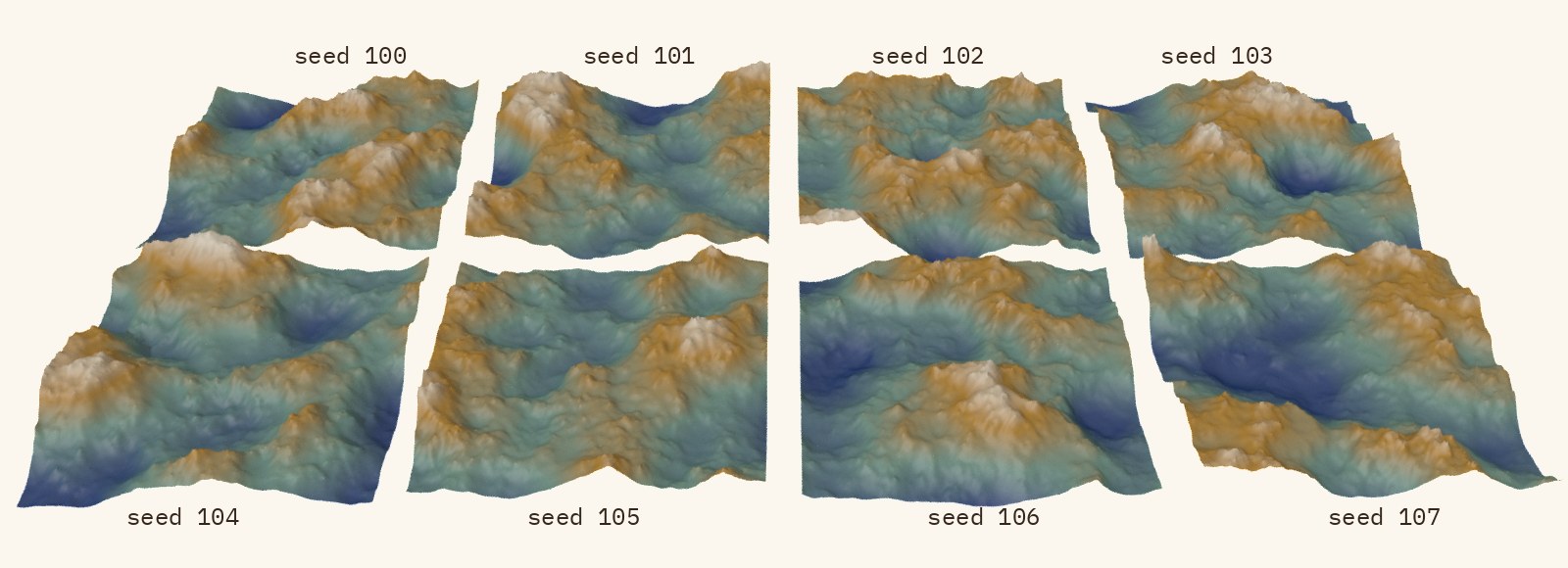
@seed * 10, so each item wrote a different terrain. Karma render of the eight files.What trips you up, and what clicks
- Cache by existence, not by content. Like the toy, Automatic caching checks that the expected files exist, not what is in them or which code wrote them. We overwrote a cached tile by hand, and the merged total used the edited file. We changed the onCookTask Callback, and the old tiles still counted as valid. Changing the seeds in the onGenerate Callback was different: the items were regenerated and all eight recooked, files or not. The docs' own tip is to keep intermediates in
__PDG_TEMP__so you can delete them wholesale to force a rebuild. PDG also invalidates downstream caches when an upstream item writes a new file, which our toy doesn't: in a two-stage test, recooking tile 5 recooked the one downstream item that read it. - Don't delete outputs by hand mid-graph. SideFX warns that destructive file operations "can make files appear to be missing, triggering the dependency system to do extra work." That is the third run above, triggered by accident.
- In-process Python doesn't run in parallel. The eight items run on separate threads, but only one thread can run Python at a time. With 10 million random numbers per tile, the eight in-process items took about 12 s on our 24-thread machine, no faster than the same eight tiles run one after another (about 13 s). As out-of-process items (no
inProcess, anditem.setCommand(...)running the tile as a separate Python script), the Local Scheduler ran them as separate processes in under 5 s with its default Total Slots, a quarter of the CPU count, and in about 4 s with 8 slots. - In-process and out-of-process see different worlds. An in-process item runs inside your Houdini session and can read all of it, but it can't edit the scene. An out-of-process item runs in a fresh process started by the scheduler and only sees the work item's saved attribute data. Code that leans on live
houstate works in one and fails in the other. houandpdgare two APIs.hou.TopNodeis the node in the network editor. Theselfin the scripts above is PDG's own object for it (in Houdini 22 aPythonProcessor, a subclass ofpdg.PyProcessor), whichhou.TopNode.getPDGNode()also returns. Generation and cooking hand youpdgobjects, and the onCookTask script starts withpdgavailable andhounot imported.- What clicks: once the graph is right, scaling out is a scheduler swap. Out-of-process items go to whichever scheduler the network uses, the Local Scheduler on your machine or HQueue or Tractor on a farm, and the graph itself doesn't change.
Try it yourself
- Run
mini_pdg.pywith nothing but Python 3. Then add amtimecomparison, so an item recooks when its input is newer than its output, and you have rebuiltmake's core rule. - In Houdini Apprentice (free for non-commercial learning), build the Python Processor plus Wait for All network above. Add a Python Script TOP after the partition, set its Evaluate Script During menu to Cook (In-Process), and sum the numbers from
work_item.inputFiles. With the default, Generate, the script runs when the item is generated and our sum came out as 0. Then delete one tile and cook again. - Swap the Python Processor for a Wedge TOP feeding a ROP Geometry Output TOP, and drive a Mountain SOP's Offset X with
@wedgeindex. Set the ROP's Cook Type to In-Process to keep the cook inside your Houdini session; the default, Out-of-Process, starts a separate Houdini process per job.
Sources
- SideFX: Introduction to PDG and TOPs (Houdini 22.0)
- SideFX: Python Processor TOP
- SideFX: Processor node callbacks
- SideFX: pdg.WorkItem
- SideFX: pdg.cacheMode
- SideFX: Using attributes
- SideFX: TOPs tips and tricks
- SideFX: PDG node network interface (work item dots)
- SideFX: Wait for All TOP
- SideFX: Local Scheduler TOP (Total Slots, Validate Outputs When Recooking)
- SideFX: In Process Scheduler TOP (how PDG runs in-process items)
- SideFX: Python Script TOP
- SideFX: ROP Geometry Output TOP
- SideFX: Wedge TOP
- Python glossary: global interpreter lock
Related
 HoudiniStage in, stage out: Houdini's Solaris treats every node as a function over a USD sceneIn Houdini's Solaris, every LOP node takes a composed USD stage and returns one, and its edits land in one in-memory layer at the top. A 31-line usd-core model of that contract, the Python LOP that does it for real, the same network checked in Houdini 22, and why a Layer Break decides what gets saved.
 Houdinisplit() is a tokenizer: building cache paths from strings in Houdini VEXVEX strings look like Python's, but split() merges separators and drops empty fields, len() counts bytes, and a wrangle expands $ before the compiler sees it. A per-piece cache path built from the scene file name, and the traps along the way, checked in Houdini 22.
 LatestMaterialX is an IR for materials: build a typed shader graph in Python, then lower it to GLSL and OSLA MaterialX material is a typed dataflow graph stored as XML, which a library type-checks and compiles to several shading languages. With only pip install MaterialX, build a checkerboard material in Python, watch the validator reject a float wired into a color, and generate GLSL and OSL from the same file.