Week in TD, Sept 28–Oct 4, 2026: Blender is porting to Android, and its color spaces are getting real IDs
In the week of Sept 28–Oct 4, 2026, coverage of Blender's Android port landed and OpenColorIO 2.6 shipped the lookup half of color interop IDs, which Blender 5.3 exposes to Python. What the port means for code, and interop IDs tested in OCIO 2.6 and a Blender 5.3 build.
TL;DR Two Blender stories from the week of Sept 28–Oct 4, 2026. First, Blender is coming to Android tablets: coverage of a Blender Conference talk put the target at the first half of 2027, and Blender's own tracker shows the hard engineering is the long tail of mobile Vulkan drivers. Second, color spaces are getting stable machine names. Blender 5.3 adds
colorspace_settings.interop_idto its Python API, and OpenColorIO 2.6.0, released on Oct 1, adds the function that finds the local color space for an incoming ID. A pipeline can stop matching color spaces by whatever label a menu shows. We ran both in OCIO 2.6.0 and a Blender 5.3 alpha build.
Blender in 60 seconds
Blender is a free, open-source 3D application written mostly in C and C++, with a Python API (bpy) that drives almost everything: menus, add-ons, importers, render setup. Every user action is an operator, a named command with a Python-visible signature, and many operators are bound to keyboard shortcuts in keymaps. Like most DCCs (digital content creation tools), Blender is a desktop app first: the UI assumes a mouse, a keyboard and a desktop-class GPU.
That background explains both stories.
Story 1: Blender on Android
Jonas Holzman, a Blender developer, gave the talk "Porting Blender to Android" at Blender Conference 2026 (Felix Meritis, Amsterdam, Sept 23–25) on Sept 25. In the week of Sept 28–Oct 4 the tech press caught up. 9to5Google (Sept 30) and Creative Bloq (Oct 1), both reporting on the talk, put the target at the first half of 2027, focused on tablets with pen input, and said the iPad version is still on hold. We couldn't find that date in Blender's own written sources: its roadmap lists Android Platform Support as "In Development", with no date. The rest checks out against Blender's tracker, where the Android tracking issue (opened Sept 21) links a pre-built demo APK of the conference build.
For people who write code, the plumbing is more interesting than the tablet.
The GPU backend is the real port. The port runs on Blender's Vulkan backend, and mobile Vulkan drivers vary a lot. On Aug 4, Jeroen Bakker asked tablet owners on Blender's developer forum to upload Vulkan capability reports: Blender was "known to work on certain latest high-end Android tablets", and the team wanted to know what mid-range and older ones lack. His design task (#162559) sorts the missing features by how hard they are to work around. Several get workarounds, and a Sept 10 commit lowered Blender's Vulkan requirement from 1.2 to 1.1 plus the extensions that make up the difference. Three features (dualSrcBlend, timelineSemaphore and geometryShader) won't get one. The tally: of 34 tablet reports, 17 will be supported and 17 won't. The table also shows that the chip doesn't settle it. Two tablets with the same Adreno 619 GPU report Vulkan 1.1 (a Galaxy Tab S7, missing four features) and 1.3 (a Xiaomi Pad 5, missing one), because the driver decides.
The input model is an API problem. Blender's UX is largely a table that maps keys to operators, and a tablet has no keyboard. The conference demo branch doesn't replace that table; it adds ways to reach it. An on-screen modifier wheel toggles Shift, Ctrl and Alt and opens the Quick Favorites menu, Enter and Esc buttons appear during modal operators, and gestures cover undo (two-finger tap) and redo (three-finger tap). The tracking issue calls the branch a sandbox "implemented in a non-maintainable way", with proper, platform-independent touch support to follow after workshops. If you register operators and keymaps in an add-on, that touch layer is the part to watch.
Python comes along. The draft integration pull request (#164188, opened Sept 21) builds Python for Android as a shared library, following PEP 738, and cross-compiles Python modules such as NumPy with crossenv. It lists "failure to load certain Python modules" as remaining work and doesn't discuss add-ons. Our reading: pure-Python add-ons are the easy case, and anything that ships compiled wheels will need Android builds, so check yours before promising tablet support.
Update, Oct 17, 2026: Blender's Oct 9 project update says the demo branch was completed and shown at the conference. Next up: x86_64 support for Chromebooks and Googlebook laptops as an intermediate milestone, merging the Android branch into main, and "Touch Abstraction Layer work". The integration pull request is still open.
Story 2: color spaces as IDs, not strings in a dropdown
This one got less attention, but it affects anyone who moves images between tools. Three changes landed close together:
- Sept 21–23: four commits by Brecht Van Lommel, listed in Blender's weekly developer notes dated Sept 28. Blender now stores each color space's interop ID next to its name and exposes it in Python. They build on runtime OpenColorIO config switching, which was in the Sept 21 notes.
- Sept 29: per-project OpenColorIO configs landed in Blender 5.3 (in the Oct 5 notes). A project can use Blender's config, ACES 1.3, ACES 2.0 or a custom one, saved as
ocio_configin itsproject.toml. - Oct 1: OpenColorIO 2.6.0 was released, with functions for finding and generating interop IDs.
Some background. OpenColorIO (OCIO) is the Academy Software Foundation (ASWF) library that Blender, Houdini, Nuke and many other tools use for color management. Each config names its color spaces however it likes, so the same space can be "ACEScg" in one config, "ACES - ACEScg" in another and "lin_ap1" in a third. OCIO's own built-in studio config lists the last two as aliases of ACEScg for exactly that reason. Pipelines have handled this with alias tables and string matching, which is fragile in the same way that matching enum labels instead of enum values is fragile. Per-project configs make it more pressing: a .blend can now move between configs that name things differently. The commit that stores the IDs says so: it "improves compatibility when loading or appending assets from blend files created with another OpenColorIO config."
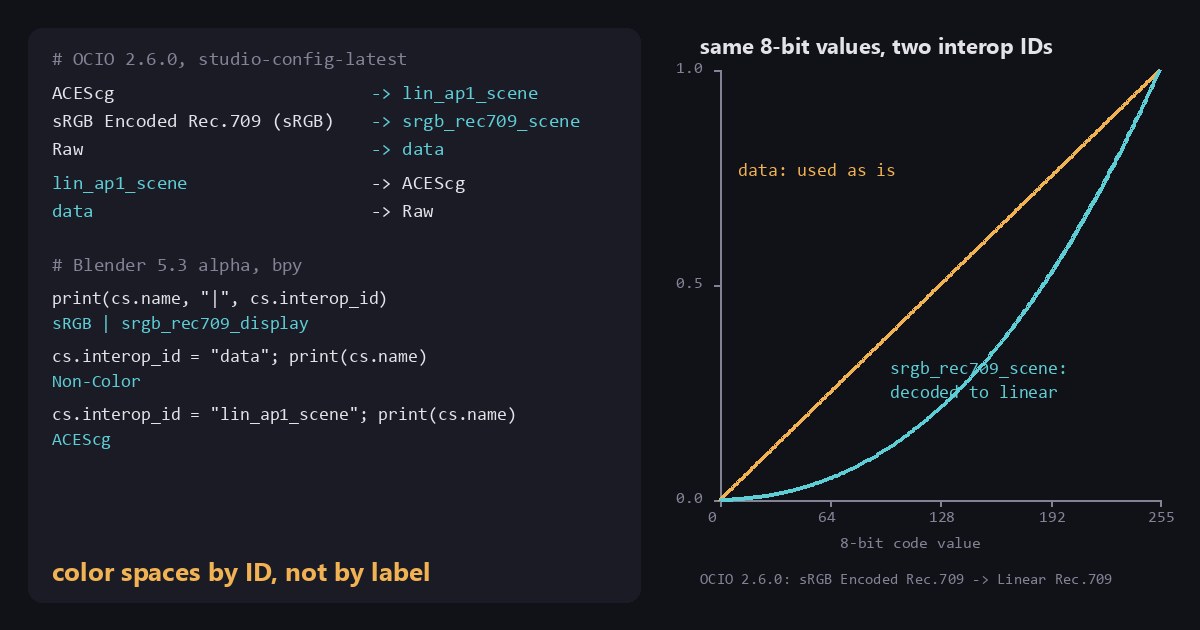
The ASWF's Color Interop Forum fixes the names. OCIO 2.5 (October 2025) added an interop_id attribute to color spaces. A Forum ID reads as encoding, primaries and image state: lin_ap1_scene is linear, ACES AP1 primaries, scene-referred. Others include srgb_rec709_scene and g24_rec709_display, plus data for non-color data such as normal maps. The Forum's July 2026 recommendation, "An ID for Color Interop", adds namespaces for everything else. IDs starting with ocio are reserved for OCIO's maintainers, who use them for camera log spaces such as ocio:arrilogc4_awg4_scene; a studio uses its own prefix; Blender's config uses blender: for its own spaces, such as blender:agxlog_rec2020_scene. It works like vendor-prefixed extensions in Vulkan or OpenGL. Menus keep showing names, and only files and APIs carry the ID.
Try it in OpenColorIO, without Blender
Run this in any Python 3 environment after pip install opencolorio. We used OCIO 2.6.0 on Python 3.12, with its built-in studio config:
# Color spaces by stable ID instead of display name.
# pip install opencolorio   (interop IDs: 2.5+, findColorSpaceForID: 2.6+)
import PyOpenColorIO as ocio

cfg = ocio.Config.CreateFromBuiltinConfig("studio-config-latest")
print("OCIO", ocio.__version__, "|", cfg.getName())

# Writer side: what ID should go into the file / USD attribute?
for name in ("ACEScg", "sRGB Encoded Rec.709 (sRGB)", "Raw"):
    cs = cfg.getColorSpace(name)
    print(f"{name:30} -> {cs.getInteropID()}")

# Reader side: an ID came in from another app; which local space is it?
for iid in ("lin_ap1_scene", "srgb_rec709_scene", "data"):
    cs = cfg.findColorSpaceForID(iid)   # returns None if the config has no match
print(f"{iid:30} -> {cs.getName()}")It printed:
OCIO 2.6.0 | studio-config-v5.0.0_aces-v2.1_ocio-v2.6
ACEScg                         -> lin_ap1_scene
sRGB Encoded Rec.709 (sRGB)    -> srgb_rec709_scene
Raw                            -> data
lin_ap1_scene                  -> ACEScg
srgb_rec709_scene              -> sRGB Encoded Rec.709 (sRGB)
data -> RawOn OCIO 2.5.2, getInteropID() works but findColorSpaceForID() doesn't exist yet. For comparison, this is the code it replaces in many pipelines:
ALIASES = {"acescg": "ACEScg", "aces - acescg": "ACEScg", "lin_ap1": "ACEScg"}
local = ALIASES.get(incoming.strip().lower()) # breaks on the next studio's configAnd in Blender 5.3
Blender's 5.3 Python API notes add interop_id next to the existing name on an image's color space settings. It's an enum built from the active config's IDs:
import bpy

img = bpy.data.images.new("probe", 4, 4)     # or any image you've loaded
cs = img.colorspace_settings
print(cs.name, "|", cs.interop_id)

cs.interop_id = "data"                        # instead of cs.name = "Non-Color"
print(cs.name)
cs.interop_id = "lin_ap1_scene"
print(cs.name)On a Blender 5.3 alpha build from Sept 25, 2026, run with blender -b --factory-startup, it printed:
sRGB | srgb_rec709_display
Non-Color
ACEScgBlender 5.2 has no interop_id. In 5.3, setting an ID the config doesn't have raises a TypeError that lists every ID it does have. Set the same PNG to srgb_rec709_display on one image and to data on another, and the data copy renders washed out, because Blender no longer decodes its sRGB values.
What trips you up, and what clicks
- An interop ID isn't another alias, but OCIO looks it up like one. An alias is a lookup convenience inside one config. An interop ID says the space conforms to a shared definition: the difference between a
typedefand an ABI. Still, OCIO 2.6.0'sfindColorSpaceForID()searches color space names and aliases, as the Forum's recommendation describes. In a test config withinterop_id: lin_ap1_sceneand no matching alias, it returnedNone. OCIO's built-in configs and Blender's list every ID as an alias too, so they resolve. If you write configs, do the same. - A miss returns
None.findColorSpaceForID()doesn't raise, so check the result before callinggetName()on it. - sRGB has two IDs in Blender. Blender's config doesn't always separate scene-referred and display-referred sRGB, so 5.3 accepts both
srgb_rec709_sceneandsrgb_rec709_displayfor its sRGB space. A new image reads backsrgb_rec709_display, so test for both, as the 5.3 notes do:if settings.interop_id in {'srgb_rec709_scene', 'srgb_rec709_display'}. - One ID can cover several spaces. Six display spaces in Blender's config share
srgb_rec709_display: plain sRGB plus the sRGB versions of Filmic, AgX, ACES 1.3, ACES 2.0 and Khronos PBR Neutral. An ID describes an encoding, not a view transform, so it isn't a unique key back to a name. - Writing an ID for a space that has none. The Forum's steps: use
getInteropID()if the config sets one; otherwise find the equivalent space in OCIO's built-in studio config; otherwise generate a local ID withgenerateLocalIDForColorSpace(). That last step needs a config name, and Blender's bundled config has none, so it fails there. If nothing works, writeunknownor nothing, never a guess.
On the Android story, it's easy to assume the hard part is the touch UI. Bakker's device table suggests the bigger engineering cost is the long tail of mobile GPU drivers.
Try it yourself
- Run the OCIO script, then load Blender's bundled config with
ocio.Config.CreateFromFile(...)(in a Blender install it's<version>/datafiles/colormanagement/config.ocio) and count the spaces with an emptygetInteropID(). In the 5.3 alpha config we used, there are none: all 63 spaces have an ID, 25 from the Forum, 32ocio:and 6blender:. - Write a function that takes two configs and maps every space in A to its counterpart in B with
findColorSpaceForID(), reporting the misses. Blender 5.3's config against OCIO 2.6's studio config gave us 7 misses. Six areblender:spaces, as you'd expect. The seventh is Linear Apple Wide Gamut: Blender's config calls itocio:linear_applewg_scene, while OCIO 2.6's studio config usesocio:lin_applewg_scene. Catching that kind of drift is what the exercise is for. - If you have an Android tablet, the demo APK is linked from Blender's Android tracking issue, and the GPU feedback thread on Blender's developer forum asks for Vulkan capability reports.
Everything here is free: opencolorio from pip, and Blender itself.
Sources
- Porting Blender to Android, Jonas Holzman, Blender Conference 2026 (talk page), and the talk video
- 9to5Google: Blender is coming to Android in 2027, iPad app still on pause, Sept 30, 2026
- Creative Bloq: Blender for Android could mean iPad is no longer the obvious choice of tablet for creatives, Oct 1, 2026
- Blender roadmap
- Feedback Needed: Android Tablet GPU support, Blender Developer Forum
- Blender tracker: #162559 Android GPU support, #163531 Vulkan: lower requirements to support Vulkan 1.1 devices, #164191 Android Platform Support tracking issue, #164188 Android: initial platform support
- 2026-10-09 Project Updates meeting, Blender Developer Forum
- Blender weekly notes: 21 September 2026, 28 September 2026, 5 October 2026
- Blender commits: store interop IDs alongside names, expose interop IDs in the Python API, accept scene and display interop IDs, per-project OpenColorIO configuration
- Blender 5.3 release notes: Python API (interop IDs), Core (project OpenColorIO configs)
- OpenColorIO: v2.6.0 release, v2.5.0 release, PR #2345: add color interop ID functions, opencolorio on PyPI
- ASWF Color Interop Forum: Color Space Encodings for Texture Assets and CG Rendering, An ID for Color Interop
Related
 HoudiniStage in, stage out: Houdini's Solaris treats every node as a function over a USD sceneIn Houdini's Solaris, every LOP node takes a composed USD stage and returns one, and its edits land in one in-memory layer at the top. A 31-line usd-core model of that contract, the Python LOP that does it for real, the same network checked in Houdini 22, and why a Layer Break decides what gets saved.
 Houdinisplit() is a tokenizer: building cache paths from strings in Houdini VEXVEX strings look like Python's, but split() merges separators and drops empty fields, len() counts bytes, and a wrangle expands $ before the compiler sees it. A per-piece cache path built from the scene file name, and the traps along the way, checked in Houdini 22.
 LatestMaterialX is an IR for materials: build a typed shader graph in Python, then lower it to GLSL and OSLA MaterialX material is a typed dataflow graph stored as XML, which a library type-checks and compiles to several shading languages. With only pip install MaterialX, build a checkerboard material in Python, watch the validator reject a float wired into a color, and generate GLSL and OSL from the same file.