Writing output in VEX: assignment creates attributes, detail writes are reductions
In a Houdini VEX wrangle, assigning to a new name creates a typed attribute, and setdetailattrib's modes turn many parallel writes into one count, maximum or list. When each kind of write becomes visible, and five traps, from reductions that start at zero to appends that silently do nothing.
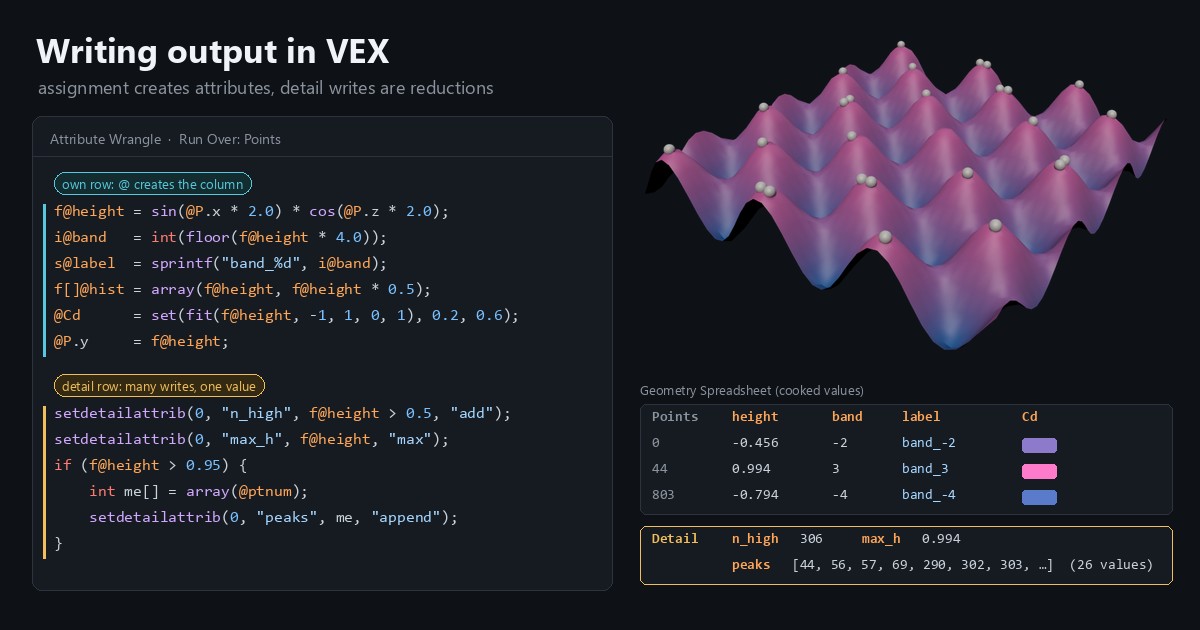
TL;DR In a Houdini VEX wrangle, assigning to a name like
f@heightcreates a new attribute, a typed column with one value per point. The letter before the@sets the type, and the wrangle's Run Over setting picks the table the column lands in. To write one value for the whole object, callsetdetailattribwith a mode such as"add","max"or"append", which turns the parallel loop into a reduction. This post exports five point attributes and three detail attributes from one wrangle, shows when each kind of write becomes visible, and covers the traps: reductions start from zero,"append"needs an array, and an attribute keeps the first type it gets.
Houdini in 60 seconds
Two earlier posts in this series read data: node parameters and attributes on any point. This one writes data, following the "Exporting attributes" section of Juraj Tomori's VEX tutorial.
Houdini geometry is four tables. Points hold positions, primitives are the polygons and curves built from them, vertices are a primitive's references to its points, and the detail is a single row for the whole object. Each table has named, typed columns called attributes: P is position, Cd is color, and you can add your own.
An Attribute Wrangle is a node that runs a VEX snippet over one of those tables. Its Run Over setting picks which one: Points (the default), Primitives, Vertices, Detail (the snippet runs once) or Numbers (a fixed count of runs). On Points, the snippet runs once per point, in parallel, like a GPU kernel over an array.
The core idea: assigning to a name creates it
f@height = 0.5;If the points have no height attribute, that line creates one, a float on every point, and then writes 0.5 into the current point's row. There is no separate declare step. The letter before the @ sets the type: f float, i int, v vector, s string, with [] added for an array (f[]@, s[]@). The gather post lists the full set. Names Houdini already knows, such as P, Cd and N, get their type without a prefix; any other name is a float.
The new attribute lands in the table you run over: a Points wrangle makes point attributes, a Primitives wrangle makes primitive attributes. To write into another table, or into an element that isn't the current one, you call a function: setpointattrib, setprimattrib, setvertexattrib or setdetailattrib (setattrib takes the class as a string). These create a missing attribute too, with zero, an empty string or an empty array as its default, typed from the value you pass. Tomori's 2018 tutorial adds the attribute first with addpointattrib; Houdini 22's help says that isn't needed any more, and in our test it wasn't. The add functions are still how you choose a default other than zero.
In programmer terms, it's a kernel whose output buffers are allocated the first time you write to them. Here's one wrangle that exports five point attributes and three detail attributes:
// Attribute Wrangle, Run Over: Points
// Input: Grid SOP with Rows and Columns set to 40

// 1) Your own row: assigning to a new name creates the attribute
f@height = sin(@P.x * 2.0) * cos(@P.z * 2.0);           // float, -1 to 1
i@band   = int(floor(f@height * 4.0));                  // int, -4 to 3
s@label  = sprintf("band_%d", i@band);                  // string
f[]@hist = array(f@height, f@height * 0.5);             // float array
@Cd      = set(fit(f@height, -1, 1, 0, 1), 0.2, 0.6);   // Cd is a known vector
@P.y     = f@height;                                    // P exists already

// 2) The detail row: one value shared by every point
setdetailattrib(0, "n_high", f@height > 0.5, "add");    // int: how many points
setdetailattrib(0, "max_h", f@height, "max");           // float: the largest
if (f@height > 0.95) {
    int me[] = array(@ptnum);                           // append takes an array
    setdetailattrib(0, "peaks", me, "append");          // int array of point numbers
}To run it: drop a Grid SOP, set its Rows and Columns to 40, wire it into an Attribute Wrangle, leave Run Over on Points and paste the code. Then open the Geometry Spreadsheet, Houdini's table view of the attributes. The Points tab has five new columns: height, band, label, hist and Cd, which is new too, since a Grid comes with only P. The Detail tab has one row: n_high is 306, max_h is 0.994, and peaks holds 26 point numbers.
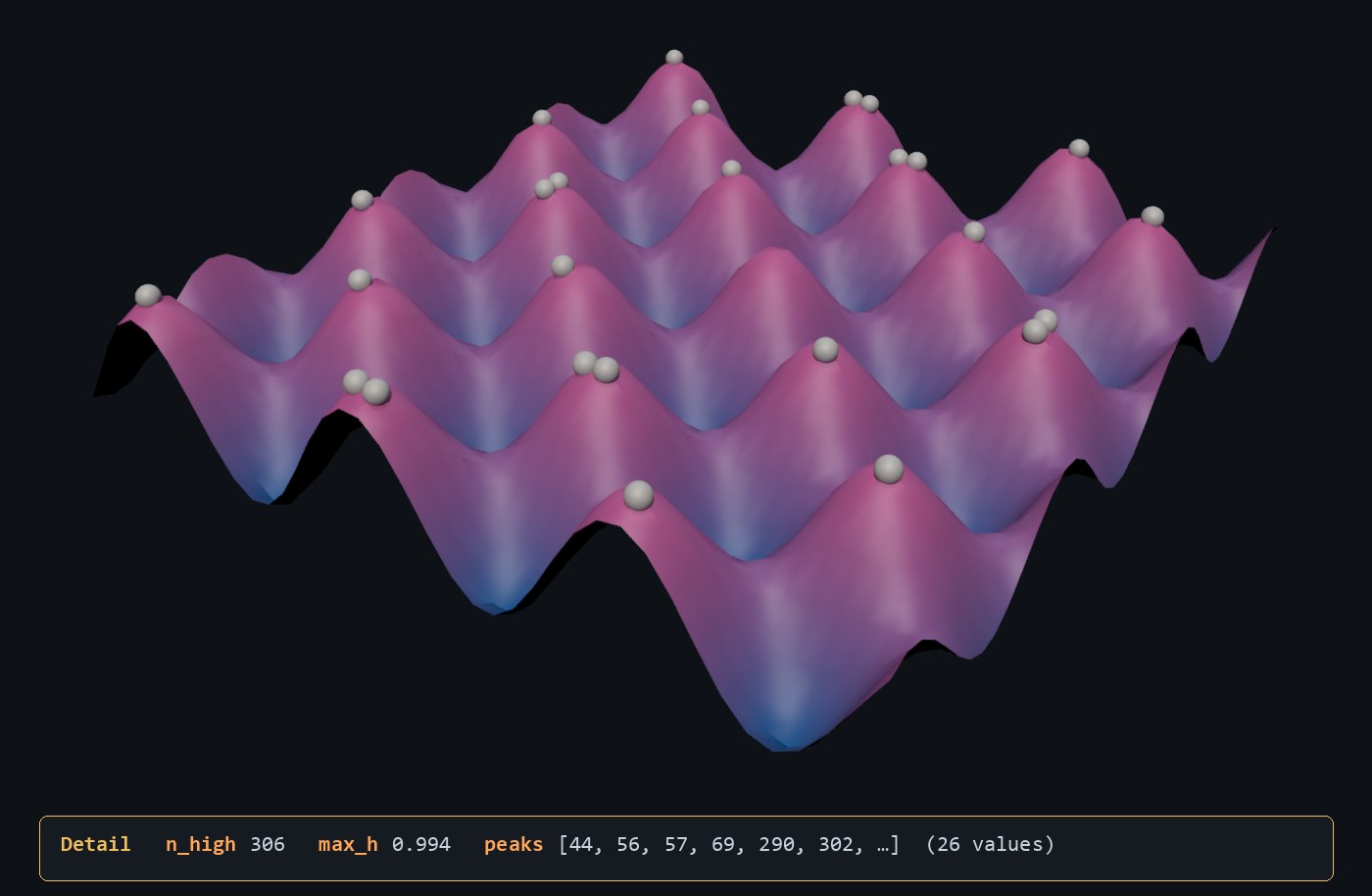
Block 2 is the new part. Every point calls setdetailattrib, and the last argument, the mode, says how all those writes combine into the one detail value: "set" (the default), "add", "min", "max", "mult" (also spelled "multiply"), "toggle", and "append" for strings, arrays and dictionaries. So "add" of a 0-or-1 comparison counts points, "max" finds the largest value, and "append" collects a list. That's a parallel reduction, and you never write an atomic or a lock.
The same thing in NumPy:
import numpy as np

def export(P):
    """P: (N, 3) array of point positions, in point-number order."""
    height = np.sin(P[:, 0] * 2) * np.cos(P[:, 2] * 2)   # f@height: one value per row
    band = np.floor(height * 4).astype(int)              # i@band
    detail = {                                           # the detail row
        "n_high": int((height > 0.5).sum()),             # "add" of 0 or 1
        "max_h": float(height.max()),                    # "max"
        "peaks": np.flatnonzero(height > 0.95),          # "append", in point order
    }
return height, band, detailIn NumPy the reductions are separate passes over finished arrays. In VEX they happen inside the parallel loop, and Houdini combines the writes for you.
When the writes land
A wrangle has three ways to touch data, and each sees writes at a different time:
@names behave like local variables: a write is visible on the next line of the same invocation. That's why@P.y = f@heightpicks up the height computed four lines earlier.point()anddetail()read the node's input, so they never see this node's writes. Inside the wrangle above,detail(0, "max_h")reads 0 on every point.setdetailattriband its siblings are queued and applied after every element has run, which is also why they win over any@write to the same attribute. The gather post covers that queue, and what it costs, forsetpointattrib.
So a step that needs a reduction's result, such as dividing every height by max_h, goes in a second wrangle downstream, where detail(0, "max_h") finally reads 0.994. It's the reason a GPU reduction needs a second kernel launch before anything can use the total.
The SideFX docs say the queue keeps these writes lock-free and deterministic. We checked on a million-point grid: five recooks on 24 threads and five on one thread gave bit-identical results. The writes behaved as if applied in point-number order every time: "set" kept point 999,999's value, "append" listed 0 to 999,999 in order, and the "add" total matched a one-at-a-time loop in 32-bit floats. The docs promise determinism, not that order.
The 32-bit part has a cost. Summing abs(f@height) over that grid with "add" gave 403,196.9; the float64 answer is 403,240.2, about 0.01% higher. Set the wrangle's VEX Precision parameter to 64-bit and attributes the wrangle creates are 64-bit; the same sum then matches float64.
Run Over Detail: one run, your own loop
The other way to write the detail row is to run the wrangle over Detail. The snippet runs once, @ names mean detail attributes, and @ptnum is -1, so any loop over points is yours to write. Here's the closest point to the origin, in a second wrangle after the one above:
// Attribute Wrangle, Run Over: Detail (runs once)
float lo = 1e9;
for (int i = 0; i < @numpt; i++) {
    vector p = point(0, "P", i);      // typed local: point() needs to know what to return
    lo = min(lo, length(p));
}
f@min_d = lo; // in Detail mode, @ is the detail rowIt reads 0.305: the displaced point nearest the origin. The typed local p isn't decoration. point() picks its return type from where its result goes, so length(point(0, "P", i)) fails to compile as an ambiguous call. The loop is serial, but you control the starting value, which matters for the first trap below. Numbers mode is a cousin: it runs the snippet a set number of times, and there @ can read detail attributes but not write them.
What trips you up, and what clicks
- Reductions start from the attribute's current value, and a new attribute starts at zero. Add
setdetailattrib(0, "min_d", length(@P), "min");to the first wrangle andmin_dcomes out 0, though no point is closer than 0.305."mult"gives 0 the same way, and"max"over values that are all negative gives 0. Putadddetailattrib(0, "min_d", 1e9);before the call and the attribute is created with that default instead, somin_dreads 0.305; the Detail loop above works too. The default only applies when the attribute is created. If the input already carriesmin_d, the modes combine with the incoming value. "append"needs an array on both sides.setdetailattrib(0, "ids", @ptnum, "append")creates an int attribute and leaves it at 0, with no error, because append works only on strings, arrays and dictionaries. Wrap the value in a one-element array. Passingarray(@ptnum)straight into the call fails to compile ("Ambiguous call to function setdetailattrib()"), becausearray()picks its return type from where its result goes. That's why the snippet assigns it toint me[]first.- The first type wins; later writes are cast or dropped. An int literal makes an int attribute, so
setdetailattrib(0, "count", 1, "add")counts in ints. Add0.5tocountelsewhere in the same snippet and that write is silently ignored, as the SideFX help pages warn. Prefixes behave the same way: the first prefix in a snippet sets the type, and an attribute that already exists keeps its own. Leave theioff@band = int(...)andbandbecomes a float; a later wrangle'si@band = 7then stores 7.0 in that float column. Prefix the first write of every new attribute. @only writes the table you run over. In a Points wrangle,f@totalreads a detail attribute calledtotalif no point attribute has that name. Butf@total += 1;creates a new point attribute calledtotal, 11 on every point, and the detail value stays at 10. To change the detail from a Points wrangle, callsetdetailattrib.- Curly braces take constants only.
v@dir = {@P.x, 0, 0};andf[]@pair = {f@height, 2};both fail with "Syntax error, unexpected identifier". Useset()for vectors andarray()for arrays, as the snippet does. Tomori's tutorial makes the same point.
Try it yourself
- Install Houdini Apprentice, the free, non-commercial edition from SideFX. It has everything in this post.
- Build the Grid and Attribute Wrangle setup above and check the Detail tab against the numbers here.
- Add a second wrangle downstream with
f@height_n = f@height / detail(0, "max_h");. The largestheight_nis exactly 1. Then put the same line in the first wrangle and see whatdetail()gives you there. - Exercise: give each polygon of the grid the average height of its four corners, from the Points wrangle. Loop over
pointprims(0, @ptnum)and callsetprimattrib(0, "avg_h", pr, f@height / 4.0, "add")for each primitivepr. Then compute the same average as a gather, in a wrangle set to Run Over Primitives that reads the corners fromprimpoints(0, @primnum). The two should agree to float rounding.
No Houdini? Blender's geometry nodes have the same idea in the Store Named Attribute node, which writes a value to a named attribute on the domain you choose (point, face and so on). One difference: if the attribute already exists, Blender changes it to the type you picked, where VEX keeps the existing type.
Functions used: setdetailattrib, adddetailattrib, setprimattrib, setpointattrib, detail, point, pointprims, primpoints, array, sprintf, fit, set, floor, length, min, sin, cos. Each one links to its entry in the Simstim VEX reference.
Sources
- jtomori/vex_tutorial, Juraj Tomori's VEX tutorial ("Exporting attributes")
- SideFX: Using VEX expressions (creating attributes, type prefixes, setting geometry attributes)
- SideFX: Attribute Wrangle (Run Over, VEX Precision)
- SideFX VEX docs: setdetailattrib (modes), setpointattrib, setprimattrib, setattrib, adddetailattrib
- Blender Manual: Store Named Attribute Node
Related
 HoudiniStage in, stage out: Houdini's Solaris treats every node as a function over a USD sceneIn Houdini's Solaris, every LOP node takes a composed USD stage and returns one, and its edits land in one in-memory layer at the top. A 31-line usd-core model of that contract, the Python LOP that does it for real, the same network checked in Houdini 22, and why a Layer Break decides what gets saved.
 Houdinisplit() is a tokenizer: building cache paths from strings in Houdini VEXVEX strings look like Python's, but split() merges separators and drops empty fields, len() counts bytes, and a wrangle expands $ before the compiler sees it. A per-piece cache path built from the scene file name, and the traps along the way, checked in Houdini 22.
 LatestMaterialX is an IR for materials: build a typed shader graph in Python, then lower it to GLSL and OSLA MaterialX material is a typed dataflow graph stored as XML, which a library type-checks and compiles to several shading languages. With only pip install MaterialX, build a checkerboard material in Python, watch the validator reject a float wired into a color, and generate GLSL and OSL from the same file.